

Table of Contents
Every stalled design review shares the same root cause: a rendering pipeline that answers questions slower than a client can ask them. ArchViz has stopped being a delivery step tacked onto the end of a project and has become the design process itself, argued in real time, frame by frame, inside the meeting where decisions actually get made. The studios still treating ArchViz as an afterthought are losing bids to teams that can reframe a facade material or reposition a skylight while the client is still talking, and in 2026 that gap in responsiveness is the difference between a signed contract and a polite follow-up email.
Nuvira Perspective
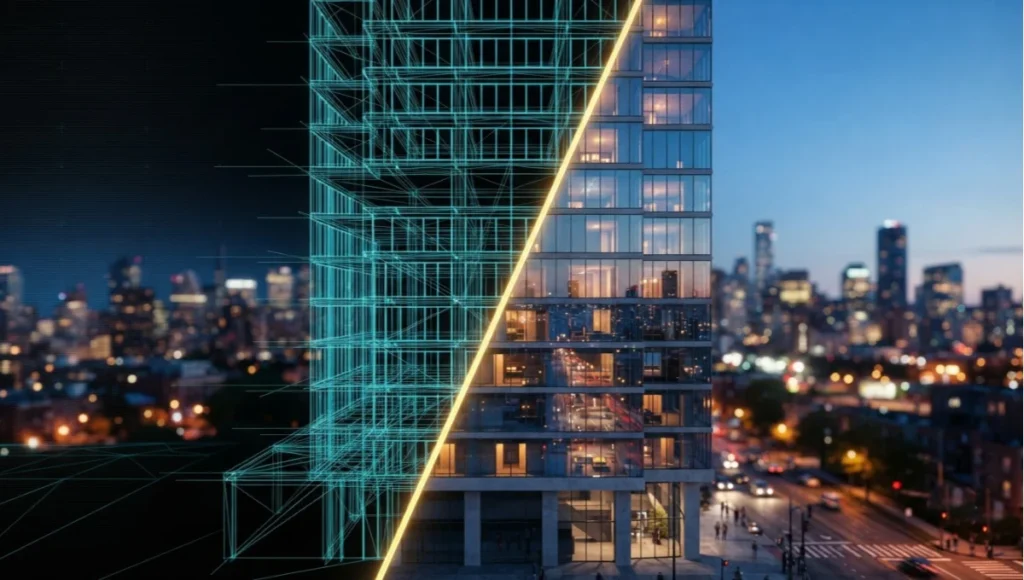
At Nuvira Space, we treat rendering pipelines as design instruments, not delivery mechanisms. The distinction matters more than it sounds: a delivery mechanism produces a picture after the decisions are made, while a design instrument produces the decisions. Generative ArchViz software, built on real-time engines and physically based simulation, has closed the historical gap between digital intent and architectural reality to the point where the two are functionally the same conversation.
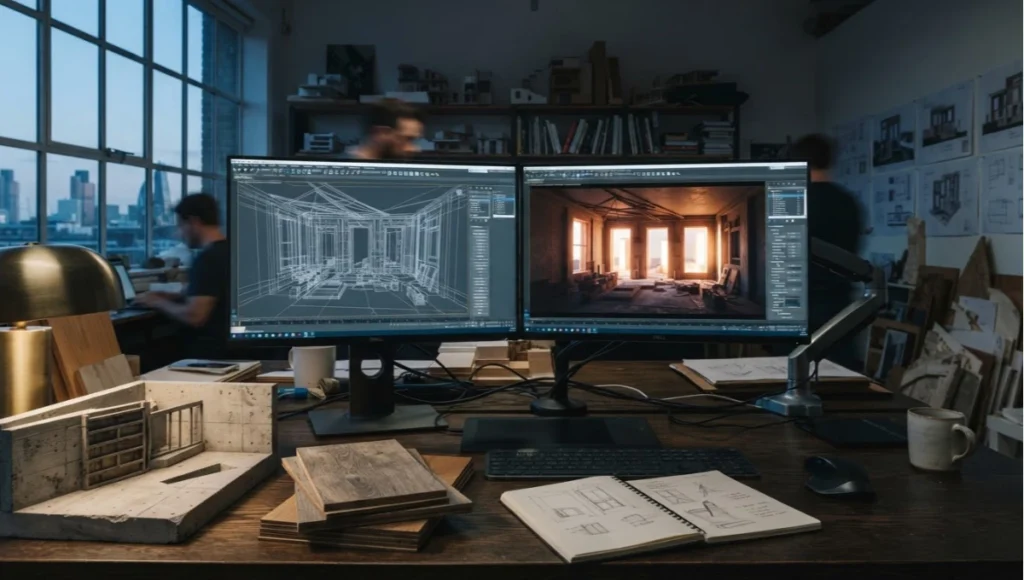
For two decades, visualization was a downstream discipline. An architect finished a scheme, handed it to a visualization team, and waited days or weeks for a still image that may or may not have reflected the latest design changes. That workflow assumed rendering was expensive, both in compute time and in artist-hours, and expensive things get scheduled late. Real-time engines inverted that assumption. When a path-traced frame resolves in under a second on consumer-grade hardware, rendering stops being a cost center and becomes a live feedback loop, available at every stage of the design, from massing studies to material call-outs.
This is the human-machine synthesis we build toward: not automation that replaces the architect’s judgment, but simulation fast enough to sit inside it. Global illumination solvers that update as a camera moves, material libraries that respond to real-world lighting data, and generative layout tools that propose variations faster than a human could sketch them are not replacing design decisions, they are compressing the time between a question and its visual answer. That compression is the actual product. The render is just the artifact.
The word ‘generative’ in generative ArchViz is often misunderstood as referring only to AI image synthesis, the kind that produces a plausible-looking facade from a text prompt. That is a narrow and, frankly, less useful reading. The more consequential meaning is procedural: parametric massing rules, rule-based material assignment, and simulation-driven daylighting studies that generate hundreds of variations against measurable criteria, glare hours, solar heat gain, view corridors, rather than a single speculative image. Nuvira’s toolchain leans on this procedural sense of generative because it produces defensible, quantifiable outputs, not just attractive ones.
That distinction matters commercially as much as technically. A client asking why a facade looks the way it does deserves an answer grounded in daylighting data, not an aesthetic preference dressed up as an algorithm’s output. Studios that can trace a rendered decision back to a simulated, measurable input hold a structural advantage in client trust over studios producing images with no underlying model to interrogate.
This is consistent with guidance from the American Institute of Architects, whose AI Task Force has published practical guidance for a changing profession, framing AI-assisted visualization as a tool that accelerates evidence-based design decisions rather than replacing the architect’s judgment.
Top 2026 Generative ArchViz Software Tools
Everything below is a workflow philosophy, and philosophy needs a toolchain to run on. The market in 2026 splits cleanly into three tiers: real-time engines for design-stage iteration and client review, offline path tracers for final marketing-grade stills, and AI-assisted renderers that sit on top of either category to accelerate concept exploration. The seven tools below are the ones actually showing up in studio toolchains this year, evaluated on pricing, platform fit, and where each one earns its place in a generative ArchViz pipeline.
The order below is not arbitrary. It follows how these tools actually surface across 2026 industry comparisons, studio adoption data, and vendor pricing pages, weighted toward the tools most frequently benchmarked head-to-head by visualization studios rather than the ones with the loudest marketing. A tool’s position in this list reflects tested, documented performance and pricing, not a subjective aesthetic preference.
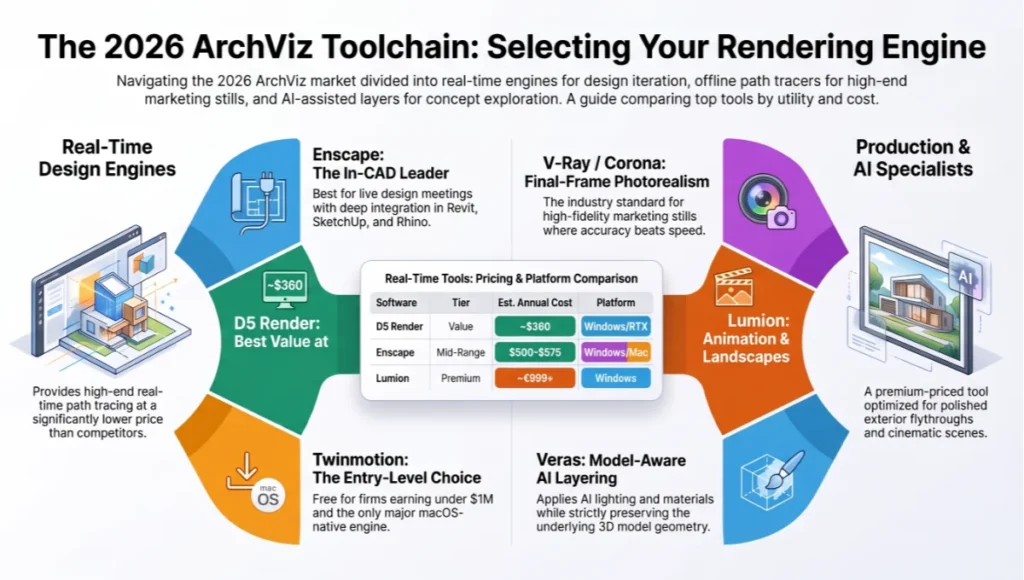
Enscape — Best for In-CAD Real-Time Review
- Category: real-time rendering plugin, lives inside Revit, SketchUp, Rhino, Archicad, and Vectorworks with zero export step
- Pricing: Solo tier runs roughly $500-575 per year per named user; Premium, which bundles Veras AI credits, runs higher
- Best for: BIM-heavy practices that want the rendered view updating live beside the design model during every design meeting
- Trade-off: Windows-first, and the deepest integration is tied to whichever CAD tool it’s plugged into, so switching authoring software means relearning the pipeline
D5 Render — Best Value Real-Time Path Tracer
- Category: standalone real-time path-tracing engine with a free non-commercial Community tier
- Pricing: Pro tier runs approximately $360 per year, undercutting Enscape and Lumion by a wide margin at the solo-seat level
- Best for: independent architects and small studios needing full path tracing without committing to a five-figure annual render stack
- Trade-off: NVIDIA RTX and Windows only, and its asset marketplace, while large, is younger than Enscape’s or Lumion’s libraries
Twinmotion — Best Free Commercial Option
- Category: standalone real-time engine built on Unreal Engine 5
- Pricing: free for firms under $1M in annual revenue; a paid seat above that threshold runs around $445 per year
- Best for: small firms needing a genuinely free, legally commercial real-time renderer, and the only major engine of the group that runs natively on macOS including Apple Silicon
- Trade-off: asset library and material depth trail D5 and Lumion slightly, though the Unreal Engine 5 foundation gives it strong long-term upgrade potential
Lumion — Best for Polished Animation and Landscape Scenes
- Category: standalone real-time engine oriented toward exterior scenes, animation, and 360-degree panoramas
- Pricing: Pro tier runs roughly €999 per year, with a Studio bundle above €1,200, making it the most expensive of the real-time engines at the solo-seat level
- Best for: landscape-heavy exterior visualization and firms whose marketing output leans on animated flythroughs rather than live design review
- Trade-off: the premium price is hard to justify for firms whose primary need is in-model design iteration rather than final animation delivery
V-Ray / Corona — Best for Final-Frame Photorealism
- Category: offline, CPU/GPU hybrid path tracers plugging into 3ds Max, SketchUp, Rhino, and Cinema 4D
- Pricing: subscriptions run in the mid-$500s per year per seat, comparable to Enscape but delivering a materially higher quality ceiling for final stills
- Best for: hero marketing images and print deliverables where lighting accuracy and material fidelity outweigh iteration speed
- Trade-off: neither is a live-review tool; most studios pair one of these with a real-time engine rather than using it alone
Veras — Best AI Rendering Layer on Top of an Existing Model
- Category: AI-assisted, model-aware rendering plugin for Revit, SketchUp, Rhino, Archicad, Vectorworks, and Autodesk Forma
- Pricing: entry plans start around $29-59 per user per month depending on bundle and billing period
- Best for: applying AI-generated materials, lighting, and mood directly onto real model geometry rather than a flat screenshot, preserving edge accuracy that prompt-only AI tools cannot match
- Trade-off: output leans toward conventional architectural-render aesthetics and is not intended for construction-document-grade deliverables
Autodesk Forma — Best for Early-Stage Environmental Analysis
- Category: cloud-based, ML-driven site and environmental analysis tool used ahead of detailed massing and visualization
- Pricing: bundled with Autodesk AEC Collection subscriptions rather than sold as a standalone product
- Best for: feeding daylighting, wind, and site-context data into a project before it reaches the detailed generative ArchViz stage described earlier in this guide
- Trade-off: it is an analysis and massing tool, not a rendering engine, so it sits upstream of the visualization pipeline rather than replacing any tool in it
Pricing above is current as of 2026 and varies by region, bundle, and billing cycle; treat it as a comparative baseline rather than a live quote. For a deeper breakdown specifically between the three most widely adopted real-time engines, see our dedicated Lumion vs. Enscape vs. D5 Render comparison, and for how these tools fit into the broader speed-versus-quality decision, our companion piece on real-time ray tracing speed versus quality.
None of this tooling replaces the workflow discipline that follows. A studio running the most expensive engine in the market on a poorly optimized scene will still iterate slower than a studio running a modest tool with the scene-assembly and lighting practices below applied correctly. Tool selection sets the ceiling; workflow discipline determines how close a studio actually gets to it.
Step-by-Step Workflow & Features
A generative ArchViz pipeline is only as strong as its weakest handoff. The following sequence reflects how Nuvira Space structures a project from raw geometry to client-ready walkthrough, with the specific settings that separate a convincing frame from an obviously synthetic one.
Stage One: Scene Assembly and Proxy Geometry
Before any lighting decision is made, the scene needs a geometry hierarchy that won’t choke the renderer during iteration. This means separating hero assets, built at full resolution, from background and context geometry, which should be proxied or instanced aggressively.
- Use nested instancing for repeated facade elements (mullions, cladding panels, balustrades) rather than unique meshes
- Cap polygon count on background vegetation and traffic with imposter billboards beyond a 40-meter camera distance
- Apply LOD (level of detail) switching keyed to camera distance, not a fixed frame budget
- Bake occlusion culling volumes for interior scenes with more than three connected rooms
Scene assembly discipline pays off disproportionately later in the pipeline. A poorly organized scene, with unique geometry where instancing should exist, doesn’t just render slower, it makes every subsequent lighting and material iteration slower too, because the renderer has to reprocess redundant data on every change. Studios that skip this stage to save time on the front end routinely lose more time to sluggish iteration than they saved.
Stage Two: Global Illumination and Light Transport
This is where most legacy pipelines lose fidelity. Baked lightmaps were a compromise forced by limited compute; real-time path tracing removes that compromise but only if the sampling strategy matches the scene’s light complexity.
Ray-Tracing Parameters That Matter
- Bounce count: minimum 4 diffuse bounces for interior daylighting studies, 6+ for spaces with light-colored, high-albedo surfaces
- Denoiser selection: temporal-spatial hybrid denoisers for animated walkthroughs; pure spatial denoisers introduce less ghosting on static hero stills
- Sample budget: 256 samples per pixel for final interior stills, 32-64 spp with denoising for real-time client review sessions
- Light portals on every window and skylight opening to prevent noisy, under-sampled interior daylight
Global illumination settings are not a technical afterthought, they are where the emotional read of a space gets decided. A cove light with insufficient bounce depth reads as flat and synthetic. The same cove, correctly sampled, reveals the subtle color bleed onto adjacent surfaces that a human eye associates, unconsciously, with a real, physically inhabited room.
Studios new to real-time GI often over-correct by cranking sample counts uniformly across a scene, which wastes compute on areas the camera never lingers on. A more disciplined approach allocates sample budget unevenly: higher counts on hero surfaces directly in frame, lower counts on peripheral geometry the denoiser can smooth without visible cost. This uneven allocation is what makes a 32-64 spp real-time review session look nearly indistinguishable from a 256 spp offline still, despite the eightfold difference in raw sample count.
For a deeper technical breakdown of how sample allocation and ray budgets trade off against frame latency, our companion guide on real-time ray tracing speed versus quality walks through the underlying benchmarks in more depth.
Stage Three: Material Authoring and Physically Based Shading
Physically based rendering (PBR) material graphs should be authored against measured reflectance data, not eyeballed against a reference photo. Nuvira’s material library ties roughness and specular values to manufacturer spec sheets wherever they exist, particularly for glazing systems and metal cladding, because those two material families are the most common source of an unconvincing render.
- Glazing: model both the reflection and transmission layers separately, with a Fresnel curve matched to the coating type (low-E, tinted, laminated)
- Metals: use measured complex IOR values rather than default ‘metallic’ presets when the material is a named finish (anodized aluminum, weathered zinc, brushed bronze)
- Concrete and stone: layer a subtle normal map at two frequency scales (aggregate-level and pore-level) to avoid the flat, plastic look of a single normal pass
Stage Four: Post-Production Workflow
Post-production in a generative ArchViz pipeline is not color correction bolted onto a finished render, it is a compositing pass built on separated render layers (AOVs) exported directly from the engine.
- Export separate passes for direct light, indirect light, ambient occlusion, and reflection to allow independent grading of each
- Apply chromatic aberration and lens distortion matched to the specific virtual camera lens specified, not a generic preset
- Grade toward the target output medium first (print, web, or projection), since each clips highlights differently
- Add sensor noise at low intensity even on ‘clean’ CGI renders; a completely noise-free image is one of the fastest tells that a frame is synthetic
Comparative Analysis: Nuvira Vs. Industry Standard
The industry-standard workflow for most mid-size architecture practices still separates concept visualization from final marketing renders, using two different toolchains and, often, two different teams. Nuvira’s approach collapses that separation, and the practical differences show up at every stage of a project.
Iteration Speed
Industry standard: a design change triggers a re-render request, queued against a render farm, returning results in hours. Nuvira: the same change propagates through a real-time engine session in under a second, visible to the whole design team on the same screen, in the same meeting.
Lighting Accuracy Under Design Change
Industry standard: baked lighting solutions require a full re-bake after any geometry change, often skipped mid-project to save time, which is why so many late-stage renders show lighting that doesn’t quite match the final massing. Nuvira: dynamic global illumination recalculates continuously, so the lighting shown at every stage reflects the actual current design, not a snapshot from two revisions ago.
Client Communication
Industry standard: clients receive still images or pre-baked flythrough videos, unable to ask ‘what if’ questions without waiting for a new render cycle. Nuvira: clients navigate the model live, in real time, testing material swaps and time-of-day changes during the meeting itself, which shortens the approval cycle measurably. On a recent mixed-use project reviewed with stakeholders in Copenhagen, live walkthrough sessions replaced what had previously been three separate rounds of static render revisions, cutting the visualization-to-approval timeline by roughly 60 percent.
Cost Structure
Industry standard: render farm time scales with frame count and resolution, making animated walkthroughs the most expensive deliverable on a proposal. Nuvira: real-time engines shift cost from per-frame compute to upfront scene optimization, meaning a well-built scene costs the same to walk through for ten minutes as it does for ten seconds.
Engine choice affects this cost structure directly. Our side-by-side comparison of Lumion, Enscape, and D5 Render breaks down licensing cost against rendering fidelity for studios weighing which real-time engine best matches their existing modeling toolchain and hardware budget.
Team Structure and Skill Requirements
Industry standard: a dedicated visualization department, often outsourced, operating on a separate schedule from the design team, which introduces communication lag at every revision cycle. Nuvira: visualization specialists sit inside the design team itself, running the real-time engine live during design meetings rather than receiving a brief and returning days later. This does not eliminate the need for specialized skill, lighting and material authoring still require trained judgment, but it removes the scheduling wall between design decisions and their visual representation.
Concept Project Spotlight — Speculative / Internal Concept Study: “Kallang Verge” by Nuvira Space
Project Overview: Location / Typology / Vision
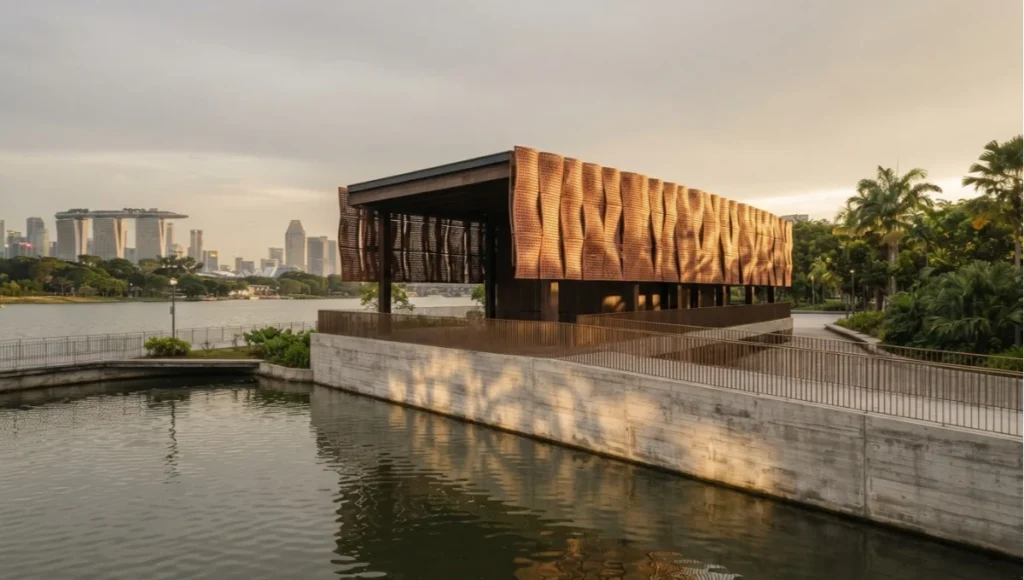
Location: Kallang Basin waterfront, Singapore. Typology: mixed-use mid-rise, ground-floor public pavilion with residential floors above. Vision: a speculative study testing how generative ArchViz workflows handle a tropical, high-humidity daylighting scenario, where diffuse sky illumination dominates and direct sun is comparatively rare, the inverse lighting condition from most temperate-climate case studies.
The internal brief for Kallang Verge asked one specific question: can a real-time GI pipeline correctly represent the soft, high-bounce, overcast-dominant light typical of Singapore’s climate without the washed-out flatness that under-sampled diffuse environments often produce.
Design Levers Applied
Lighting Levers
- Overcast HDRI environment captured at 8am local time, matched to Kallang Basin’s actual sky luminance data
- Increased diffuse bounce count to 7 to resolve subtle color bleed from the terracotta-toned facade screens onto interior soffits
- Light portals placed at every perforated screen opening to prevent noise in the filtered daylight entering the pavilion
Material Levers
- Perforated terracotta rain screen modeled with a two-scale normal map to capture both panel-level warping and surface-level porosity
- Water feature at the pavilion’s edge given a dynamic normal-mapped ripple pass tied to a wind-speed variable, rather than a static reflection
Transferable Takeaway:
The lesson from Kallang Verge generalizes beyond tropical climates: any project dominated by diffuse rather than direct light needs bounce counts and light-portal placement tuned specifically for that condition, not left at defaults calibrated for direct-sun scenes. Studios working in consistently overcast or heavily shaded urban contexts should treat diffuse-light tuning as its own workflow step, not a variation on standard daylighting setup.
Intellectual Honesty: Hardware Check
Real-time path tracing at the fidelity described above is not free, and pretending otherwise does a disservice to any studio budgeting for a workflow change. A single workstation capable of sustaining interactive frame rates with 4+ diffuse bounces at 1080p typically requires a current-generation GPU with at least 16GB of video memory; anything less forces a compromise on either resolution, bounce depth, or frame rate, and that compromise will show up in client-facing sessions as visible noise or lag.
- Minimum viable single-seat setup: one current-generation high-end GPU, 64GB system RAM, NVMe storage for texture streaming
- Team-scale real-time review setup: a rendering workstation feeding a shared display, plus individual lightweight client seats for walkthrough-only sessions
- Render farm dependency does not disappear entirely; final 4K stills at maximum sample counts still benefit from offline batch rendering overnight
Studios evaluating this shift should budget for a hardware refresh cycle, not a software subscription alone. The tools are only as fast as the silicon running them, and a generative ArchViz workflow purchased without matching hardware will underperform its own marketing claims.
There is also an honest conversation to have about diminishing returns. Doubling GPU spend does not double perceived image quality; past a certain sample count and bounce depth, additional compute buys noise reduction that a client will not consciously register. The more defensible investment is usually in denoiser quality and light-portal placement discipline, both of which improve perceived fidelity at a fraction of the hardware cost of simply throwing more samples at a poorly set up scene. A studio with a modest GPU and a well-optimized scene will consistently outperform a studio with premium hardware and a careless one.
The value of matched hardware and workflow discipline scales well beyond visualization alone. In NVIDIA’s documented case study on Foster + Partners’ Cyclops workflow, GPU-accelerated ray tracing compressed environmental feedback that traditionally arrived after major design decisions were already locked into a near-instant loop available from the earliest concept stage, the same principle Nuvira applies to visual fidelity rather than daylighting analysis.
2030 Future Projection
By 2030, the meaningful shift will not be faster rendering, that curve is already well understood and largely a matter of GPU generational improvement. The shift will be in how generative layout tools and real-time rendering converge into a single feedback loop, where a design change and its visual, structural, and daylighting consequences are evaluated simultaneously rather than sequentially.
Expect scene understanding to move from manual proxy and LOD authoring toward automated, AI-assisted geometry optimization that reads a scene’s actual complexity and allocates compute accordingly, removing much of the manual scene-assembly labor described in Stage One above. Material authoring will likely shift toward measured, manufacturer-supplied PBR data becoming a standard deliverable alongside spec sheets, rather than something visualization teams have to reverse-engineer from photographs.
The studios best positioned for that shift are the ones building disciplined, well-tagged scene libraries now, since automated tooling will only be as effective as the data it has to learn from.
Expect a second, quieter shift: client review itself moving out of the office entirely. As real-time engines become viable on lightweight client hardware, including tablets and browser-based viewers, the walkthrough session stops being something a studio schedules and becomes something a client can revisit on their own time, testing material and lighting variants between formal meetings. That changes the cadence of approval from a small number of high-stakes reviews to a continuous, lower-friction dialogue, which will reward studios that build their scenes to withstand unsupervised exploration rather than a single guided walkthrough.
Reconstruction techniques are converging with this same trajectory. Our earlier analysis of NeRF-based architectural visualization moving 2D photography into 3D scene reconstruction points to existing buildings and site photography becoming direct scene inputs, reducing the manual modeling labor currently required before a renovation or infill project can even enter the visualization pipeline.
None of this removes the underlying discipline described in the workflow sections above. Faster hardware and smarter automation amplify good scene-assembly and lighting habits; they do not substitute for them. A poorly optimized scene run through a 2030-era engine will still iterate slower than a well-optimized scene run through today’s tools.
Secret Techniques: Advanced User Guide
These are workflow adjustments that rarely appear in software documentation because they depend on judgment rather than a settings menu.
- Bias camera exposure very slightly toward underexposure (roughly a third of a stop) on exterior daylight renders; it reads as more photographic and reduces the chance of blown highlights on glazing reflections
- Introduce a barely-perceptible depth-of-field falloff even on architectural stills, where deep focus is the technical default; a completely uniform focal plane is one of the more reliable subconscious cues of a synthetic image
- When compositing people into a walkthrough, match their light wrap to the strongest light source in frame, not the average scene light; mismatched light wrap is more noticeable to viewers than slightly imperfect figure proportions
- For water and reflective floor surfaces, layer two roughness values (a fine ripple and a coarser wave pattern) rather than a single roughness map, since real reflective surfaces are almost never uniformly smooth
- Push interior color temperature very slightly warmer than the literal fixture spec (roughly 200K) when photographing occupied living spaces; the marginal warmth reads as inhabited rather than clinical without registering as an obvious edit
- Vary vegetation scale and rotation randomly within a tight range even on instanced assets; perfectly uniform tree canopies are a subtle but consistent tell of a proxied scene
None of these techniques are secret in the sense of being undocumented, they appear scattered across cinematography and VFX literature. What is uncommon is applying them systematically to architectural stills, where the convention has historically been to prioritize geometric clarity over photographic imperfection. The studios producing the most convincing ArchViz today are, in effect, borrowing film-industry restraint and applying it to a discipline that has tended toward technical over-polish.
Comprehensive Technical FAQ
Rendering and Hardware
Q: What GPU memory headroom should a studio budget for real-time ArchViz at 4K?
A: Plan for a minimum of 16GB of video memory for 1080p interactive sessions; 4K final delivery with high bounce counts typically benefits from 24GB or more to avoid texture streaming stutters during camera movement.
Q: Does real-time path tracing eliminate the need for a render farm?
A: No. It eliminates the need for a farm during iteration and client review, but final ultra-high-resolution stills at maximum sample counts still benefit from offline batch rendering.
Lighting and Materials
Q: How many diffuse bounces are enough for an interior daylighting study?
A: Four bounces is a reasonable floor for most interiors; spaces with high-albedo, light-colored finishes need six or more to resolve visible color bleed accurately.
Q: Why do PBR materials sometimes look artificial despite correct roughness values?
A: Roughness alone doesn’t capture multi-scale surface variation. Layering a fine-detail normal map on top of a coarser one, as described in the Kallang Verge material levers, resolves most of this issue.
- Common causes of an unconvincing PBR material: single-scale normal maps, default metallic presets instead of measured IOR, and roughness values copied between unrelated material types
Workflow and Process
Q: Should visualization and design teams use the same software toolchain?
A: Wherever possible, yes. Splitting concept visualization and final marketing renders across two toolchains is the single biggest source of lighting and geometry mismatch late in a project.
Q: How should a studio budget post-production time in a real-time pipeline?
A: Post-production shifts from a large batch task at project end to smaller, continuous grading passes applied to separated AOV layers throughout the project, which is generally faster in total but requires the compositing habit to be built into the workflow from day one.
Q: How does climate context change the ArchViz workflow, as in the Kallang Verge study?
A: Diffuse-dominant climates need higher bounce counts and deliberate light-portal placement at every filtered opening, while direct-sun climates place more weight on accurate sun-angle data and glare analysis. Treating the two as the same lighting problem produces washed-out results in overcast contexts and blown highlights in direct-sun ones.
Deliverables and Client Handoff
Q: What should a studio hand a client alongside a rendered walkthrough?
A: A brief summary of the underlying simulation inputs, daylighting hours modeled, material sources referenced, and camera lens specifications used, gives the client a defensible basis for the image rather than an unexplained picture.
Q: How long should a generative ArchViz scene remain usable after initial delivery?
A: A well-optimized scene with instanced geometry and separated AOV layers should remain editable for the life of the project, including post-occupancy marketing renders, without requiring a rebuild from scratch.
See Your Project Rendered in Real Time
If your current visualization workflow still measures iteration in hours instead of seconds, the gap is not your team’s skill, it’s the pipeline underneath it. Nuvira Space works directly with architecture studios to rebuild that pipeline around real-time global illumination, measured material data, and post-production workflows that hold up under client scrutiny. Get the specs, run a pilot scene against your own project geometry, and see the difference a real-time feedback loop makes in your next design review.
© Nuvira Space All rights reserved. | THE VISUAL LAB Series | All specifications cited are based on internal testing and publicly available manufacturer documentation, no external links provided. "Kallang Verge" is a speculative internal concept study and does not represent a completed project.