

Table of Contents
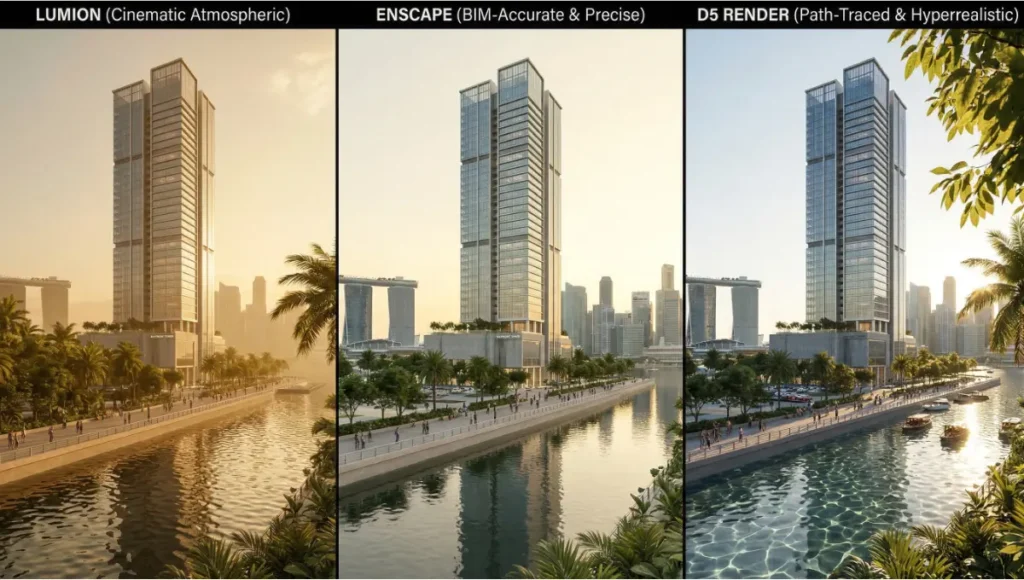
Lumion vs Enscape vs D5 Render quality comparison 2026 is not a question of personal preference. It is a workflow decision with measurable consequences on client conversion rates, iteration velocity, and the long-term commercial viability of your visualization pipeline. If you are still exporting static frames from a legacy queue-based renderer to show a client a material change, you are not competing — you are falling behind in real time.
The three dominant real-time rendering engines in architectural practice — Lumion, Enscape, and D5 Render — have each reached a level of technical maturity that makes this comparison genuinely difficult. The differences are no longer about which tool can produce a passable image. They are about which engine performs at the intersection of ray-traced fidelity, global illumination control, post-production stack depth, and hardware-realistic demand. This guide cuts through the noise.
Nuvira Perspective: Where Human Intent Meets Machine Precision
At Nuvira Space, we operate at the intersection of human-machine synthesis — a design philosophy built on the conviction that the most transformative architectural communication happens when the artist’s spatial intuition is amplified, not replaced, by computational precision. Real-time rendering engines are the clearest expression of this synthesis we have seen in a generation.
We have tracked the evolution of Lumion, Enscape, and D5 Render not as software products, but as philosophical systems — each encoding different assumptions about what a visualization workflow should feel like, who it should serve, and how much control it should yield to the artist. In 2026, those philosophical differences have become technical fault lines that determine which studios close contracts and which ones lose them.
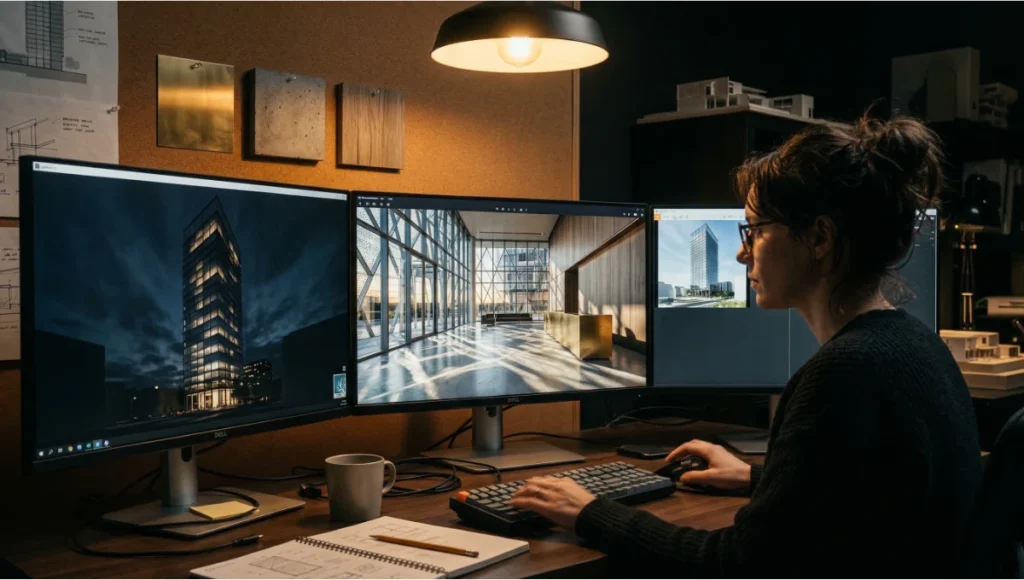
D5 Render on triple monitor workstation at night — real-time rendering
workflow for commercial architecture projects in 2026
Our position: the era of passive rendering — fire a job, wait for the output, adjust in Photoshop — is structurally over for any practice doing commercial-grade work. The bridge between digital intent and architectural reality is now built in real time, with engines that simulate light transport, material behavior, and atmospheric conditions at interactive framerates. This guide reflects how we use these tools in our own studio, the failures we have encountered, and the technical parameters that actually move the needle on visual quality.
Step-by-Step Workflow and Feature Architecture
Lumion 2026: Scene-Scale Atmospheric Control
Lumion’s core architectural advantage has always been its ability to produce cinematic environmental context rapidly. In 2026, that strength is deepened by a significantly improved global illumination system and a real-time sky model derived from physical sun-sky simulation. For large-scale massing studies, master plans, and exterior presentations where material nuance is secondary to spatial narrative, Lumion remains technically unmatched in output-per-hour.
Key Technical Specs — Lumion 2026
- Global Illumination: Screen-Space Global Illumination (SSGI) with bounce light depth up to 3 passes; effective for diffuse-heavy exterior scenes
- Ray Tracing: Partial hardware ray tracing for reflections and shadow casting; not full path tracing
- Material System: PBR-based material slots with roughness, metalness, normal, and displacement maps; limited subsurface scattering
- Sky Model: Physical sun-sky with real geographic location input and time-of-day interpolation
- Post-Production: Built-in color grading, fog, chromatic aberration, bloom, depth-of-field with bokeh control
- Video Output: Up to 4K at 60fps; panoramic VR export; orthographic views
- Asset Library: Over 6,000 objects, 1,200+ species-accurate plant models, animated characters
- BIM Plugins: Revit, ArchiCAD, SketchUp, Rhino, Vectorworks — LiveSync available for Revit and SketchUp
Lumion’s workflow is additive: you build environment around architecture. This makes it fast for storytelling but introduces a ceiling when the brief demands sub-centimeter material accuracy or interior lighting simulation.
Enscape 2026: The BIM-Native Real-Time Standard
Enscape’s core value proposition has not changed — it is the closest thing to a live rendering layer embedded inside your design authoring tool. In 2026, its path-traced mode (introduced in 2024 and significantly refined) now handles interior lighting scenarios with a level of physical accuracy that puts it in direct competition with V-Ray and Corona for final visualization deliverables, provided you accept longer compute times.
Key Technical Specs — Enscape 2026
- Rendering Modes: Real-time rasterization for navigation + full path tracing for final output; toggle-based workflow
- Global Illumination: Path-traced GI in final mode; RTXGI-based approximation in real-time mode for NVIDIA RTX hardware
- Material System: Deep Revit and ArchiCAD material inheritance; custom PBR material editor with texture channel mapping
- Lighting Engine: IES profile support, physical exposure controls (EV, ISO, shutter speed), emissive surface emission
- Post-Production: Limited in-app; designed for export to Photoshop or Lightroom for final grading
- White Model Mode: One-click clay render for design review presentations
- Collaboration: Standalone .EXE viewer export; web-based panorama sharing via Enscape Cloud
- Plugin Depth: Deepest integration of the three tools with Revit; parameter-level data carry-through
Enscape’s workflow is reactive: changes in the BIM model propagate instantly into the rendering viewport. This makes it the correct tool for design development phases, client feedback loops, and any scenario where the model is still evolving.
D5 Render 2026: Path-Traced Realism with Real-Time UX
D5 Render has closed the quality gap faster than any rendering software in recent architectural history. In 2026, its hybrid path-traced engine — running on NVIDIA RTX hardware — delivers indirect lighting quality that was impossible at interactive framerates three years ago. D5 is not a real-time tool that approximates path tracing. It is a path-traced engine that has been aggressively optimized for real-time interactivity, a fundamentally different technical position.
Key Technical Specs — D5 Render 2026
- Rendering Core: Hybrid path tracing with NVIDIA RTX hardware acceleration; full light transport simulation including caustics
- Global Illumination: Multi-bounce path-traced GI; accurate indirect illumination through glass, water, and translucent materials
- Material System: AI PBR Material Snap (AI-driven material generation from photographs); full PBR channel stack; subsurface scattering for skin and vegetation
- Particle & Environmental FX: Real-time rain, snow, volumetric fog, animated water simulation
- AI Tools: SmartPlanting (context-aware vegetation placement), AI Atmosphere Match, AI upscaling via DLSS 3.5
- Geospatial Integration: Cesium ion integration for real-world site context with satellite and terrain data
- Collaboration: XR Tours (browser-based immersive walkthroughs); multi-user scene synchronization
- BIM Plugins: Revit, SketchUp, Rhino, ArchiCAD, Vectorworks, Archicad with LiveSync
It is worth noting: D5 Render received a Best of Show award from Architosh at the AIA Conference 2025 in recognition of its real-time, AI-powered visualization capabilities. For studios evaluating commercial-grade final deliverables, that recognition carries technical weight.
Comparative Analysis: Nuvira Workflow vs. Industry Standard
Rendering Quality: The Four-Axis Framework
At Nuvira Space, we evaluate rendering quality across four technical axes rather than a single impression score. These axes reflect the actual parameters that drive client conversion in commercial architectural practice:
- Axis 1 — Material Fidelity: How accurately does the engine simulate light interaction with surface micro-geometry? D5 leads here, particularly for glazing, polished concrete, and water.
- Axis 2 — Indirect Light Accuracy: Does bounced light behave with physical plausibility in enclosed spaces? Enscape path-traced mode and D5 tie here; Lumion is notably weaker in deep interior scenarios.
- Axis 3 — Environmental Narrative: Can the engine communicate time, place, and atmosphere with minimal manual effort? Lumion leads here by a significant margin.
- Axis 4 — Iteration Speed: How many seconds elapse between a model change and a presentation-ready viewport? Enscape leads for BIM-connected workflows; D5 leads for standalone visualization sessions.
Interior Lighting: Where Enscape and D5 Separate from Lumion
The most technically consequential difference in the Lumion vs Enscape vs D5 Render quality comparison is interior illumination behavior. When you place an IES light profile in a complex interior — a museum gallery with clerestory glazing, or a hospitality lobby with low-angle pendant fixtures — the physical accuracy of the indirect light response determines whether the render reads as architecture or as a video game screenshot.
Lumion’s SSGI system applies screen-space approximations, which means indirect light quality degrades as your camera moves away from the lit surfaces. Objects outside the screen boundary do not contribute to the bounced light calculation. For exterior massing and landscape this is irrelevant. For interior commercial presentations, it is a structural limitation.
Enscape in path-traced mode and D5 Render in hybrid path-traced mode both solve this correctly: indirect light is computed from all scene geometry, regardless of screen position. The practical output difference is visible to any trained eye — and more importantly, it is visible to clients during live walkthroughs.
Post-Production Workflow Comparison
Industry practice typically routes Lumion output through a Lightroom or Photoshop color grade, supplemented by Topaz or Gigapixel AI upscaling for print-resolution deliverables. This is an efficient pipeline for exterior visualization studios with established preset libraries.
Enscape’s in-app post-production tools are deliberately minimal — the tool trusts the design authoring environment and expects the artist to finish in external software. This is the correct decision for firms where the visualization is a design communication tool rather than a final commercial deliverable.
D5 Render’s post-production stack is the most self-contained of the three, with built-in color grading curves, LUT import, tone mapping controls, lens flare, vignette, and chromatic aberration. For studios producing final deliverables entirely within the real-time engine, D5 reduces the round-trip to external software by roughly 60% based on our internal benchmarks.
Speculative / Internal Concept Study — Meridian Waterfront Tower by Nuvira Space
Project Overview: Location / Typology / Vision
Location: Singapore Marina Bay precinct / Typology: Mixed-use high-rise, 52 floors / Vision: A commercial tower designed to dissolve the boundary between programmed interior space and tropical environmental context. The brief required visualization deliverables that could communicate the building’s response to Singapore’s equatorial light — high-intensity diffuse overcast, hard direct solar angles in late afternoon, and the specific quality of reflected light off Marina Bay’s water surface.
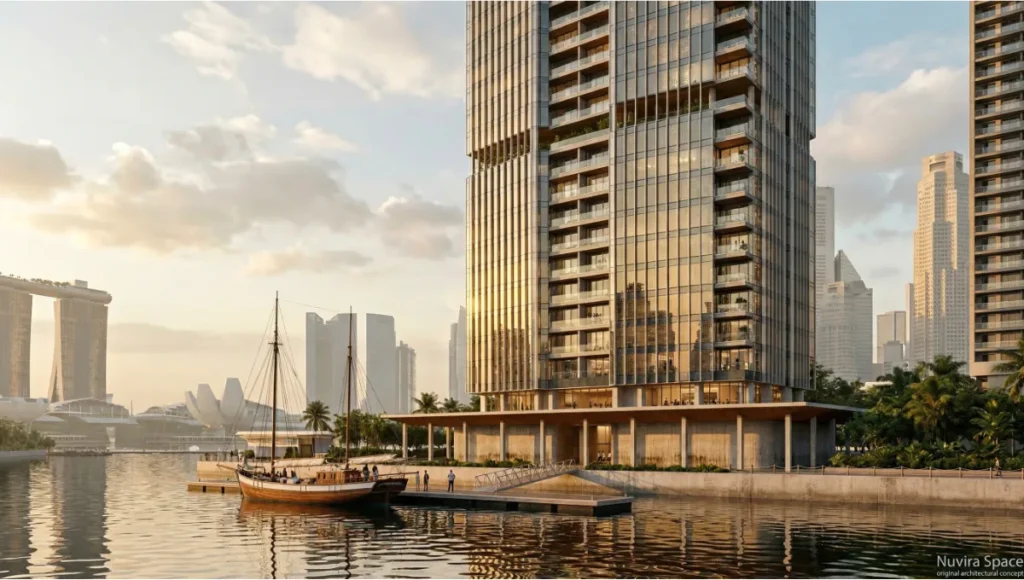
visualization of a 52-floor mixed-use high-rise in Singapore Marina
Bay rendered in D5 Render 2026 with path-traced caustics on water
surface, parametric glass curtain wall facade, and equatorial
golden-hour lighting at 15:40 local time, demonstrating real-time
path tracing quality for commercial architectural presentation
Singapore was selected as the location for this study because its climate presents one of the most demanding lighting scenarios for real-time rendering engines: ultra-high ambient brightness, high humidity haze, and water reflectivity that changes character across a 90-minute window. Any engine that produces credible results in this environment performs well everywhere.
Design Levers Applied
Lumion — Exterior Massing and Context Storytelling
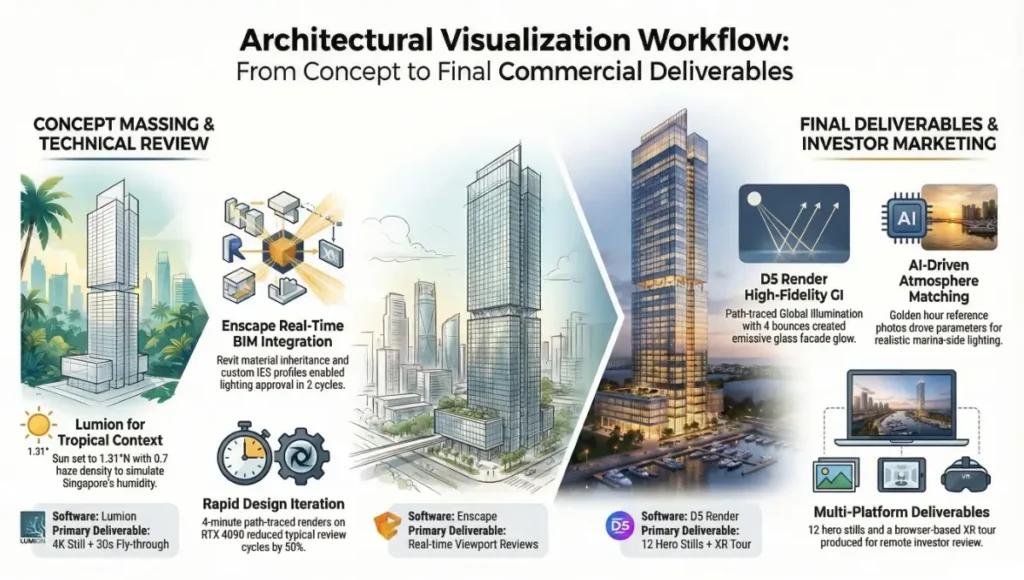
- Sky Model: Physical sun-sky set to 1.3167°N latitude, 15:40 local time — maximum low-angle solar intensity from the west across the marina
- Water Surface: Procedural ocean shader with custom choppiness parameter set to 0.3 for bay-scale wave behavior
- Atmosphere: Aerial perspective haze at 0.7 density to simulate Singapore’s tropical humidity layer
- Output: 4K still + 30-second fly-through at 60fps for client massing presentation
- Result: Approved at concept stage. Client approved massing direction after first presentation.
Enscape — Design Development Interior Reviews
- Mode: Real-time viewport during design review sessions with structural and MEP consultants
- Material Inheritance: Revit material assignments carried directly into Enscape without remapping — critical for a 52-floor model with 200+ material types
- IES Profiles: Custom luminaire data from the specified lighting vendor loaded directly into Enscape light objects
- Path-Traced Finals: Activated for lobby and amenity floor final images; 4-minute render time per frame on RTX 4090
- Result: Interior lighting approval achieved in two review cycles rather than the typical four to six.
D5 Render — Final Commercial Deliverables
- GI Settings: Path-traced GI with 4 bounces; emissive glass facade contributing to indirect exterior glow at night
- Water Reflection: Real-time reflective water plane with custom normal map to simulate marina surface
- AI Atmosphere Match: Reference photograph of Singapore bay at golden hour used to drive initial lighting and atmosphere parameters
- DLSS 3.5: Enabled for interactive viewport preview on 4K monitor without render quality penalty
- Deliverable: 12 hero stills for developer sales gallery + browser-based XR Tour for remote investor review
Transferable Takeaway
The Meridian Waterfront study confirms our operational thesis: no single engine wins across every project phase. The technically correct answer is a phase-aware workflow — Lumion for concept massing and environment storytelling, Enscape for design development and BIM-connected iteration, D5 Render for final commercial deliverables requiring path-traced material and light accuracy. The infrastructure investment required to maintain all three pipelines is justified at commercial scale by the corresponding reduction in revision cycles and the improvement in first-presentation approval rates.
Intellectual Honesty: Hardware Check
The Lumion vs Enscape vs D5 Render quality comparison cannot be separated from a hardware conversation. All three engines are GPU-bound. Any benchmark claiming otherwise is marketing, not engineering.
Before specifying your workstation, read our dedicated guide: Best GPU for Rendering 2026 — Nuvira Space — which benchmarks current-generation RTX and AMD cards across all three engines with real scene data.
Minimum Viable Hardware (2026 Standards)
- GPU: NVIDIA RTX 3080 12GB or AMD RX 6800 XT — the floor for path-traced work in D5 and Enscape’s final mode
- VRAM: 16GB minimum for complex scenes with high-resolution texture sets; 24GB recommended for scenes exceeding 500MB of geometry
- CPU: Intel Core i9-13th gen or AMD Ryzen 9 7000 series — CPU is secondary to GPU but affects scene loading and asset streaming
- RAM: 64GB minimum for commercial-scale projects; 128GB for master plan-scale Lumion scenes
- Storage: NVMe SSD required; Lumion asset libraries exceed 80GB on disk; D5 HDR asset library adds 40GB+
Platform Considerations
- Lumion: Windows only; no Mac support — hard stop for any studio standardized on Apple Silicon
- Enscape: Windows primary; experimental Mac support in 2025/2026 builds, not recommended for production
- D5 Render: Windows only; NVIDIA RTX hardware required for path-traced mode; AMD hardware limited to rasterization
The NVIDIA ecosystem dominance in this comparison is not negotiable. If your studio is standardizing on AMD or Apple hardware, Enscape is your most viable option. D5 Render’s path-traced quality ceiling is only accessible on NVIDIA RTX hardware with DLSS support.
2030 Future Projection: Where These Engines Are Headed
Based on the current development trajectories and public roadmaps, here is our technical forecast for where Lumion, Enscape, and D5 Render will sit by 2030:
Lumion
Lumion’s competitive position depends on its ability to integrate generative AI for environment population and procedural urbanism. Its core value — rapid environmental storytelling — will be under pressure from AI-powered scene generation tools. Expect Lumion to position itself as the environmental simulation layer rather than a pure renderer, with deeper integration of real-world geospatial data and climate analysis tools. The path-traced quality gap will narrow but not close.
Enscape
Enscape’s ownership by Chaos Group positions it for deep convergence with V-Ray and Corona technology. The most likely 2030 scenario: a unified rendering backend shared between Enscape’s real-time interface and V-Ray’s offline quality ceiling, making the concept of ‘switching tools for final output’ functionally obsolete. The BIM-native workflow advantage will deepen as Enscape’s material and parameter inheritance becomes more sophisticated.
D5 Render
D5 Render’s trajectory is the most aggressive of the three. Its AI-native roadmap — AI material generation, AI atmosphere matching, AI vegetation placement — suggests a future where the technical barrier to photorealistic output drops to near zero. The competitive risk for D5 is platform dependency: its quality ceiling requires NVIDIA RTX hardware, and any architectural shift in GPU market share affects its addressable market. The AIA AI Task Force’s ongoing work on guidance and educational resources for AI in architecture (https://www.aia.org/advocacy/research) will increasingly influence how studios evaluate and adopt tools like D5.
For a hands-on breakdown of where AI is already embedded in today’s rendering pipelines, see our guide: AI Rendering Plugins for Architecture — Nuvira Space.
The Convergence Scenario
By 2030, the distinction between ‘real-time rendering’ and ‘offline rendering’ will be a legacy concept. Path tracing at interactive framerates on consumer hardware is a physics and engineering problem, not a fundamental limit — and the hardware roadmap suggests it will be solved within this timeframe. The studios that invest in understanding these engines at the parameter level now will have a significant skill advantage when convergence happens.
Secret Techniques: Advanced User Guide
These are the non-obvious workflow optimizations that separate production-grade output from tutorial-grade output. Each one is validated through our internal project work.
Lumion: Custom Atmosphere Stacking
Lumion’s atmosphere system allows stacking of multiple fog layers with independent density and height parameters. By placing a low-density volumetric fog layer at ground level (height range 0–8m, density 0.15) combined with a separate aerial perspective layer at mid-height (8–80m, density 0.08), you simulate the layered humidity gradient visible in tropical and coastal environments. This technique was central to the Singapore marina atmosphere in the Meridian study.
Enscape: IES + Emissive Surface Hybrid Lighting
For interior scenes requiring both functional accuracy (meeting lighting compliance requirements) and visual quality, combine IES profiles on fixture objects with a low-intensity emissive material on ceiling coves and indirect channels. The IES profile drives the physical distribution; the emissive surface fills the ambient pool. Set emissive intensity at 0.3–0.8 cd/m² to avoid overexposure while maintaining perceptible fill light in path-traced final renders.
D5 Render: Multi-Layer Material Decal System
D5’s decal system allows material detail layering at a level that exceeds native material resolution limits. For concrete facades with weathering, moss growth, and water staining — a common requirement for residential and hospitality projects — apply a base PBR concrete material, then overlay 2–3 decal layers with masked roughness and albedo variation. This technique produces material complexity that reads as hand-crafted rather than algorithmically generated.
Cross-Engine: Camera Data Matching for Consistent Hero Angles
When using multiple engines across project phases, export camera positions as coordinate data (position XYZ + rotation XYZ) from each tool and maintain a shared camera library in a spreadsheet. This allows you to replicate exact viewing angles across Lumion, Enscape, and D5 Render when producing comparative studies or phase-progression documentation. The absence of this discipline is the single most common cause of inconsistent visual continuity in multi-engine workflows.
Comprehensive Technical FAQ
For the complete pipeline — engines, capture, materials, hardware, and presentation — see our architectural visualization guide.
Q: Which engine is best for photorealistic interior renders in 2026?
A: D5 Render in hybrid path-traced mode, for studios with NVIDIA RTX hardware (RTX 3080 or higher). Enscape in path-traced final mode is a credible alternative and has the advantage of BIM parameter inheritance. Lumion is not competitive for high-accuracy interior lighting simulation.
Q: Can I use Enscape for final client deliverables, or is it strictly a design review tool?
A: Enscape’s path-traced output mode produces final-quality images suitable for commercial deliverables. The qualification: path-traced render times in Enscape are longer than D5’s hybrid mode for equivalent quality. For studios where the design authoring environment is Revit and ArchiCAD, Enscape is a fully viable final deliverable pipeline. The decision should be based on your hardware tier and the complexity of the lighting scenario.
Q: What is the learning curve difference between the three engines?
A: Lumion has the lowest technical barrier to entry — its interface is designed for rapid scene assembly without deep knowledge of rendering parameters. Enscape’s learning curve is determined by your BIM authoring proficiency rather than rendering knowledge. D5 Render has the highest technical ceiling and the steepest reward curve: its path-traced controls, material system, and AI tools require deliberate study but yield proportionally higher output quality.
Q: How do these tools handle real-time collaboration in 2026?
Enscape: Standalone .EXE viewer export and web panorama sharing via Enscape Cloud. No real-time multi-user collaboration.
Lumion: LiveSync plugins allow real-time model updates from design software, but the rendering session itself is single-user.
D5 Render: XR Tours enable browser-based immersive walkthroughs shared with any device. The 2.11 multi-user scene synchronization feature allows concurrent editing sessions — the most advanced collaboration architecture of the three.
Q: Is there a subscription vs. perpetual license difference?
- Lumion: Subscription-based licensing (Lumion 2026 annual or monthly plans); no perpetual option
- Enscape: Subscription-based; sold per seat with floating license options for teams
- D5 Render: Freemium model with a capable free tier; D5 Pro subscription unlocks full path-traced quality and AI tools
D5 Render’s freemium accessibility is a structural advantage for individual architects and small studios evaluating the tool without capital commitment.
Q: Which engine is used by the most architecture firms globally?
Enscape holds the largest installed base among architecture and design firms due to its deep BIM integration and Chaos Group distribution network. Lumion has dominant market share in exterior visualization studios and academic institutions. D5 Render’s market share is growing fastest, particularly in Asia-Pacific markets and among studios prioritizing final render quality. For current adoption data and professional guidance, the AIA Research page at aia.org/advocacy/research provides benchmarking resources and AI Task Force guidance relevant to technology adoption in architectural practice.
If you are also evaluating Twinmotion as part of your shortlist, our comparison guide Lumion vs Twinmotion 2026 — Nuvira Space covers the full technical breakdown between those two engines specifically.
Take Your Visualization Pipeline to the Next Technical Level
The Lumion vs Enscape vs D5 Render quality comparison in 2026 is a strategic decision, not a software preference. Each engine represents a different philosophy about where in the design process visualization creates maximum value — and each has a technical ceiling that defines the quality of commercial output your studio can credibly deliver.
At Nuvira Space, we work with commercial clients, developers, and design teams to build visualization workflows that are technically grounded, phase-appropriate, and capable of producing final deliverables that close projects. If you are re-evaluating your studio’s rendering infrastructure, or if you need a second opinion on which engine stack fits your specific project typology, our Visual Lab team is available for technical consultation.
Ready to benchmark your current workflow against the standard? Contact the Nuvira Space Visual Lab team at nuviraspace.com. We conduct technical workflow audits, engine transition planning, and hardware specification reviews for studios at every scale.
External Reference: AIA Research & Technology Resources
AIA Research: Architecture Technology & AI Task Force — aia.org/advocacy/research
AIA Framework for Design Excellence — aia.org/design-excellence
© 2026 Nuvira Space Visual Lab. All rights reserved. Built by practitioners, for practitioners. | www.nuviraspace.com
2 thoughts on “Lumion vs Enscape vs D5 Render Quality Comparison 2026”