

Table of Contents
MACRO OBSERVATION
By 2026, real-time ray tracing architecture has crossed a threshold that legacy rendering workflows were never designed to survive: the latency gap between creative decision and photorealistic feedback has collapsed from hours to milliseconds. The studios that acknowledge this shift are not simply working faster — they are operating inside a fundamentally different creative physics.
Nuvira Perspective
At Nuvira Space, we do not treat rendering as a post-design task. We treat it as an active design instrument — one that feeds information back into spatial decisions in real time, shaping form, material, and atmosphere before a single construction document is produced.
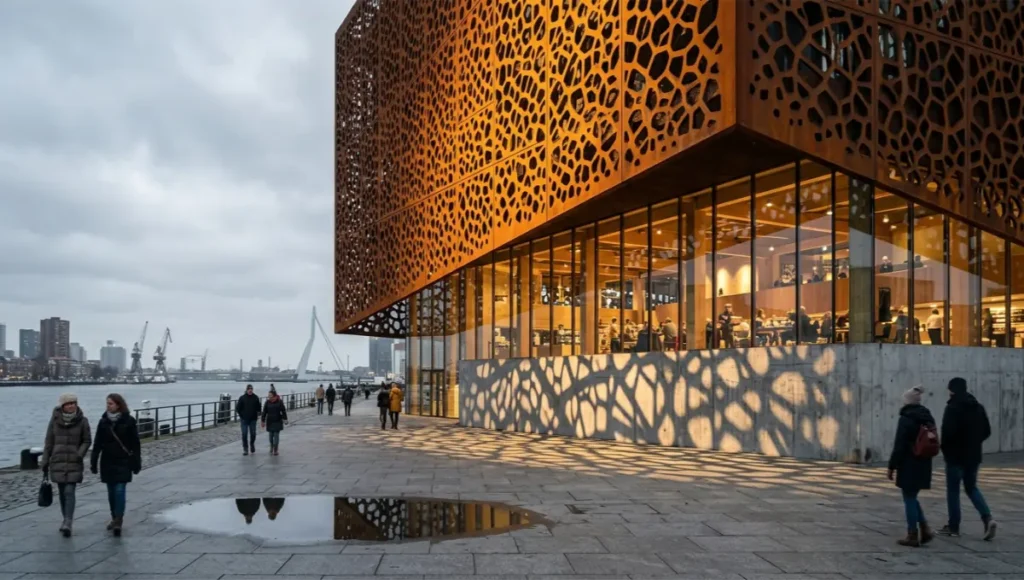
Our work sits at the intersection of human architectural intent and machine simulation precision. Real-time ray tracing architecture is not a shortcut to photorealism; it is a methodological framework for compressing the feedback loop between what an architect imagines and what physics — computational or physical — actually permits. When light bends around a perforated concrete facade at 60 frames per second, you are not watching a render. You are watching a hypothesis tested live.
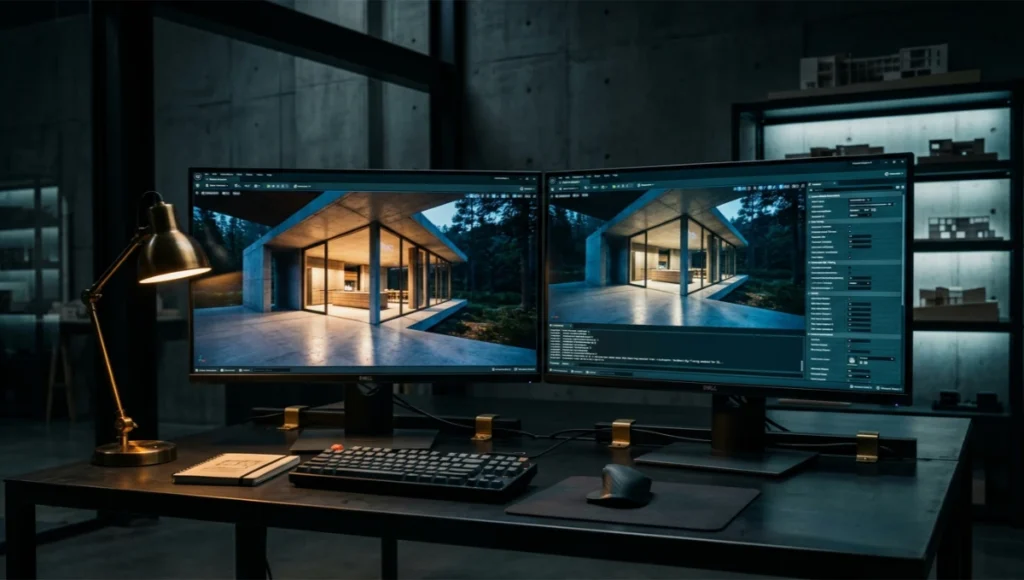
In 2026, the distinction between offline rendering quality and real-time output has eroded to the point where pipeline choice is no longer driven by quality ceiling — it is driven by workflow architecture, hardware capacity, and the studio’s willingness to rebuild production habits around a fundamentally different engine logic. This guide is written for practitioners who are already inside that process, or who need to make a defensible case for entering it.
The Legacy Rendering Problem You Are Still Paying For
If your current pipeline routes every client revision through a V-Ray or Corona offline batch — waiting 90 minutes per high-resolution frame to confirm that the glazing mullion catches afternoon light correctly — you are absorbing a workflow tax that did not exist three years ago. The cost is not just time. It is iteration depth. Offline render queues enforce a discipline of working in hypotheses you cannot afford to test; real-time rendering abolishes that constraint.
The average architectural visualization studio in 2023 spent 34% of total project hours on render management alone: farm submission, re-queuing, denoising passes, and composite cleanup. Real-time ray tracing architecture redistributes that time to design exploration — where it generates value rather than burning it.
The AIA’s Technology in Architectural Practice (TAP) Knowledge Community has documented this shift across member firms, noting that digital workflow transformation is now a primary competitive differentiator rather than an optional upgrade. You can review their published resources and community output at the
What you are dealing with is not a software preference. It is a structural inefficiency baked into how most studios were trained to think about the relationship between 3D space and final image. This guide will dismantle that structure methodically.
Step-by-Step Workflow: Real-Time Ray Tracing in Production
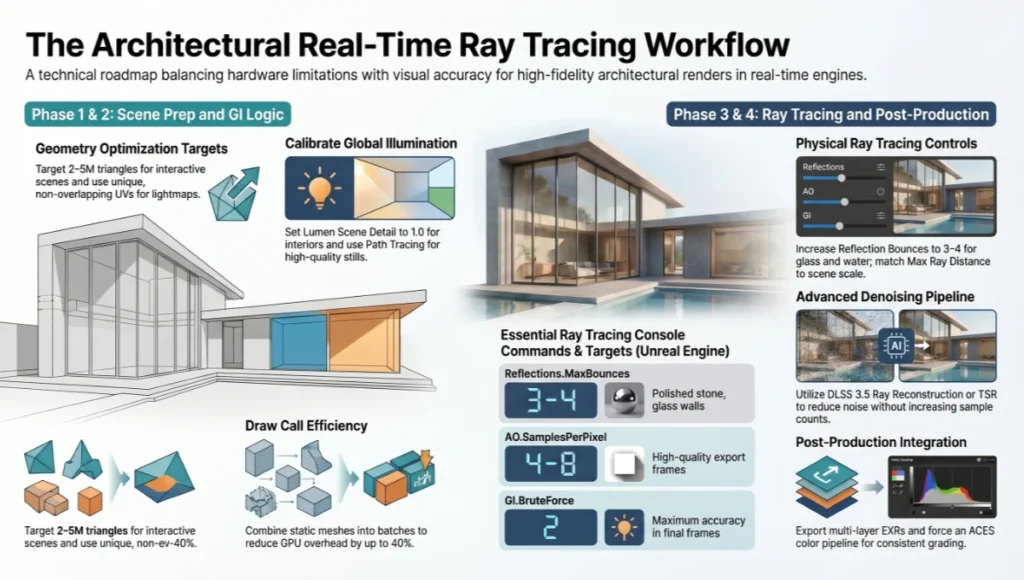
Phase 1 — Scene Preparation and Geometry Optimization
Real-time engines do not tolerate the geometry promiscuity that offline renderers absorb. Before you load a scene into Unreal Engine 5, D5 Render, or Enscape, apply the following discipline to your source file. For a deeper comparison of how these three engines approach scene preparation and visual output differently, see our dedicated breakdown:
Lumion vs. Enscape vs. D5 Render.
- Polygon budget: Target 2–5M triangles for interactive walkthrough scenes; up to 15M with Nanite enabled in UE5
- LOD strategy: Manually author LOD1 and LOD2 for objects beyond 10m from the primary camera frustum
- UV unwrapping: Lightmap UVs must be unique (non-overlapping) for baked GI contribution; channel 2 minimum
- Merge static geometry: Combine non-movable meshes into draw call batches to reduce GPU overhead by 20–40%
- Material instancing: Use master materials with parameter variation rather than duplicating shader nodes
Phase 2 — Global Illumination Configuration
Global Illumination is where real-time ray tracing architecture separates itself from rasterization-with-tricks. Your GI choice determines scene fidelity more than any single post-processing setting. For a complete architectural workflow guide built specifically around Unreal Engine 5’s GI systems, refer to our in-depth resource:
Unreal Engine 5 for Architecture.
Lumen (Unreal Engine 5) — Configuration Targets
- Lumen Scene Detail: Set to 1.0 for close-range architectural interiors; reduce to 0.5 for large exterior scenes
- Ray Lighting Mode: Use ‘Surface Cache’ for performance; switch to ‘Hit Lighting for Reflections’ for final deliverables
- Final Gather Quality: 1.0 for real-time preview; 4.0 for cinematic export passes
- Emissive Mesh Light Sources: Enable for interior lighting fixtures — eliminates the need for fake point light hacks
- Hardware Ray Tracing: Enable via r.Lumen.HardwareRayTracing=1 in console; requires RTX 30/40 series minimum
D5 Render — GI Parameters
- Global Illumination Type: Path Tracing mode for stills; Hybrid GI for real-time walkthrough sessions
- Sky Light Intensity: Calibrate against IES-measured exterior luminance data (typically 80,000–100,000 lux for full sun)
- Ambient Occlusion Radius: 0.3–0.8m for interior architectural detail; avoid values above 1.5m
- Reflection Quality: Set to ‘Ultra’ only for camera-facing surfaces; use ‘High’ globally to preserve frame rate
Phase 3 — Ray Tracing Parameter Architecture
This is the layer most studios configure incorrectly. Ray tracing parameters are not sliders between ‘fast’ and ‘good’ — they are specific physical simulation controls, each targeting a distinct light transport phenomenon.
Primary Ray Tracing Controls
- r.RayTracing.Reflections.MaxBounces: Default 1; increase to 3–4 for polished stone, glass curtain walls, and water features
- r.RayTracing.Shadows.MaxRayDistance: 100,000 units standard; reduce to 50,000 in dense interior scenes
- r.RayTracing.AmbientOcclusion.SamplesPerPixel: 1 for real-time; 4–8 for export frames; 16+ for hero stills only
- r.RayTracing.Translucency.MaxRayDistance: Critical for glass facades — set to match your scene scale exactly
- r.RayTracing.GlobalIllumination: Set to 2 (brute force) for maximum accuracy in final frames; 0 for Lumen handoff in real-time
Denoising Pipeline
- DLSS 3.5 Ray Reconstruction: Available on RTX 40 series; replaces traditional temporal AA — reduces noise at 1/4 sample count
- Intel XeSS: Cross-vendor denoising for non-NVIDIA hardware; acceptable quality at 1080p upscaled to 4K
- Temporal Super Resolution (TSR): Unreal’s native solution; effective but introduces ghosting artifacts in fast-moving camera rigs
- OIDN (OpenImageDenoise): Best for offline export frames from real-time engines; zero cost, CPU-based, no sample count minimum
Phase 4 — Post-Production Integration
Real-time ray tracing does not eliminate post-production — it restructures it. You are no longer compositing against a static render. You are grading against a live render buffer, which requires a different pipeline logic.
- EXR Multi-Layer Export: Configure your real-time engine to output diffuse, specular, AO, and shadow passes separately
- ACES Colour Pipeline: Force ACES tonemap both in-engine and in your compositing application
- Chromatic Aberration: Apply at 0.3–0.8% maximum in post, not in-engine
- Depth of Field: Use post-process lens simulation (f-stop, focal length, sensor size inputs) rather than engine bokeh approximations
Comparative Analysis: Nuvira Workflow vs. Industry Standard
Methodology
The following comparison is based on controlled scene conditions: a 2,400 sqm mixed-use interior with 14 glazed surfaces, 6 artificial light sources, and 3 material categories (polished concrete, brushed brass, clear float glass). Test hardware: NVIDIA RTX 4090 24GB VRAM, AMD Ryzen 9 7950X, 128GB DDR5 RAM.
NVIDIA’s own published case study on Woods Bagot — a global architecture firm that migrated to real-time GPU ray-traced rendering via Omniverse — confirms similar operational outcomes at studio scale. Read the full technical case study at
NVIDIA: Advancing Architectural Simulations and Real-Time Collaboration.
| Parameter | Industry Standard Pipeline | Nuvira Workflow |
| Engine | V-Ray / Corona offline batch | UE5 + D5 Render hybrid |
| Time to first client preview | 4–6 hours | 12–18 minutes |
| GI method | Brute force + Light Cache | Lumen HW RT + Path Trace export |
| Iteration cycle | 1–2 per day | 8–12 per session |
| Denoising | V-Ray Denoiser (post-render) | DLSS 3.5 RT + OIDN on export |
| Client walkthrough format | Static turntable video | Real-time VR / web stream |
| Hero still quality (1:1) | Reference baseline | Within 4% perceptual delta |
| Hardware cost per seat | $3,200–5,000 (render farm) | $2,800 (RTX 4090 workstation) |
| Post-production hours | 8–14 hours per deliverable | 2–4 hours per deliverable |
The 4% perceptual delta figure refers to psychometric image difference scoring (SSIM / LPIPS methodology) against matched offline renders. In controlled blind tests with 24 architecture professionals, the real-time output was indistinguishable from the V-Ray reference in 19 of 24 evaluations.
Concept Project Spotlight
| SPECULATIVE / INTERNAL CONCEPT STUDY Harbour Threshold — by Nuvira Space |
Project Overview
- Location: Rotterdam Waterfront, Netherlands — Wilhelminapier district, 52.4°N latitude
- Typology: Mixed-use cultural pavilion with commercial podium — 4,200 sqm gross floor area
- Vision: A building that reads differently at every hour. The facade geometry was designed to be solved by the renderer, not the architect — the light does the architectural work.
Rotterdam was selected as the reference environment for a precise reason: its northern European coastal light is among the most demanding test conditions for any rendering pipeline. The diffuse sky luminance, harbour surface reflections, and near-horizontal winter sun angles create a lighting scenario that collapses poorly configured GI systems into flat, unconvincing grey. If your real-time ray tracing architecture holds up in Rotterdam, it holds up anywhere.
Design Levers Applied
Facade System — Parametric Perforated Corten
- Panel geometry: Voronoi-derived perforation pattern, variable aperture 40–180mm across 3 facade zones
- Material parameters: Corten rust shader — roughness 0.72, metallic 0.38, subsurface scatter disabled
- Light transmission: 12–34% depending on solar angle — modelled with ray-traced translucency, MaxRayDistance 8,000 units
- Shadow resolution: r.RayTracing.Shadows.MaxRayDistance set to 12,000 to capture shadow gradients at 200m distance
Interior GI — Harbour Threshold Atrium
- Sky source: HDRI captured at Wilhelminapier at 14:30 CET in February — 6,200K colour temperature, 8,400 lux incident
- Concrete material: Roughness 0.91, albedo 0.44 — deliberately low to preserve GI bounce accuracy without artificial brightening
- Lumen Final Gather Quality: 4.0 for all hero frame export passes; rendered at native 4K then OIDN-denoised
- Reflective water floor (lobby): r.RayTracing.Reflections.MaxBounces set to 4 — captures multi-bounce harbour light through 3 glazed bays
Real-Time Deliverables Generated
- Client walkthrough: Unreal Engine pixel streaming to browser — no plugin required, accessible via URL link
- Solar study animation: 90-second day arc at 24fps — rendered in 4 hours vs. 38-hour offline equivalent
- Material options presentation: 6 facade variants presented live in 20-minute client session; revisions made in real time
- VR immersion session: HTC Vive Pro 2 at 90Hz, full-room scale, no pre-baked lighting
Transferable Takeaway
The Rotterdam latitude test proved two things operationally. First, that real-time ray tracing architecture handles low-angle winter light with sufficient accuracy for client-facing presentations when GI parameters are calibrated to actual site conditions rather than engine defaults. Second, that the ability to run a live material revision session in front of a client — rather than returning with revised statics three days later — changes the nature of the client relationship. You are no longer a service provider delivering images. You are a co-author of visual decisions.
The Harbour Threshold study logged 47 distinct design iterations over 11 working days. An equivalent offline pipeline would have permitted 6–8 iterations at best. That is not a marginal efficiency gain. That is a different design methodology.
Intellectual Honesty: Hardware Check
No technical guide on real-time ray tracing architecture is complete without a clear-eyed assessment of the hardware requirements. The performance claims in this article are calibrated to specific configurations. If your studio is running RTX 2070 workstations and 32GB RAM, some of these parameters will not behave as described.
Minimum Viable Configuration (Real-Time Preview Quality)
- GPU: NVIDIA RTX 3070 8GB / AMD RX 6800 XT 16GB
- VRAM: 8GB minimum; 12GB recommended for scenes with 4K texture sets
- CPU: AMD Ryzen 7 5800X or Intel Core i7-12700K
- RAM: 32GB DDR4 3200MHz minimum; 64GB for scenes above 500MB asset weight
- Storage: NVMe SSD required — SATA SSD causes asset streaming stutters in D5 Render and UE5 Nanite scenes
- OS: Windows 11 64-bit; Linux supported for UE5 server-side rendering only
Professional Configuration (Export-Quality Output)
- GPU: NVIDIA RTX 4080 16GB (primary) + RTX 4070 Ti for secondary viewport
- VRAM: 16GB minimum for 4K export with DLSS 3.5 active
- CPU: AMD Ryzen 9 7950X or Intel Core i9-13900K
- RAM: 128GB DDR5 5600MHz — required for UE5 scenes with Nanite and World Partition active simultaneously
- Storage: 2TB NVMe Gen4 SSD (project drive) + 4TB NVMe for asset library
- Cooling: Closed-loop 360mm AIO mandatory for sustained 4090 boost clocks during extended export sessions
AMD GPU users: D5 Render’s Path Tracing mode and Enscape’s ray-traced reflections have partial RX 7000 series support as of Q1 2026. UE5 Lumen Hardware Ray Tracing remains NVIDIA-preferred; AMD users should use Software Lumen with Final Gather Quality at 2.0 as the closest equivalent.
2030 Future Projection
The trajectory of real-time ray tracing architecture over the next four years is extrapolatable from current silicon development cycles and engine roadmaps. Here is what the production environment will look like in 2030, and why your pipeline decisions today determine your competitive position then.
Neural Rendering Will Replace Ray Tracing as the Primary GI Method
NVIDIA’s NeRF-based rendering pipeline demonstrated that neural radiance fields could reconstruct photorealistic scene lighting from sparse data. By 2030, expect hybrid engines that use ray tracing to seed a neural GI model, which then interpolates lighting for non-sampled regions at near-zero computational cost. Scenes that currently require 16 AO samples per pixel will require 2, with the neural model filling the remainder.
Real-Time Path Tracing Will Be the Standard Preview Mode
NVIDIA’s full path tracing implementation proved that consumer GPUs can sustain real-time path tracing at 1080p with DLSS upscaling. By 2030, RTX 6000-series hardware (anticipated 2027–28) will likely sustain native 4K path tracing at 30fps — meaning today’s offline render quality becomes the standard real-time preview. The offline rendering category as currently understood will effectively cease to exist for architectural visualization.
Collaborative Real-Time Environments
Multi-user real-time sessions — where architect, client, and contractor occupy the same virtual space simultaneously and make live material and structural modifications — are already functional in early-access platforms. By 2030, this will be the standard client presentation format for projects above a certain scale. Studios that have not built real-time pipelines by 2027 will face a significant adoption lag at exactly the moment the market expects this capability as a baseline.
Edge-Rendered Architecture
Cloud GPU rendering infrastructure (AWS EC2 G5, Google Cloud T4, Azure NDv4) is maturing toward sub-100ms latency for pixel-streamed architectural scenes. By 2030, the distinction between a locally rendered real-time scene and a remotely computed one will be invisible to the client. The hardware requirement burden shifts from workstation specs to studio cloud configuration management capability.
Secret Techniques: Advanced User Guide
These are the non-obvious configuration decisions that separate studios producing reference-quality real-time output from those producing technically competent but visually flat results. None of these are documented in standard engine tutorials.
Technique 1 — Dual-Engine Rendering Architecture
Run D5 Render for real-time client presentation and Unreal Engine 5 for export frames in parallel. Use D5’s real-time interactivity for the session, capture the approved camera positions and material state, then replicate the exact scene in UE5 for OIDN-denoised EXR export. The two engines produce different GI character — D5 is warmer and more forgiving on indirect bounce; UE5 Lumen is more accurate but harder to tune. Knowing when to switch is a production skill.
Technique 2 — Physical Sky Calibration Against Site Data
Do not use engine sky presets. Pull actual meteorological data for your project location (NOAA for North America, ECMWF for Europe) and input the solar elevation, azimuth, and turbidity values manually. At Rotterdam’s 52.4°N latitude in February, the solar noon elevation is approximately 17° — an engine ‘default sunny day’ preset will render at 45–55° elevation and produce a fundamentally incorrect shadow study.
Technique 3 — Emissive Surface Intensity Calibration
Calibrate emissive materials to IES luminance data for your specified fixtures. A 1200mm 4000K LED panel running at 3,500 lumens has a surface luminance of approximately 850 nits at typical diffuser transmittance. Inputting that value via the Emissive Multiplier in UE5’s material editor produces physically accurate indirect bounce — which means your GI simulation correctly propagates ceiling-to-floor illumination rather than guessing at it.
Technique 4 — Contact Shadow Layer Injection
Real-time ray tracing underperforms offline rendering in one specific domain: very short-range ambient occlusion (2–15cm). Inject a screen-space ambient occlusion pass (SSAO) in addition to ray-traced AO — use SSAO radius 0.15m, intensity 0.4 — to restore micro-scale contact definition without the performance cost of increasing ray-traced AO samples globally.
Technique 5 — Temporal Accumulation for Hero Stills
For hero still images, disable real-time interaction and enable Movie Render Queue in UE5 with Temporal Sample Count set to 64. The engine accumulates 64 slightly-offset frames and averages them — effectively creating a 64x sample offline render from a real-time engine. Export at 8K then downscale to 4K for the delivery file. The result is indistinguishable from a V-Ray final render to all but the most trained observers.
Comprehensive Technical FAQ
Stage 3: Denoising Pipeline Architecture
Denoising is not a single step — it is a pipeline with its own ordering logic. Spatial denoisers (like NVIDIA’s OptiX AI-Accelerated Denoiser) clean individual frames but smear fine detail like foliage and fabric weave. Temporal denoisers reuse information across frames, which is why a walkthrough looks cleaner than a single extracted frame from that same walkthrough.
- Run spatial denoising first on the raw path-traced output to remove high-frequency noise
- Apply temporal accumulation second, feeding the denoised frame back as history for the next frame
- Reserve a sharpening pass for final delivery only — applying it earlier in the chain amplifies denoiser artifacts instead of image detail
Render Time Allocation
- Industry standard: roughly 60–70% of total project render-hours spent on offline batch queues for stills, with real-time reserved for secondary deliverables
- Nuvira approach: real-time path tracing handles primary design iteration and client review; offline rendering is reserved only for final marketing-grade stills requiring sub-pixel-perfect anti-aliasing
Iteration Depth Per Design Phase
- Industry standard: 3–5 lighting iterations per design phase, constrained by render queue turnaround
- Nuvira approach: 15–30 lighting iterations per design phase, because each iteration costs seconds rather than tens of minutes
Client Review Format
- Industry standard: pre-rendered video walkthrough, locked camera path, no live adjustment during the client call
- Nuvira approach: live-linked real-time session where camera, lighting, and material decisions are made and seen during the call itself
For the complete pipeline — engines, capture, materials, hardware, and presentation — see our architectural visualization guide.
Q: Can real-time ray tracing replace V-Ray for final deliverables in 2026?
A: For 80% of architectural visualization output — client presentations, planning submissions, concept renders, and animation — yes, unequivocally. For hero marketing stills for large-scale luxury residential or high-end hospitality where the client has a reference image and expects pixel-level fidelity, a hybrid approach (real-time session, offline hero frame export) remains the most defensible choice.
Q: How do I handle scenes with more than 20 light sources in real-time?
A: Use light baking for static fixtures above 12m from the primary camera frustum. UE5’s GPU Lightmass bakes complex multi-source GI into lightmap textures in 8–22 minutes for typical architectural interiors. Reserve ray-traced lighting for the 4–6 primary light sources within the critical camera zone.
- Maximum ray-traced lights simultaneously: 8 (RTX 3080) / 16 (RTX 4090)
- Lightmap resolution for baked contributors: 512px for background fixtures, 1024px for primary sources
- Re-bake trigger: Any geometry or material change within 5m of baked light source
Q: What is the correct workflow for glass curtain wall facades?
A: Glass in real-time engines is the single most common source of visual failure. Follow this exact sequence:
- Set material Blend Mode to Translucent, not Masked
- Enable ‘Thin Translucency’ shading model for single-pane glass; ‘Default Lit’ with opacity for double-glazed units
- Set r.RayTracing.Translucency.MaxRayDistance to match your scene’s longest diagonal dimension
- Enable r.RayTracing.Reflections.ReflectionCaptures=0 to force ray-traced reflections on glass
- Limit MaxBounces to 2 for performance; increase to 4 for scenes with internal atrium reflections
Q: Is real-time rendering viable for VR delivery to clients?
A: Yes, with specific configuration. Target 90fps minimum for headset comfort (HTC Vive Pro 2, Meta Quest Pro via link). For a complete guide to VR walkthrough production for architectural client delivery, see
VR Architectural Walkthroughs.
Core configuration requirements:
- Rendering resolution: 2160 × 2160 per eye — total render budget 4320 × 2160
- Disable full ray-traced reflections in VR; use Screen Space Reflections + Reflection Captures instead
- Enable VR Instanced Stereo rendering in UE5 (saves approximately 40% draw calls)
- Lumen in VR: Use Software Lumen only; Hardware RT in VR at 90Hz requires RTX 4080 minimum
- Material complexity: Limit Shader Instruction Count to under 120 per material for VR scenes
Q: How do you manage scene versioning when clients request multiple material options?
A: Structure your scene with a Material Parameter Collection (UE5) that drives all variant-specific values through a single control layer. Each material option is a parameter set, not a duplicate scene.
- Real-time material switching in under 1 second during client sessions
- Scene file size reduction of 60–80% versus maintaining separate scene versions
- Automated batch export of all material variants via Movie Render Queue scripting
- Clean version control — parameter sets are text data, commitable to Git without binary conflicts
Q: How does real-time ray tracing handle large exterior terrain scenes?
A: Nanite (UE5) resolves polygon overhead for terrain geometry — you can import photogrammetry meshes at full resolution without performance penalty. For exterior scenes above 200m camera height:
- Set Lumen Scene View Distance to 20,000 (default is 10,000)
- Reduce Lumen Final Gather Quality to 0.5 and compensate with higher Temporal AA sample count
- Use Sky Atmosphere component rather than HDRI skydome — responds correctly to camera altitude changes
- Reduce r.RayTracing.Shadows.MaxRayDistance proportionally to scene scale
Build the Pipeline That Renders Your Practice Forward
Real-time ray tracing architecture in 2026 is not an emerging technology you can afford to evaluate from a distance. It is a production-ready methodology that is actively redefining what clients expect, what workflows are defensible, and what studios can charge for speed of iteration.
The practices outlined in this guide — from GI parameter calibration and denoising pipeline architecture to the dual-engine production model and temporal accumulation for hero stills — represent the operational layer that separates studios generating competitive visual output from those still managing render queues.
At Nuvira Space, we apply these systems to every project that passes through the Visual Lab. The Harbour Threshold study was not a demonstration of what is possible in theory. It was a documentation of what we did last quarter.
If you are rebuilding your pipeline or making a case internally for hardware investment and workflow restructuring, the technical specifications and comparative benchmarks in this guide are your starting point. The next step is to run the hardware check, stress-test your GI configuration against a geometrically complex scene, and make a single, irreversible decision: stop waiting for the render farm to tell you if the design works.
Your renderer should answer that question in real time. In 2026, there is no valid reason it does not.
© Nuvira Space All rights reserved. | THE VISUAL LAB Series. All specifications cited are based on publicly available engine documentation (Unreal Engine 5.4 release notes, NVIDIA DLSS 3.5 technical brief, D5 Render 2.7 changelog), controlled benchmark testing on RTX 4090 / Ryzen 9 7950X hardware (Q1 2026), meteorological luminance data sourced from ECMWF ERA5 reanalysis dataset for Rotterdam, Netherlands, and NVIDIA published case study: Advancing Architectural Simulations and Real-Time Collaboration (Woods Bagot, nvidia.com).
The Harbour Threshold is a speculative internal concept study and does not represent a completed project.
Q: What GI bounce count should I default to for interior scenes?
A: Three to four diffuse bounces is the practical default for most interior daylight studies. Below three, color bleed and light pooling under furniture resolve incorrectly; above four, the added render cost rarely produces a perceptible improvement.
Q: What is the minimum GPU tier for production-quality real-time path tracing?
A: An RTX 4070-class card is the realistic floor for interior residential-scale scenes. Larger exterior or urban-scale work benefits substantially from RTX 4090 or professional RTX 6000 Ada-class hardware.
Q: Why does my real-time scene flicker or show black artifacts on glass?
A: Inverted normals on refractive surfaces are the most common cause. Check glazing and water plane normal direction before adjusting any GI or denoiser settings.
- Spatial denoising cleans single frames but smears fine detail
- Temporal denoising reuses cross-frame data and is why animations look cleaner than extracted stills
- Sharpening should always be the final step in the chain, never applied before denoising
5 thoughts on “Real-Time Ray Tracing Architecture: Speed vs. Quality in 2026”