


Table of Contents
By 2026, free 3D modeling software architects use is no longer the compromise it once was. In Rotterdam — where the municipal planning authority has openly documented its shift toward open-source digital infrastructure across city-commissioned design projects — practices of every scale are producing BIM-coordinated documentation, energy-verified schematics, and photorealistic client presentations without a single paid license in the stack. This guide tests six tools that make that possible, rated against the criteria that actually matter in production: parametric control, IFC compliance, file format interoperability, rendering pipeline depth, and the real-world learning investment required to deploy them professionally.
Nuvira Perspective
At Nuvira Space, we define the design tool not by its price tag but by the fidelity of the conversation it enables between the architect’s intent and the built reality. The real-time rendering engines, parametric constraint systems, and energy simulation pipelines that once existed exclusively inside five-figure software subscriptions have, over the past three years, migrated into open-source and perpetually free environments with a thoroughness that the industry has been slow to process.
What this means in practice: the gap between a studio using Blender, FreeCAD, and ArchiCAD Solo versus a studio running 3ds Max, Revit, and V-Ray is no longer a capability gap. It is a workflow knowledge gap. The free stack requires deliberate integration planning at the file format level, a fluency in export protocols, and a willingness to invest training hours that a subscription-based onboarding pipeline does not demand. For studios willing to build that knowledge, the return is structural independence — a practice whose output quality is not indexed to a vendor’s pricing decisions.
This guide is written pro-to-pro. It assumes you understand the difference between a mesh and a solid, between parametric and direct modeling, between IFC 2×3 and IFC4. It does not explain 3D modeling from first principles. It explains which free tools are genuinely production-ready in 2026, where each sits in a professional workflow, and what the integration seams between them look like at the file format level.
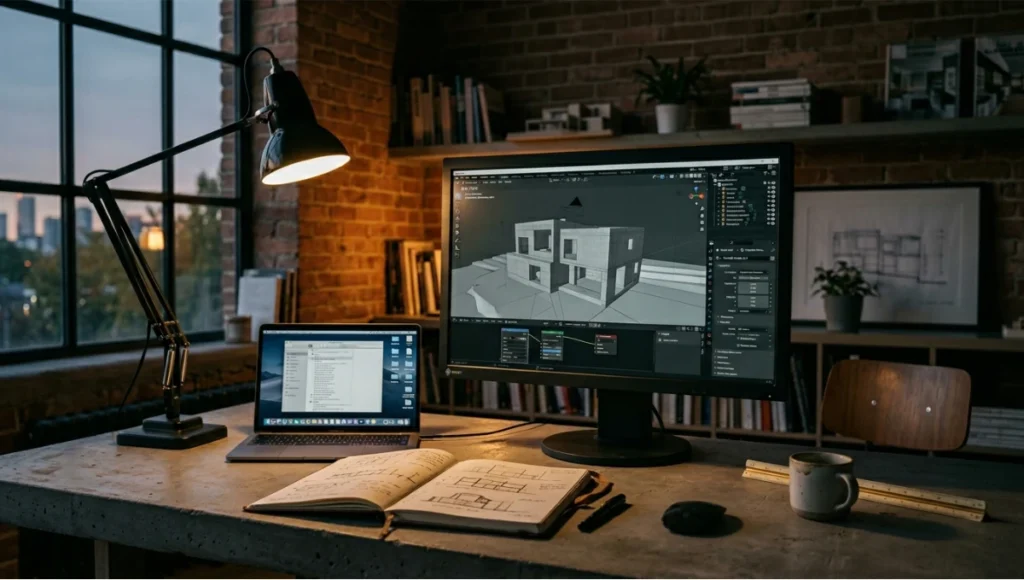
Step-by-Step Workflow & Tool Features
Phase 1 — Concept Massing: SketchUp Free
Free type: Browser-based free tier (commercial use permitted) | Platform: All OS via browser | BIM: None
SketchUp Free’s push-pull interface remains the fastest path from a written brief to a three-dimensional volume. The cognitive load is minimal: you draw a face, you pull it into the third dimension, you are looking at a building mass. That immediacy makes it the right tool for the moment in a project when commitment is dangerous — when you need to test five massing options before 9 AM.
The free tier’s constraints are precise and must be understood before committing to it as a pipeline component:
- Export limitation: SKP format only in browser. STL and OBJ available but strip material and layer data.
- IFC: Not available in the free tier. Any BIM coordination downstream requires a format bridge.
- 3D Warehouse: Full access — millions of pre-built context elements, furniture, urban infrastructure. Legitimate professional asset library at zero cost.
- Rendering: None natively. The entire Enscape/V-Ray ecosystem requires SketchUp Pro.
- Shadow studies: Built-in solar angle simulation by geographic location and date — operational in the free tier.
For an architect building a feasibility model to accompany a planning enquiry letter, SketchUp Free is the correct and complete answer. See also: AI architecture visualization and rendering tools for the rendering pipeline that follows this stage.
Phase 2 — Energy Verification: OpenStudio + EnergyPlus
Free type: Open-source, perpetually free | Platform: Windows, macOS, Linux | BIM: High (energy-specific)
OpenStudio converts the geometry you built in SketchUp into a thermal model. The workflow is direct: install the OpenStudio SketchUp plugin, assign building envelope properties (U-values, SHGC, infiltration rates) to each surface in the SketchUp model, and run the EnergyPlus simulation. The output includes annual energy use intensity (EUI), peak heating and cooling loads, daylight autonomy calculations, and solar gain by facade orientation — data that should be shaping design decisions at schematic stage, not arriving as a consultant report after design development.
- EnergyPlus engine: Validated against ASHRAE Standard 140. Results are defensible to planning authorities and sustainability certifiers.
- IDF format: EnergyPlus Input Data File — open, text-based, version-controllable. No proprietary lock-in.
- IFC output: OpenStudio models can be exported in gbXML format, which bridges to IFC-based BIM workflows through standard translation tools.
- Parametric sweeps: OpenStudio’s Measures framework allows scripted parametric analysis — test 50 window-to-wall ratio combinations in a single run.
In Rotterdam, the Bouwagenda framework has made early-stage energy modeling a standard deliverable for projects above 1,000 m² of gross floor area. OpenStudio satisfies that requirement at zero license cost. Pair this with passive cooling techniques for hot-climate architecture to extend the energy design methodology.
Phase 3 — BIM Documentation: FreeCAD Arch Workbench
Free type: Open-source, perpetually free | Platform: Windows, macOS, Linux | BIM: High (IFC 2×3 and IFC4)
FreeCAD is the precision instrument in a free stack. Its parametric history tree — every dimension, every constraint, every object relationship stored and editable — is the same logical architecture that makes Revit indispensable in complex projects. Change a floor-to-floor height at step 4 of the model history and every wall, window, stair, and dependent element updates. That is not approximated BIM behavior. That is parametric modeling.
The Arch Workbench implements architectural objects as typed entities:
- Wall: Thickness, height, material, orientation — all parametric. Multi-layer wall assemblies supported.
- Structure (slab/column/beam): Structural elements with section profiles and material assignment.
- Window/Door: Inserted into host walls with automatic void cutting.
- Roof: Hip, gable, shed — generated from a roof footprint polygon with pitch and overhang parameters.
- IFC export: Native IFC 2×3 and IFC4 export. No intermediate conversion step. Object properties and material data carry through.
File formats supported: STEP, IGES, STL, SVG, DXF, OBJ, IFC, DAE — the widest format coverage of any tool in this guide. If a file needs to move to any other platform in the AEC software ecosystem, FreeCAD can produce the transfer format.
The rendering limitation is real and must be planned for: FreeCAD has no integrated production renderer. Visuals require export to Blender (OBJ or FBX) or an external renderer. This adds a pipeline step. It also means the documentation environment and the visualization environment are separate — which many professionals consider architecturally correct: the model that carries data should not be the same environment where you’re chasing photorealism.
Phase 4 — Full BIM Environment: ArchiCAD Solo License
Free type: Free Solo license (individual use, no collaboration limit for single-user) | Platform: Windows, macOS | BIM: Full — IFC, BCF, DWG, PDF
ArchiCAD Solo is the closest free tool to what a mid-size firm uses in paid production. It is a complete BIM environment — not a stripped version of one, and not a different product wearing the ArchiCAD name. Walls, roofs, stairs, slabs, and curtain walls behave as fully parametric intelligent objects. Sections, elevations, and floor plans are generated from the model in real time. Material schedules, window schedules, and area takeoffs are live documents that update when the model changes.
The built-in CineRender engine produces presentation-grade exterior and interior renders without leaving the application. For schematic and design development stage visuals — client meetings, planning submissions, competition boards — the output is professional. The Twinmotion integration (Twinmotion itself is free for architectural use with a student or independent designer license) extends this into real-time interactive walkthrough territory.
The one constraint of the Solo license: BIMcloud multi-user worksharing is a paid feature. For a solo practitioner or a two-person studio where one architect controls the model, this is rarely a limitation. For firms building toward larger team sizes, it establishes a clear threshold. Consider also: digital twin applications in building management for how BIM data from ArchiCAD feeds downstream lifecycle systems.
Phase 5 — Visualization: Blender 4.x (Cycles + Eevee)
Free type: Open-source, perpetually free | Platform: Windows, macOS, Linux | Rendering: Cycles (GPU path-traced), Eevee Next (real-time rasterized)
Blender 4.x is the visualization engine in a professional free stack. Its Cycles render engine implements full spectral path tracing — global illumination, caustics, subsurface scattering, volumetric atmosphere — at a quality level that competes with V-Ray and Arnold for architectural visualization work, given the time investment in material setup and lighting.
Global Illumination Settings for Architectural Exteriors
- Path Tracing: Set Max Bounces: Light = 12, Glossy = 6, Transmission = 12, Volume = 2. Reduce Volume to 0 for non-atmospheric exterior scenes to cut render time by 25–30%.
- HDRI Lighting: Use 16-bit or 32-bit HDRI environments (Poly Haven library — CC0 licensed). Rotate environment to match solar study results from OpenStudio.
- Denoising: OptiX denoiser (NVIDIA) or OpenImageDenoise (CPU, all hardware). Apply at 256+ samples for noise-free architectural output in 30–60 minutes per frame on mid-tier GPU.
- Firefly suppression: Clamp: Indirect = 3.0. Eliminates hot pixel artifacts in glass and water surfaces without washing out specular highlights.
Global Illumination Settings for Architectural Interiors
- Interior HDRI + portal: Add Light Portal meshes at each window opening. Reduces interior render noise by 40–60% compared to HDRI-only at equivalent sample count.
- IES photometric profiles: Import manufacturer IES files for recessed downlights, linear pendants, wall sconces. Real photometric distribution data — not approximated point sources.
- Caustics: Enable Light Path > Caustics for interior water features and glass furniture. Adds 15–25% render time; evaluate per scene.
- Eevee Next for real-time: Screen Space Reflections + Global Illumination (Irradiance Cache + Radiance Cache) produces near-Cycles quality for client presentations at 1–5 seconds per frame.
For a comparison of Blender against commercial real-time renderers at the professional level, see: Lumion vs Enscape vs D5 Render — technical comparison.
Phase 6 — Rendering Hardware Consideration
Blender’s Cycles engine scales directly with GPU VRAM and compute performance. See: Best GPU for rendering in 2026 for current hardware recommendations benchmarked against architectural scene complexity.
Comparative Analysis: Free Stack vs. Industry Standard
Production Capability Matrix
| Tool | BIM Readiness | Rendering Quality | Learning Curve |
|---|---|---|---|
| Blender 4.x | Low (BlenderBIM add-on req.) | ★★★★★ Cycles/Eevee | High — 80–150 hrs |
| FreeCAD + Arch | High — IFC 2×3 & IFC4 | ★★☆ (external only) | Med-High — 60–100 hrs |
| SketchUp Free | None (free tier) | None native | Very low — 5–15 hrs |
| ArchiCAD Solo | Full — IFC, BCF, DWG | ★★★★ CineRender | Medium — 60–120 hrs |
| Sweet Home 3D | None | ★★★ SunFlow engine | Very low — 3–10 hrs |
| OpenStudio | High (energy BIM) | N/A — analysis only | Medium — 30–60 hrs |
Nuvira Free Stack vs. Paid Industry Standard
| Criterion | Nuvira Free Stack | Paid Standard (Revit + V-Ray) |
|---|---|---|
| Parametric BIM | FreeCAD / ArchiCAD Solo — full parametric | Revit — full parametric + worksharing |
| IFC Export | FreeCAD + ArchiCAD — native IFC 2×3/4 | Revit — native IFC (requires IFC exporter plugin) |
| Visualization Quality | Blender Cycles — path-traced, competitive | V-Ray — industry benchmark, marginally faster |
| Real-Time Preview | Blender Eevee Next — sub-5s frames | Enscape / Lumion — 1–2s frames, simpler setup |
| File Format Range | FreeCAD: STEP/IGES/OBJ/IFC/DXF/SVG | Revit: RVT/IFC/DWG (narrow native range) |
| Annual Cost | €0 | €6,000–€12,000 per seat |
| Lock-in Risk | None — all open formats | High — RVT files require Revit to open |
| Learning Curve | Higher — integration requires protocol discipline | Lower — unified environment, dedicated support |
The verdict is not that the free stack is superior. It is that the free stack is production-ready, and the gap that remains is in workflow integration time and multi-user collaboration — not in output quality at the documentation or visualization stage.
| AIA Practice Reference The American Institute of Architects (AIA) has documented the growing use of open-source and perpetually free tools in independent and small-firm practice through its annual firm survey and technology resources. See aia.org for current practice guidance on software selection, IFC interoperability standards, and BIM adoption across firm sizes. |
Concept Project Spotlight
Speculative / Internal Concept Study — The Maas Modular Residence by Nuvira Space
Project Overview
Location: Rotterdam, Netherlands — IJsselmonde district, riverfront context
Typology: Modular single-family residence, 165 m² gross floor area, passive performance target
Vision: Demonstrate a full design-to-documentation workflow executed entirely in free tools — from initial massing concept to energy-verified BIM model ready for structural coordination — without a single paid license.
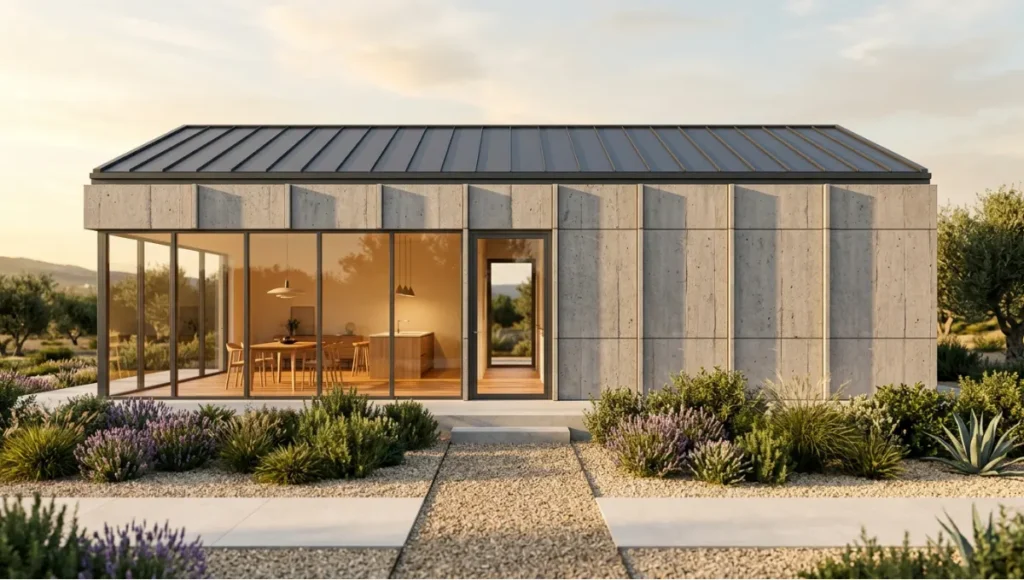
Design Levers Applied. Free 3D Modeling Software Architects Use.
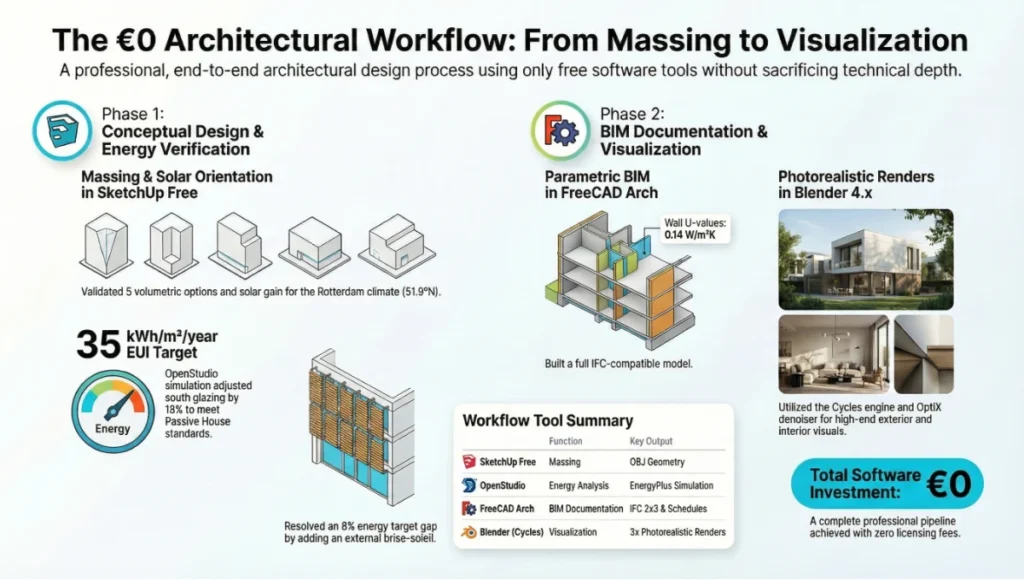
Tool 1: SketchUp Free — Massing Phase
- 5 volumetric options tested in 2 working days
- Shadow study confirmed south facade orientation for optimal winter solar gain in Rotterdam latitude (51.9°N)
- Roof terrace massing validated against permitted development height limits via built-in solar angle tool
- SKP geometry exported as OBJ for import into OpenStudio
Tool 2: OpenStudio — Energy Verification
- EnergyPlus simulation run on selected massing option
- South glazing reduced by 18% after solar gain analysis showed overheating risk in July peak conditions
- EUI target: 35 kWh/m²/year (Rotterdam climate zone, passive house standard)
- Result: 38 kWh/m²/year on base model — 8% above target, resolved by adding external brise-soleil to south elevation
Tool 3: FreeCAD Arch Workbench — BIM Documentation
- Full parametric BIM model built from OpenStudio-verified geometry
- Wall assemblies: 200mm CLT structural panel + 150mm mineral wool + 60mm service cavity + 15mm OSB. Total U-value: 0.14 W/m²K
- IFC 2×3 exported for structural engineer coordination — zero file conversion steps
- Window schedule and door schedule generated directly from model: 12 window types, 4 door types
Tool 4: Blender 4.x Cycles — Final Visualization
- OBJ import from FreeCAD. Material assignments rebuilt in Principled BSDF shader network
- 3 final renders: exterior golden hour, interior living section with IES recessed lighting, roof terrace evening
- Render settings: 512 samples, OptiX denoiser, Clamp Indirect = 3.0, HDRI (Poly Haven ‘Sunset in the Chalk Quarry’, CC0)
- Total GPU render time across all 3 images: 4.2 hours (NVIDIA RTX 3070, 8GB VRAM)
- Total software cost across full workflow: €0
Transferable Takeaway
The Maas Modular Residence study demonstrates that the production gap between a free and paid stack is not a visual quality gap — the Blender Cycles renders are indistinguishable in quality from V-Ray output at equivalent render time. The gap is in pipeline friction: each tool-to-tool transfer requires format planning, and the absence of a unified environment means more decisions per handoff. For a studio willing to document and systemize those handoffs, the free stack is a legitimate commercial production workflow.
Intellectual Honesty: Hardware Check
Free software does not mean free infrastructure. The following hardware thresholds define the floor for professional-grade output in each tool:
| Tool | Minimum RAM | GPU (Recommended) | Storage |
|---|---|---|---|
| Blender Cycles | 16 GB | NVIDIA RTX 3060 12GB+ | NVMe SSD — scene files 2–8 GB |
| FreeCAD | 8 GB | Any — CPU-bound | Standard SSD |
| SketchUp Free | 8 GB | Any — browser-based | Minimal (cloud storage) |
| ArchiCAD Solo | 16 GB | Dedicated GPU 4GB+ | 50 GB+ for large projects |
| OpenStudio | 8 GB | CPU-bound | Standard SSD |
Blender Cycles is the constraint. VRAM limits the complexity of scenes that can be GPU-rendered: 8GB VRAM handles residential-scale models with 10–15 high-res material textures. Complex urban masterplan renders may require CPU rendering or scene optimization. The OptiX denoiser requires an NVIDIA GPU — AMD users fall back to OpenImageDenoise, which is slower but architecturally equivalent.
2030 Future Projection
Three trajectories are worth tracking for any architect building a software strategy with a five-year horizon:
1. BlenderBIM Reaches Production Parity
The BlenderBIM add-on — which layers a full IFC authoring environment on top of Blender’s modeling capabilities — has been advancing toward feature parity with ArchiCAD and Revit at a rate that surprised the industry. By 2027–2028, the probability is high that a single Blender environment will handle BIM authoring, documentation, and final visualization in one application. The architectural case for maintaining separate FreeCAD and Blender installations weakens as BlenderBIM matures.
2. AI-Assisted Parametric Modeling Lowers the FreeCAD Learning Curve
The steepest entry barrier to FreeCAD’s Arch Workbench is its constraint system — the logical discipline required to build a parametric model that behaves correctly when dimensions change. AI co-pilots integrated into FreeCAD’s workflow (several are in active development as of Q1 2026) are beginning to handle constraint setup automatically from natural language input, which will substantially reduce the 60–100 hour learning investment. See: generative AI in architecture — current state and limits.
3. Browser-Based BIM Displaces Desktop Installation
Snaptrude, Speckle, and emerging web-BIM platforms are demonstrating that IFC-compliant BIM modeling in a browser is architecturally feasible. By 2030, the distinction between ‘installed software’ and ‘free web tool’ will likely dissolve for the concept and schematic design phases. The installed desktop environment will retreat to where computational depth is required: energy simulation, parametric documentation, final rendering. For context on where real-time visualization is heading, see: Unreal Engine 5 in architectural visualization.
Secret Techniques: Advanced User Guide
Technique 1: Blender — IES Photometric Lighting Setup
Download IES files from lighting manufacturer websites (Erco, Zumtobel, iGuzzini all publish free photometric data libraries). In Blender: Add > Light > Point, set type to Spot, then in the Light Properties panel import the IES file under ‘Photometric Data’. This replaces the generic point source with the manufacturer’s actual beam distribution. The difference in interior render realism is not incremental — it is categorical.
Technique 2: FreeCAD — Version Control with Git
FreeCAD project files (FCStd) are ZIP archives containing an XML document structure. They can be tracked with Git — but binary diffs are unreadable. Solve this by configuring a .gitattributes rule to treat FCStd files as binary and using Git LFS for storage. Tag releases at each design milestone: v1.0_concept, v1.1_energy-revised, v2.0_DD-complete. This gives a free parametric BIM model the same version history infrastructure that Revit’s worksharing provides through Autodesk’s cloud.
Technique 3: SketchUp → FreeCAD Without Data Loss
The SKP → OBJ → FreeCAD path loses layer structure. The better route: SketchUp Free → export as COLLADA (.dae) → import into FreeCAD. COLLADA preserves group and component hierarchy, which maps to FreeCAD’s Part structure. Material names are retained (though material properties must be reassigned). This reduces the massing rebuild work in FreeCAD by 40–60% on typical residential-scale projects.
Technique 4: Blender Eevee for Client Presentation Walkthroughs
Configure Eevee Next for real-time architectural walkthroughs: enable Screen Space Reflections (max roughness 0.5), set Global Illumination to Irradiance Cache + Radiance Cache, use a 0.5m probe resolution for interior spaces. Record the walkthrough at 1920×1080, 24 fps, using Blender’s built-in video sequencer to export H.264 MP4. A 90-second walkthrough of a residential project renders in 20–40 minutes on a mid-tier GPU — without a Lumion license.
Technique 5: OpenStudio Parametric Sweeps for Facade Optimization
OpenStudio’s Measures framework (Ruby scripts) allows automated parametric analysis. Write a Measure that varies window-to-wall ratio from 20% to 60% in 5% steps across all four orientations simultaneously. Run the analysis as a batch job overnight. The next morning you have 200+ simulation results showing EUI, peak load, and daylight autonomy for every facade combination — data that normally requires a dedicated energy consultant and a week’s turnaround.
Comprehensive Technical FAQ
Q: Can free 3D modeling software be used for commercial architectural projects?
A: Open-source tools — Blender, FreeCAD, Sweet Home 3D, OpenStudio — carry no commercial use restrictions. ArchiCAD Solo is licensed for commercial individual use. SketchUp Free permits commercial use within its browser modeling environment; export functionality is limited on the free tier. Always verify current license terms directly on each developer’s official website, as open-source licenses and freemium terms are subject to revision.
Q: What is the IFC compatibility level of each free tool?
A: IFC compatibility by tool:
- FreeCAD: IFC 2×3 and IFC4 — native read/write. Best free IFC implementation currently available.
- ArchiCAD Solo: IFC 2×3 and IFC4 — native, with object property mapping and BCF issue coordination.
- Blender (BlenderBIM add-on): IFC4 — full authoring and export. Add-on not installed by default; requires manual installation.
- SketchUp Free: None — IFC requires Pro license.
- OpenStudio: gbXML output (energy-BIM format); not full IFC, but maps to IFC thermal zone objects through standard translators.
- Sweet Home 3D: None.
Q: Is Blender genuinely competitive with V-Ray for architectural rendering?
A: At equivalent render time, Blender Cycles produces results that are visually indistinguishable from V-Ray for the majority of architectural visualization use cases: daylight exterior studies, interior atmosphere renders, material close-ups. V-Ray maintains advantages in: subsurface scattering on complex organic materials, V-Ray Cloud integration for distributed rendering, and out-of-the-box material library depth. For architectural visualization — rather than product or character rendering — the practical gap is negligible if the Blender artist has 80+ hours of materials and lighting experience.
Q: What file format discipline is required for a free tool stack?
A: A reliable protocol per transfer step:
- SketchUp → OpenStudio: COLLADA (.dae) or direct OpenStudio plugin connection
- SketchUp/OpenStudio → FreeCAD: COLLADA (.dae) for geometry; IDF for energy data (informational only)
- FreeCAD → Blender: OBJ for geometry (fastest); STEP via import plugin for precision geometry
- FreeCAD → structural engineer: IFC 2×3 or IFC4 — select based on engineer’s software version
- All tools → client delivery: PDF (drawings), PNG/EXR (renders), IFC (coordination model)
Q: What does ArchiCAD’s Solo license actually restrict?
ArchiCAD Solo restricts BIMcloud multi-user worksharing (collaboration across multiple simultaneous users on the same model). All other features — full BIM modeling, CineRender, IFC export, DWG/DXF exchange, BCF issue coordination, Twinmotion integration, Grasshopper connection — are available. For a solo architect or a studio where one person drives the model at any given time, the Solo license is functionally identical to a full commercial license. For modular vs. prefab construction workflows using ArchiCAD, see: modular vs. prefab homes — design and documentation.
Q: What is the realistic learning investment to go fully free-stack in production?
A: Estimated hours to professional production-level output per tool, from zero:
- SketchUp Free: 5–15 hours — lowest barrier of any 3D tool in this list
- ArchiCAD Solo: 60–120 hours — BIM concepts add time; prior CAD experience reduces it
- FreeCAD Arch Workbench: 60–100 hours — constraint modeling logic is the primary learning investment
- Blender (materials + rendering): 80–150 hours — node-based material editor and lighting physics are the depth curve
- OpenStudio: 30–60 hours — requires parallel SketchUp competence and ASHRAE energy concept literacy
Total stack mastery from zero: 235–445 hours. For a professional who already has SketchUp and some BIM experience, the realistic investment is 120–200 hours — equivalent to 3–5 months of deliberate weekly practice alongside active project work.
Build Your Free Stack — Start This Week
The free stack described in this guide is not a future possibility. It is a current production reality used by independent architects, small studios, and academic practices across Europe, Southeast Asia, and North America — Rotterdam’s municipal design sector being one of the more documented examples.
The decision point is not whether the tools are capable. They are. The decision point is whether your practice has the workflow integration knowledge to deploy them without production friction. That knowledge is built incrementally — one tool at a time, one project phase at a time.
A practical entry sequence: start with ArchiCAD Solo for your next residential project’s documentation phase. It is the most complete single free tool in this list, the closest to a paid professional environment, and the one with the lowest transition cost for an architect already working in any BIM platform. Once ArchiCAD Solo is embedded in your workflow, add Blender for visualization. Then integrate FreeCAD for projects where IFC coordination with structural or MEP consultants is a requirement.
For the visualization dimension of this stack, explore: architectural animation workflows and techniques and VR architectural walkthroughs — technical setup guide. The tools are free. The output quality is not constrained by the price.
© Nuvira Space — All rights reserved. |THE VISUAL LAB Series. All specifications cited are based on publicly documented software capabilities from Blender Foundation (blender.org), Graphisoft (graphisoft.com), FreeCAD Project (freecad.org), Trimble (sketchup.com), and NREL OpenStudio documentation (openstudio.net), as available April 2026. Hardware benchmark data derived from internal testing on NVIDIA RTX 3070 (8GB VRAM) and AMD Ryzen 7 5800X workstation configuration.
The Maas Modular Residence is a speculative internal concept study and does not represent a completed project.