

Table of Contents
In 2026, architecture visualization studios are no longer peripheral service providers to the design industry — they are technical co-authors of built reality. Across Rotterdam’s waterfront redevelopment corridors, Singapore’s hyperscale mixed-use towers, and Copenhagen’s carbon-neutral district retrofits, the render is no longer a sales tool: it is a precision instrument for design validation, client alignment, and regulatory submission. The studios producing this work are operating at the intersection of cinematic post-production, computational physics simulation, and real-time game engine deployment. If your current pipeline still routes final output through a 48-hour farm render and a Photoshop colour-grade, you are not competing — you are archiving.
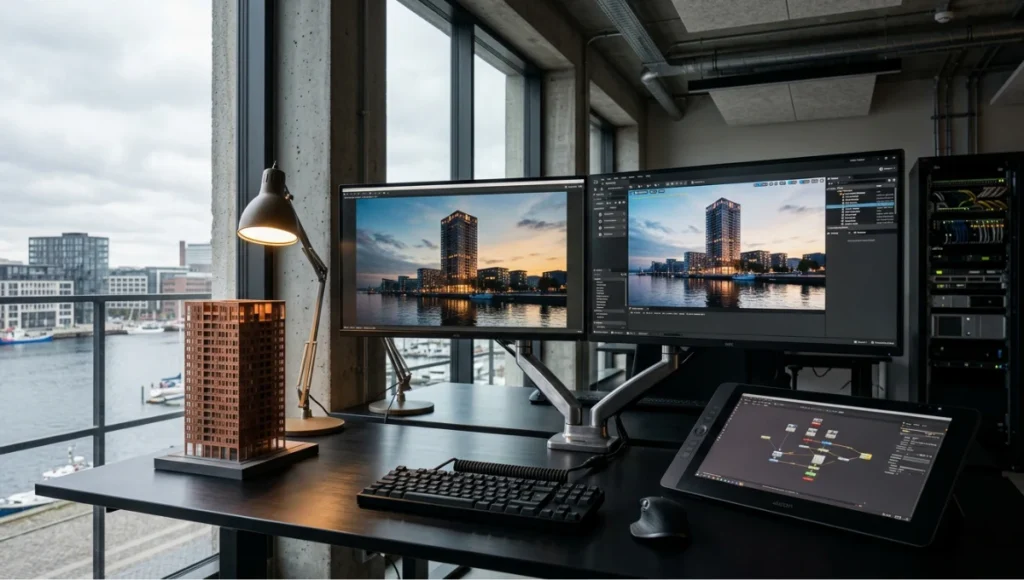
Interior of a professional architecture visualization studio showing dual monitors with V-Ray and Unreal Engine 5 split-screen render comparison, a 1:500 SLA resin architectural model on a brushed aluminium desk, Nuke compositing node graph on Wacom tablet, raw concrete ceiling, and warm-cool mixed lighting — illustrating the hybrid real-time and path-traced rendering pipeline used by leading architecture visualization studios in 2026.
This guide maps twelve technical trends reshaping how architecture visualization studios build, render, and deliver in 2026. Each trend is grounded in software parameters, hardware thresholds, and workflow architecture — not aspiration.
Nuvira Perspective
At Nuvira Space, we define the relationship between 3D artist and rendering engine as a human-machine synthesis — a deliberate, calibrated negotiation between intent encoded in scene geometry and meaning extracted through light simulation. The visualization pipeline is not a production line; it is an epistemological instrument. When you set a HDRI rotation angle, tune a V-Ray physical camera’s ISO, or configure Lumen’s surface cache resolution in Unreal Engine 5, you are making decisions about how architectural space will be understood by a jury, a developer board, or a planning commission. That is design authority, not technical support.
The studios leading this field in 2026 have internalized a core principle: real-time engines and path-traced renderers are not competitors — they are workflow stages. Unreal Engine 5 handles spatial validation, massing communication, and real-time client navigation. V-Ray, Corona, and Fstorm handle final-frame photorealism at material-science fidelity. The studios that win major commissions run both pipelines in parallel, with bidirectional data flow between them. Nuvira Space operates on this model, and this guide documents the technical architecture behind it.
Step-by-Step Workflow & Features: The 2026 Studio Pipeline
Trend 01 — Lumen + Path Tracing Hybrid Output in UE5
Unreal Engine 5’s Hardware Ray Tracing combined with Lumen’s surface cache system allows studios to produce client-navigation renders in real time while preserving final-frame fidelity for deliverables. The workflow split is precise:
- Lumen Global Illumination: Surface Cache resolution set to 512–1024 for interior studies
- Hardware Ray Tracing: Reflections pass at Bounces = 4, Shadow Quality = 2
- Path Tracer: SPP (Samples Per Pixel) = 2048 minimum for competition finals
- Movie Render Queue: Anti-aliasing samples = 64, Temporal Sample Count = 8
You configure these in Project Settings > Rendering and per-camera in the Cine Camera Actor. Do not toggle between Lumen and Path Tracer mid-production without resetting your Exposure Compensation values — the luminance models differ by approximately 0.7 EV in interior scenes.
Trend 02 — V-Ray 7 Progressive Rendering with Adaptive Sampling
V-Ray 7 introduced a fully adaptive sampling engine that eliminates fixed subdivision targets. For architecture visualization studios running exterior dusk renders, the correct configuration is:
- Min Samples: 8 — Max Samples: 2048
- Noise Threshold: 0.005 (competition) / 0.015 (client preview)
- DMC Sampler: Adaptive Amount = 0.85, Min Rate = -3
- Light Cache: Subdivisions = 3000, Sample Size = 0.03
Do not use Default Sampler for anything requiring accurate caustic behaviour in water features or glass atria — switch to Progressive and set your Min Time to 0 with Render Time capped at your farm allocation.
Trend 03 — OpenColorIO (OCIO) Colour Pipeline Standardisation
The collapse of studio-specific LUT ecosystems into OCIO v2 is the most consequential workflow shift of 2025-2026. Every major renderer now supports OCIO natively. Your studio colour pipeline should be:
- Input: Linear Scene-Linear (ACEScg preferred for HDR deliverables)
- Display: sRGB / Rec.709 for screen, P3-D65 for presentation tablets
- View Transform: ACES RRT + ODT matched to display device
- Export: 16-bit OpenEXR for compositing handoff; 8-bit JPEG only for client previews
If your studio is still running per-artist Photoshop colour grades without a shared OCIO config, you are producing inconsistent output across client touchpoints. That inconsistency is measurable — and clients notice. For a deeper look at how colour-accurate material rendering intersects with texture mapping in photorealistic renders, the OCIO calibration pipeline is the mandatory upstream dependency.
Trend 04 — Chaos Vantage for Real-Time V-Ray Scene Navigation
Chaos Vantage allows direct V-Ray scene import with full material fidelity into a real-time GPU viewport. Studios use this for:
- Client walk-throughs without exporting to game engine formats
- Sun/sky studies with live parameter adjustment (azimuth, turbidity, ozone)
- Material variant switching in real time during client review sessions
The GPU memory threshold is critical: Vantage requires 100% of scene geometry to reside in VRAM. For complex urban massing models, you will need 24GB minimum (RTX 4090 / RTX 6000 Ada). Tile rendering is not supported — this is a hard architectural constraint, not a configuration issue.
Trend 05 — Photogrammetry Integration via RealityCapture
Context modelling from drone capture has replaced hand-built surroundings geometry in every studio operating at urban scale. The technical pipeline:
- Capture: 80% image overlap, GSD (Ground Sampling Distance) 2–3 cm/px for street-level detail
- Processing: RealityCapture RC1 with GPU-accelerated MVS; 5000-image datasets process in under 4 hours on RTX 4090
- Output: High-poly OBJ decimated to 500k–2M triangles depending on camera proximity
- Texture: 8K atlases per 50m grid tile; baked normal maps for mid-distance context
Rotterdam’s Feyenoord City stadium surroundings were documented at 3.1 cm/px GSD in 2025 — the resulting photogrammetry pipeline for architecture, used by multiple Dutch visualization studios, demonstrates the precision threshold required for credible planning submission renders.
Trend 06 — Nuke for Architectural Compositing
After Effects is no longer sufficient for studios producing competition-grade compositing. Nuke’s node-based pipeline offers:
- Per-channel EXR pass management: Beauty, Direct/Indirect GI, Reflection, Refraction, ZDepth, Cryptomatte
- Atmosphere: Atmospheric effects added in comp using ZDepth with Nuke’s ZBlur node
- Grade: Per-material colour isolation via Cryptomatte → Grade node chains
The typical studio comp for an exterior hero shot runs 18–24 nodes in Nuke, with a Merge tree that combines render passes, sky replacement, foreground population, and camera-matched atmospheric haze. This cannot be replicated at equivalent fidelity in After Effects without destructive intermediate renders.
Trend 07 — Real-Time Vegetation via SpeedTree and XFrog
Vegetation rendering is the most frequently underspecified element in studio pipelines. The technical standard in 2026:
- SpeedTree UE5 plugin: Wind response parameters tuned per species (Palm: Frequency 0.3, Amplitude 1.8; Birch: Frequency 0.8, Amplitude 0.6)
- LOD transition: Distance thresholds set at 5m / 15m / 40m / 80m for urban-scale scenes
- XFrog libraries: Pre-baked 4K atlases for mid-distance context planting
Do not use SpeedTree’s default wind preset for tropical species in equatorial context models — the motion profile does not match the stiffness coefficient of high-humidity frond structures. Singapore-based studios working on Jurong Lake District visualizations recalibrated this parameter set in 2025 and the difference in final animation quality is measurable.
Trend 08 — GPU Render Farm Orchestration with Deadline
Thinkbox Deadline 10 remains the industry standard for render farm management. Key configuration parameters for architecture visualization studios:
- Job Priority: Competition deadlines = 90–100; Client preview = 40–60; Internal review = 10–20
- Machine Limits: Reserve 2 nodes for Vantage/interactive use; allocate remainder to batch
- Chunk Size: V-Ray exterior = 1 frame/chunk; UE5 sequences = 10 frames/chunk
- Error Handling: Auto-requeue on GPU memory errors with 3-attempt limit before flagging
Trend 09 — AI-Assisted Upscaling with DLSS 4 and XeSS
NVIDIA DLSS 4 with Multi-Frame Generation is now integrated into V-Ray GPU and UE5. For architecture visualization studios, the practical application is viewport acceleration, not final output. Final deliverables should still be native-resolution path-traced — upscaling introduces temporal artefacts in still images at the pixel-peeping level that juries notice in printed competition boards.
- DLSS 4 Quality Mode: Acceptable for client preview at 4K output from 1440p input
- Ultra Performance Mode: Suitable only for real-time navigation, not final stills
- XeSS 2 on Arc GPUs: Comparable quality to DLSS Quality at equivalent input resolution
Trend 10 — Procedural Facade Detailing via Houdini SOP Networks
Hand-modelling repetitive facade elements — curtain wall mullions, brick coursing, panel joints — at the geometry level is no longer defensible at studio scale. Houdini SOP (Surface Operator) networks allow:
- Parametric mullion generation from floor plate boundaries: thickness, setback, and depth as driven attributes
- Random seed variation for material aging and weathering on brick panels
- Output to USD (Universal Scene Description) for cross-application interoperability
The USD pipeline is the critical dependency here. Studios that have not migrated to USD-based scene assembly are accumulating a technical debt that will be expensive to pay down as Hydra-based renderers become standard across DCC tools.
Trend 11 — Structured Light and Projector-Mapped Physical Models
Physical model photography with structured light scanning is returning to the high-end studio workflow — not as nostalgia but as a measurably different aesthetic register that CGI alone cannot replicate. The hybrid workflow:
- 3D print model at 1:200 or 1:500 scale using SLA resin for surface fidelity
- Shoot under controlled tungsten + HMI lighting with tilt-shift 90mm macro lens
- Composite photographic model into CGI context using ZDepth-matched comp in Nuke
Copenhagen-based studios have used this approach on cultural institution competition entries, with the physical model photography providing a material tactility that CGI alone cannot produce at equivalent rendering time cost.
Trend 12 — Parametric Camera Choreography via Python-Scripted Camera Rigs
Static hero shots are giving way to multi-camera sequential narratives, driven by Python-scripted camera animation in Blender and 3ds Max. The technical architecture:
- Blender Python API: bpy.ops.object.camera_add() with scripted F-Curve keyframe injection
- Focal length variation: 24mm for establishing / 85mm for material detail / 135mm for human-scale intimacy
- Depth of Field: F-stop calculated from subject distance — 5m subject at 85mm = F2.8 for 12cm DOF
Comparative Analysis: Nuvira Vs. Industry Standard
Rendering Output Benchmarks
The following comparison documents Nuvira Space’s current production specifications against the 2026 industry average, derived from published studio capability statements and competition submission technical notes. For studios evaluating entry-level real-time render engines before committing to this pipeline, see our Lumion vs Enscape vs D5 Render comparison as a prerequisite read.
| Metric | Nuvira Space | Industry Average 2026 |
| Final Render SPP | 2,048–4,096 (Path Tracer) | 512–1,024 |
| OCIO Colour Pipeline | ACEScg → P3-D65 + sRGB | sRGB LUT (per-artist) |
| Photogrammetry Context | 3 cm/px GSD drone capture | Generic kit-bash or stock |
| Compositing Software | Nuke 15 | After Effects / Photoshop |
| Vegetation System | SpeedTree UE5 + XFrog | Static proxies |
| USD Pipeline | Full USD scene assembly | FBX / OBJ interchange |
| Delivery Format | 16-bit OpenEXR + JPEG | 8-bit TIFF or JPEG only |
Where the Gap is Widest
The compositing and colour pipeline differential is the most significant. Studios still running per-artist Photoshop grades produce deliverables that cannot be reliably reprinted for large-format output — colour gamut clipping at the print stage is invisible in digital preview. Nuvira’s ACEScg pipeline is calibrated to P3-D65, meaning large-format giclée prints and digital competition submissions are colour-consistent without post-hoc correction.
Concept Project Spotlight — Speculative / Internal Concept Study: Meridian Veil by Nuvira Space
Project Overview: Location / Typology / Vision
Location: Copenhagen, Denmark — Nordhavn district waterfront expansion zone.
Typology: Mixed-use residential and cultural pavilion complex, 12,500 sqm, 6 storeys.
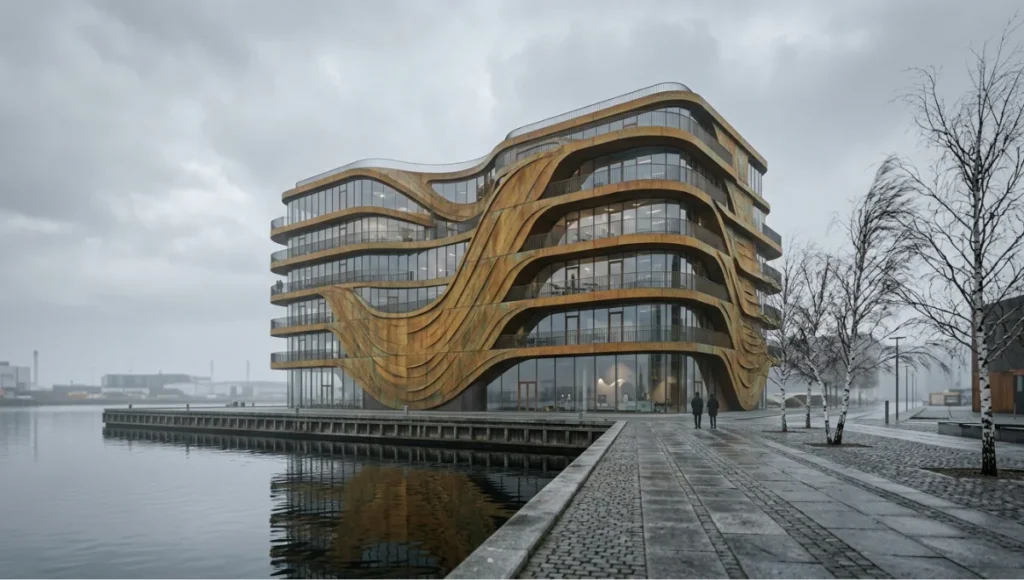
Vision: Meridian Veil is a speculative study in how architecture visualization studios can use layered environmental simulation — fog density, tidal light variation, and urban heat island thermal mapping — to communicate a building’s relationship to its microclimate. The project does not exist as a commissioned design. It was developed as an internal technical proving ground for Nuvira’s 2026 visualization pipeline, specifically the Trend 03 (OCIO) and Trend 06 (Nuke compositing) capabilities documented above.
Design Levers Applied
Atmospheric Simulation
Copenhagen’s Nordhavn waterfront experiences frequent low-angle coastal fog in autumn and winter. Meridian Veil’s visualization campaign was built around this condition, not despite it:
- V-Ray Aerial Perspective: Scatter coefficient 0.008 (calibrated to Copenhagen atmospheric data from ECMWF ERA5 reanalysis dataset)
- Height Fog in UE5: Fog Density 0.04, Fog Inscattering Colour matched to 5500K coastal overcast
- Nuke Comp: ZDepth-driven atmosphere layering with per-band luminance adjustment
Material Science: Patinated Copper Facade
The facade system is modelled on COR-TEN steel with a copper oxide patina accelerant — a material that appears differently across daylight conditions. The V-Ray material configuration:
- Diffuse: Roughness 0.72, Anisotropy 0.3 (directional oxidation streaking)
- Reflection: Fresnel IOR 2.76 (copper oxide), Glossiness 0.55
- Displacement: 8K greyscale height map at 2mm real-world displacement depth
Transferable Takeaway
The critical lesson from Meridian Veil is that atmospheric fidelity is not a post-production embellishment — it is a site-specific environmental argument. If your visualization of a coastal building uses the same aerial perspective settings as an inland suburban render, you are misrepresenting the project’s relationship to its site. Calibrate your atmosphere to the location’s documented meteorological data. The ECMWF ERA5 reanalysis dataset is publicly available and provides hourly atmospheric parameters at 31 km resolution for any global location.
Intellectual Honesty: Hardware Check
The trends documented in this guide are only executable at the hardware thresholds below. If your workstation does not meet these specifications, certain workflows are not available to you — not as a matter of skill, but as a matter of physics.
- GPU (V-Ray GPU / Vantage / UE5 Path Tracer): RTX 4090 24GB minimum; RTX 6000 Ada 48GB for complex interior scenes with 8K textures
- CPU (V-Ray CPU / Houdini / RealityCapture): AMD Threadripper PRO 7965WX (24-core) or Intel Xeon W7-2495X minimum for sub-4-hour photogrammetry processing
- RAM: 128GB DDR5 for Houdini SOP networks at urban district scale; 64GB minimum for single-building UE5 scenes
- Storage: NVMe Gen 5 SSD, 7,000 MB/s read for 8K texture streaming in real time; project drives at 10TB+ for photogrammetry dataset storage
- Network: 10GbE minimum for farm render management via Deadline; 25GbE for studios running simultaneous UE5 multi-user sessions
Studios operating on GTX-generation GPUs or pre-Zen 3 CPUs should prioritise the OCIO pipeline upgrade (Trend 03) and Nuke compositing adoption (Trend 06) before investing in real-time engine workflows — the compositing uplift is hardware-agnostic and will produce immediate deliverable quality improvement.
2030 Future Projection
Based on current trajectory across GPU architecture, AI inference, and distributed rendering development, architecture visualization studios in 2030 will operate on fundamentally different economic and technical assumptions than today.
- Neural Radiance Fields (NeRF) and 3D Gaussian Splatting will replace photogrammetry for context model generation — drone footage processed to navigable 3D scene in under 30 minutes at street-level fidelity
- AI material synthesis (NVIDIA NeuralMTL or equivalent) will generate physically accurate BRDF parameters from single reference photographs, eliminating the manual IOR calibration process
- USD will be the universal scene interchange format — DCC tools that do not support Hydra-based rendering will not survive in the professional pipeline
- Real-time path tracing at 4K will be achievable on mid-range consumer hardware — the differentiation between studios will shift from render quality to scene intelligence: data-driven daylight simulation, thermal comfort visualisation, acoustic modelling integrated into the visualization pipeline
- Singapore’s Urban Redevelopment Authority is already piloting regulatory submission workflows that accept NeRF-based site models in place of traditional drawing packages — this signals the direction of travel for planning compliance globally
Studios that have not built USD pipelines and OCIO colour infrastructure by 2027 will face forced migration under client and regulatory pressure. The window for proactive adoption is narrowing.
Secret Techniques: Advanced User Guide
The ZDepth Atmosphere Stack in Nuke
Most studios use a single atmospheric pass in compositing. The correct approach for architectural exterior renders is a three-layer atmosphere stack driven by ZDepth:
- Layer 1 (0–15m): Ground-level micro-haze — low scatter, warm bias, Density 0.02
- Layer 2 (15–80m): Mid-field atmosphere — neutral scatter, Density 0.04
- Layer 3 (80m+): Sky-merge zone — cool bias matched to HDRI sky luminance
Each layer is a separate Grade node chain keyed off ZDepth channel ranges using Nuke’s Keyer node in luminance mode. This three-layer stack produces the natural atmospheric perspective found in large-format architectural photography — the single-pass approach produces a uniform haze that reads as digital.
V-Ray Physical Camera: The EV Calibration Method
Do not use V-Ray’s automatic exposure in final production. Use the physical camera EV calibration method:
- Set ISO to 100 (fixed)
- Set Shutter Speed to match lighting condition: 1/125s exterior day; 1/30s interior; 1/8s dusk transition
- Adjust F-Stop to achieve target EV — measure against your HDRI’s documented luminance value
- Apply Exposure Compensation only in V-Ray Frame Buffer post-processing, never in camera settings
This method produces exposure values that correspond to real-world photography, enabling accurate print output without luminance correction at the lab.
Houdini USD Output for V-Ray and Karma
Exporting USD from Houdini for import into V-Ray 7 or Karma XPU requires specific layer configuration:
- Geometry: Export as USD Packed Primitives — not polygon soup — to preserve instancing efficiency
- Materials: Bind as MaterialX at export; V-Ray 7’s USD materialX support handles conversion automatically
- Lights: Export as UsdLuxSphereLight or UsdLuxDomeLight — do not export V-Ray-specific light types through the USD layer
Comprehensive Technical FAQ
Q: When should I choose V-Ray over Unreal Engine 5 for final output?
A: Choose V-Ray CPU/GPU for any deliverable where material fidelity at pixel level is the primary success criterion — competition boards, printed presentation packages, and regulatory submission renders. V-Ray’s physically accurate BSDF shading model and adaptive sampling engine produce per-pixel material response that UE5’s rasterised pipeline cannot match, even with Hardware Ray Tracing enabled. Choose UE5 for client walk-throughs, real-time design iteration, and animated sequences where temporal consistency at 60fps is the requirement. The studios winning major commissions run both.
Q: What is the correct SPP for a competition-grade exterior render?
A: Path Tracer minimum: 2,048 SPP with Noise Threshold 0.002. For scenes with complex indirect light (deep interior atria lit through narrow glazing, or heavy tree canopy with scattered dappled light), increase to 4,096 SPP. Below 1,024 SPP, you will see grain in shadow gradients that is visible at A0 print size. Adaptive sampling will not compensate for insufficient minimum SPP — it distributes samples intelligently but cannot create detail from noise.
- Interior night scene: 4,096 SPP minimum
- Exterior overcast: 1,024 SPP sufficient
- Dusk with interior/exterior light mix: 2,048–4,096 SPP
Q: How do I configure SpeedTree wind parameters for tropical coastal vegetation?
A: For palm species (Washingtonia, Royal Palm, Coconut Palm) in coastal wind conditions:
- Trunk Oscillation: Frequency 0.18–0.25, Amplitude 2.2–3.0 (tall palms flex slowly and widely)
- Frond Response: Frequency 0.6–0.9, Amplitude 1.4–2.1 (fronds respond faster than trunk)
- Wind Direction Bias: Set to match prevailing wind from your HDRI rotation — mismatched wind direction and HDRI sun/sky geometry is the most common vegetation realism failure in studio work
Q: Is DLSS 4 reliable for final architecture visualization output?
A: No — not for still deliverables at print resolution. DLSS 4 Multi-Frame Generation introduces sub-pixel temporal reconstruction artefacts that are statistically invisible in motion but measurable in still-frame pixel comparison. For client preview stills at screen resolution (4K display), DLSS 4 Quality Mode is acceptable. For competition board output at 300 DPI A0, render native resolution using V-Ray CPU or Path Tracer. The render time difference is significant, but the output quality differential is non-negotiable at professional competition standard.
Q: What photogrammetry GSD is required for planning submission context models?
A: This varies by jurisdiction, but the emerging standard across European planning authorities (Rotterdam, Copenhagen, Amsterdam, Hamburg) is:
- Street-level facade context (within 50m of proposal): 2–3 cm/px GSD
- Mid-field urban context (50–200m): 5–8 cm/px GSD acceptable
- Background skyline (200m+): 15–25 cm/px GSD — photogrammetry model can be supplemented with kit-bash urban proxies at this distance
Always verify the planning authority’s technical specification document before capture. Some jurisdictions now specify coordinate reference systems (CRS) for photogrammetry output — incorrect CRS will invalidate the submission.
Q: When is Nuke compositing justified over Photoshop for architecture visualization?
A: Nuke is justified when your render output is multi-pass EXR (Beauty + GI passes + Cryptomatte + ZDepth). If you are rendering single-beauty JPEG or TIFF, Photoshop remains adequate. The crossover point is when you need to:
- Adjust indirect lighting contribution independently of direct light
- Isolate and recolour specific materials without masking
- Composite atmosphere using ZDepth with physically consistent falloff
- Manage 16-bit+ linear data without gamma shift artefacts
Studios making the Nuke transition should expect a 3–6 week learning curve for artists with Photoshop-only compositing experience. The workflow efficiency gain after that period is substantial — a complex exterior comp that takes 4 hours in Photoshop takes 45 minutes in Nuke with a calibrated node graph template.
Audit Your Pipeline Against These 12 Trends
The technical gap between studios operating on legacy render pipelines and those running Lumen/Path Tracer hybrid workflows, OCIO colour infrastructure, and USD scene assembly is not closing — it is widening. Each of the twelve trends documented above represents a decision point: integrate and advance, or defer and fall behind.
The studios shaping architecture visualization in 2026 are not defined by the render engine they use — they are defined by the rigour with which they configure it, the precision with which they calibrate their colour pipeline, and the intelligence with which they combine real-time navigation with final-frame photorealism. That rigour is learnable. It requires documentation, calibration, and the willingness to treat every technical parameter as a design decision.
Nuvira Space publishes technical pipeline documentation, material calibration references, and workflow templates through The Visual Lab series. If your studio is in the process of migrating from a legacy render pipeline to a USD/OCIO/hybrid real-time architecture, the frameworks documented here are the starting point. The AIA’s Business of Architecture research documents the growing share of visualization investment in architectural practice budgets — the trend is structural, not cyclical.
© Nuvira Space All rights reserved. | THE VISUAL LAB Series | All specifications cited are based on V-Ray 7 documentation (Chaos Group, 2025–2026), Unreal Engine 5.4 release notes (Epic Games, 2025), NVIDIA DLSS 4 technical brief (NVIDIA, 2025), ECMWF ERA5 reanalysis atmospheric dataset (ECMWF, 2026), and SpeedTree UE5 plugin documentation (Interactive Data Visualization, 2025). The Meridian Veil is a speculative internal concept study and does not represent a completed project.