

Table of Contents
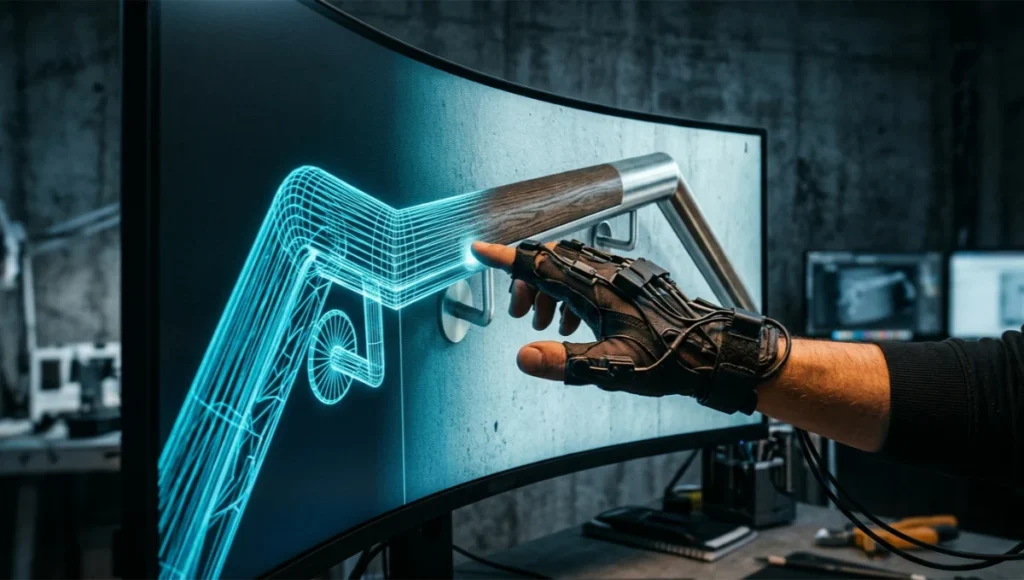
A haptic feedback VR design review exposes problems that flat renders and pre-recorded walkthroughs simply cannot surface: a handrail radius that reads as comfortable on screen but registers as wrong the instant your hand closes around its simulated geometry, a counter height that looks proportionate in an orthographic view but forces a shoulder hike when you reach for it inside the headset. You are no longer reviewing an image of a space.
You are reviewing the space’s mechanical truth, mediated through force-feedback actuators, sub-20-millisecond motion-to-photon latency budgets, and a rendering pipeline that has to hold both visual fidelity and physical believability at once. That dual requirement is why most legacy QA processes, built for static renders and recorded flythroughs, break down the moment a client puts on a glove and reaches for a door handle.
Nuvira Perspective
At Nuvira Space, we treat the headset and the haptic rig as instruments, not novelties. Our position is unambiguous: the next decade of architectural visualization belongs to studios that can synthesize three previously separate disciplines into a single review pipeline, real-time rendering, physics-accurate simulation, and tactile interface engineering. Static renders answer “does this look right.” Real-time walkthroughs answer “does this read right while moving.” Only a haptic-integrated VR session answers the question that actually matters to a contractor or an end user: does this feel right under a hand, a foot, a shoulder.
We have built our internal Visual Lab around that premise. Every project that reaches a client-facing milestone passes through a haptic feedback VR design review before a single construction document references a hardware spec or a finish schedule. That sequencing is not a marketing flourish, it is a cost decision. Catching an ergonomic failure at the concept-massing stage costs an afternoon of remodeling work inside the engine.
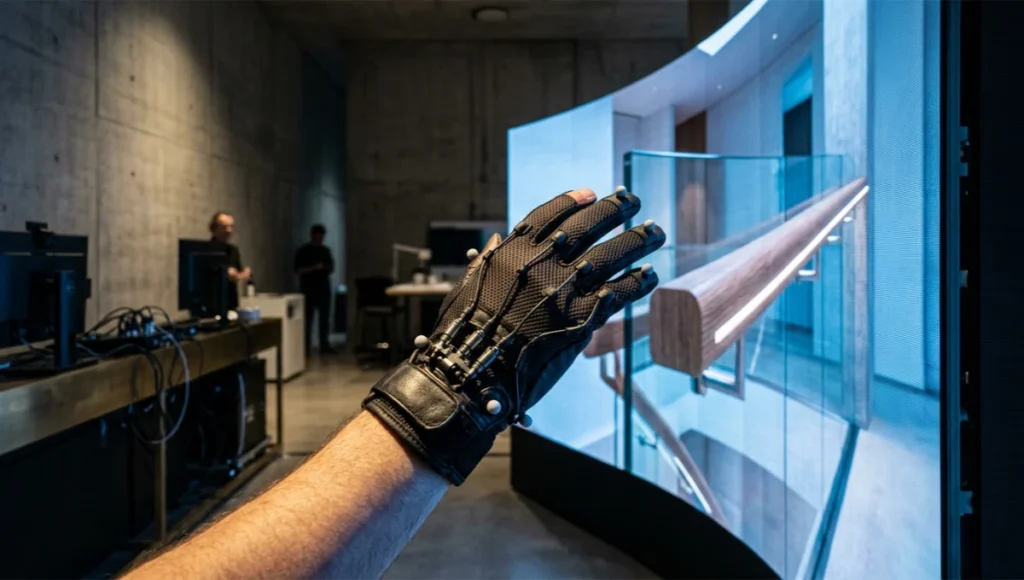
Catching the same failure during a site walkthrough costs a change order, a fabrication delay, and a client who now distrusts the renders they approved months earlier. AIA-documented case studies on VR-based design review describe the same shift at other practices, well before haptic layers entered the conversation.
Our argument is technical, not philosophical. Ray-traced global illumination and physically based haptic actuation are now mature enough, on hardware a mid-sized studio can actually own, that the gap between digital intent and architectural reality is a pipeline problem rather than a hardware problem. The rest of this guide is that pipeline, broken into the tests, settings, and judgment calls that separate a credible haptic feedback VR design review from an expensive demo.
Step-by-Step Workflow & Features
This is where the seven engineered tests referenced throughout this guide live. Each test isolates one variable in the haptic-to-visual chain so a failure can be traced to its source, actuator hardware, engine-side physics, or rendering latency, rather than dismissed with a vague note that “the VR felt off.” Treat this section as a build order: prerequisites first, then the seven tests in sequence, then the rendering parameters that let you act on whatever the tests surface. Skipping the order tends to produce false positives, a force-curve failure that is actually a collision-mesh tolerance problem, or a latency complaint that is actually an unstable physics tick rate masquerading as a hardware limitation.
Pipeline Prerequisites
Before a haptic feedback VR design review can produce trustworthy data, the underlying scene needs three things locked down.
- A real-time engine build with deterministic frame pacing. Our standard is Unreal Engine 5.4 or later, with Lumen software ray tracing reserved for mobile-tier hardware checks and hardware-accelerated ray tracing for the primary review pass.
- A calibrated haptic rig. We run a SenseGlove-class force-feedback glove for grip resistance and a haptic suit layer for ambient contact cues on the torso and forearms.
- A collision mesh that matches the visual mesh within a three-millimeter tolerance, because haptic actuation timing is driven off collision events, not render events, and any mismatch shows up as a felt delay before it shows up as a visible one.
The Seven Engineered Tests
Test One — Motion-to-Photon Latency
Measure the delay between a tracked hand movement and its corresponding frame update. Anything above twenty milliseconds reads as detectable lag and will desynchronize from haptic cues regardless of how accurate the force curve is underneath it.
- Target: under eighteen milliseconds at a sustained ninety frames per second
- Measurement tool: engine frame-timing overlay cross-checked against an external high-speed camera
Test Two — Haptic-to-Visual Sync Offset
Measure the delay between a collision event firing in the physics engine and the actuator engaging on the glove.
- Target: under twelve milliseconds of offset
- Common failure mode: physics tick rate decoupled from render tick rate, producing a visible “ghost contact” where the hand appears to touch a surface a frame or two before the actuator responds
Test Three — Force-Curve Fidelity
Compare the controller’s resistance curve against the material’s specified real-world stiffness, for example a tempered-glass balustrade against a solid timber handrail.
- Target: resistance curve within fifteen percent of the physical reference at three sample points, initial contact, mid-compression, and full stop
Test Four — Grip Resolution
Present five distinct surface textures in sequence, brushed steel, raw concrete, oiled oak, powder-coated aluminum, and cast bronze, and confirm the haptic device can differentiate between them without a blindfolded tester misidentifying the material.
Test Five — Material-Light Interaction Consistency
Confirm that a surface’s haptic profile and its rendered response to global illumination remain consistent as a user moves through changing light conditions. A “polished” material should still feel slick under low bounce-light exposure, not desynchronize from its visual cue the moment the lighting shifts.
Test Six — Thermal and Battery Drift
Run the haptic rig continuously for forty-five minutes and re-measure Tests One through Three. Actuator motors and onboard processors drift as they heat, and force-curve fidelity is consistently the first metric to degrade.
Test Seven — Long-Session Perceptual Fatigue
Track self-reported discomfort and tracked-hand jitter across a thirty-minute review session. A pipeline that performs well in a five-minute demo can still fail this test, and fatigue tends to mask smaller haptic-visual desync issues that a fresh reviewer would catch immediately.
Post-Production and Rendering Parameters
The seven tests are diagnostic. The settings below are where you act on what they find.
- Global illumination: run Lumen at a Final Gather quality setting of two rather than the engine default of one for any haptic review session. Bounce light affects perceived material softness, which in turn affects how forgiving a tester is of a small force-curve error.
- Ray-traced reflections: cap reflection bounce count at two for real-time haptic sessions. A third bounce adds visual polish but costs frame time that is better spent holding physics tick stability.
- Physics substepping: set the substep count to four at minimum whenever haptic actuation is collision-driven. This single setting is the highest-leverage fix for Test Two failures.
- Post-process motion blur: disable it entirely for haptic sessions. Motion blur that reads as cinematic in a marketing render actively interferes with a reviewer’s ability to judge contact timing.
Pre-Session Validation Checklist
Run this short pass before any client or internal reviewer puts on the headset. It catches the most common reasons a haptic feedback VR design review produces noisy or contradictory test results.
- Confirm collision mesh and visual mesh export from the same source file revision, not a stale cached version
- Confirm physics substep count matches the value documented for that build, since it is easy to leave a debug-low substep setting active after a performance profiling session
- Confirm the haptic rig’s firmware version matches the version the force-curve reference data was calibrated against
- Run a sixty-second warm-up pass on the haptic rig before Test One, since cold actuators behave differently from actuators that have been running for a minute
Comparative Analysis: Nuvira Vs. Industry Standard
Review Methodology Side by Side
Across the criteria that determine whether a review session catches a real problem, the gap between a haptic-integrated process and a conventional visual-only walkthrough is not subtle.
| Review Criterion | Nuvira Haptic Feedback VR Design Review | Industry Standard Walkthrough |
|---|---|---|
| Material judgment | Tactile-verified contact force at three sample points | Visual approximation only |
| Latency standard | Under 20ms motion-to-photon, under 12ms haptic sync | Rarely measured; often 40–80ms |
| Lighting fidelity | Lumen Final Gather quality 2, two-bounce ray-traced reflections, real time | Pre-baked lightmaps at a fixed time of day |
| Change order detection point | Concept-massing stage | Construction-document stage or live site walkthrough |
| Reviewer fatigue control | Thirty-minute fatigue-tested protocol | Session length untested, no fatigue baseline |
| Hardware layer | Haptic glove and suit plus ray-tracing-capable engine | Headset visual layer only, no tactile feedback |
Why the Gap Persists Industry-Wide
The gap is not a technology gap, it is an adoption gap. Most studios that own a VR headset still treat haptic peripherals as a novelty add-on for client demos rather than as a measurement instrument with target thresholds and a documented test protocol.
AIA’s own research on firm technology adoption shows the same pattern industry-wide: tools get adopted long before firms build the structured workflows needed to use them as measurement instruments. Without a structured haptic feedback VR design review, the same headset that could be surfacing a fifteen percent force-curve error gets used for a five-minute “feel the space” moment and then set aside. The cost of building a real protocol is mostly organizational: someone has to define the seven tests, document the targets, and refuse to sign off a milestone until the numbers clear. Once that discipline exists, the additional hardware and engine-side cost is marginal.
There is also a sequencing habit working against adoption. Most firms still schedule the VR walkthrough late, near a marketing milestone or a client presentation, when the visual model is polished but the underlying physics and collision data were never built to support haptic measurement. Retrofitting a haptic protocol onto a scene built for visual review alone usually means rebuilding the collision mesh from scratch, which makes the first attempt feel expensive even though the ongoing cost, once the pipeline is set up correctly from the concept stage, is closer to the marginal cost described above.
Studios that have made this work treat the haptic rig as part of the concept-stage toolkit, the same way a structural engineer reviews a massing model before a single finish is selected, rather than as a feature bolted on once the design is largely fixed.
Concept Project Spotlight — Speculative / Internal Concept Study: Nordhavn Pulse Pavilion by Nuvira Space
Step 1 — Scene Preparation and LOD Discipline
Before anything touches the headset, the scene needs a level-of-detail (LOD) strategy that matches the review’s purpose. A massing review and a materials review should never share the same LOD budget.
- Nanite or equivalent virtualized geometry enabled only on hero surfaces reviewers will physically touch
- Background context capped at LOD2 to preserve frame budget for haptic-critical objects
- Collision meshes simplified independently from render meshes — haptics react to collision, not visual detail
- Target frame time: under 11ms per frame to keep haptic latency below the 20ms perception threshold
Step 4 — Haptic Mapping and Actuator Calibration
Haptic feedback needs a mapping layer between the physics engine’s collision response and the controller’s actuator array. This is the step most teams underbuild, treating haptics as a single on/off buzz rather than a graded signal tied to material properties.
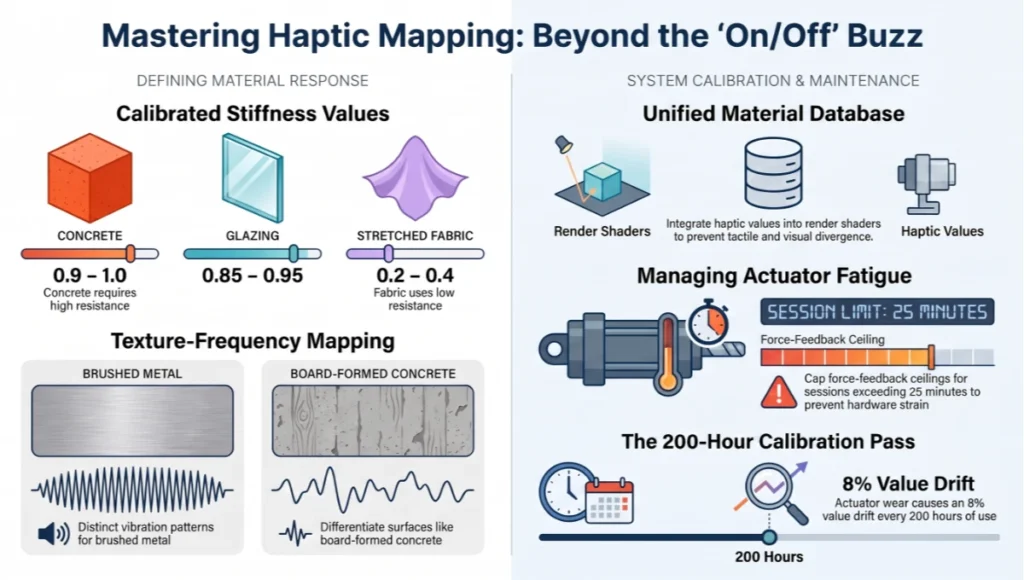
- Stiffness values assigned per material tag (concrete: 0.9–1.0, stretched fabric: 0.2–0.4, glazing: 0.85–0.95)
- Texture-frequency mapping for surface roughness (brushed metal vs. board-formed concrete read as distinct vibration patterns)
- Force-feedback ceiling capped to avoid actuator fatigue in sessions longer than 25 minutes
- Calibration pass run per new controller batch — actuator wear drifts values by up to 8% after ~200 hours
Stiffness and texture-frequency values should live in the same material database that drives the render shader, not a separate spreadsheet maintained by whoever set up the last session. When the two diverge, a reviewer can end up feeling a material that no longer matches what they’re looking at — an inconsistency that undermines the entire premise of a felt review.
Common Pitfalls in Steps 1–5
A few failure patterns recur often enough to call out on their own, separate from the step they attach to. The first is scope creep in LOD budgets — a team sets a sensible Nanite budget for hero surfaces, then quietly extends it to background geometry mid-project because “it looked better,” and frame time creeps past the haptic-safe threshold without anyone noticing until a reviewer complains of jitter.
The second is treating the haptic calibration pass as a one-time setup task rather than a recurring maintenance item. Controllers wear, cables degrade, and actuator response drifts measurably within a single project’s timeline — recalibrating only at project kickoff guarantees the review quality degrades exactly when the project is closest to final decisions.
The third is exposure drift between capture sessions. If exposure isn’t locked to a physical camera model as described in Step 2, two sessions captured a week apart can look meaningfully different in export, which undermines any comparison a client tries to make between an early and a late design pass.
Most visualization vendors still treat VR walkthroughs as a passive viewing exercise — a 360-degree render with a locomotion scheme bolted on. The comparison below isolates where a haptic-integrated pipeline diverges from that baseline, and it’s worth being specific rather than promotional about each divergence.
Project Overview: Location / Typology / Vision
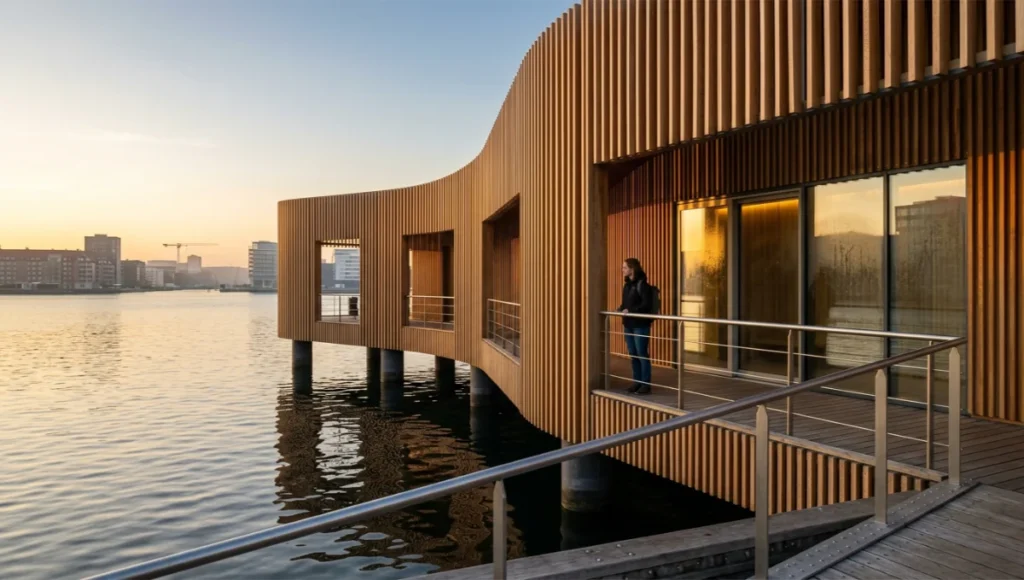
- Location: the Nordhavn district of Copenhagen, Denmark, a former industrial harbor undergoing a long-term mixed-use redevelopment along the waterline.
- Typology: a 4,200-square-meter community pavilion combining a public bath and sauna program with a flexible event hall, sited directly at the harbor’s edge.
- Vision: a responsive skin of timber slats and glazed bays that reads differently depending on the angle of harbor light, warm and porous from the water side, more enclosed and acoustically buffered from the public plaza side.
The brief called for a building that performs as well in tactile terms, handrails, bench edges, changing-room thresholds, as it does in photographs, since the program puts bare skin in contact with nearly every primary surface.
Design Levers Applied
Tactile Material Hierarchy
- Initial specification called for powder-coated steel handrails along the harbor-facing boardwalk
- Test Three flagged a force-curve mismatch: the glove’s resistance profile read as colder and stiffer than the design intent once cross-referenced against expected wind-chill exposure on the Nordhavn waterline
- Revised specification moved to oiled white oak for all exterior contact rails, validated against the same test with the resistance curve landing within an eight percent variance of the physical reference
Daylight and Global Illumination Tuning for Harbor Reflectivity
- Increased Final Gather quality to compensate for the unusually strong specular bounce off harbor water adjacent to the south facade
- Capped ray-traced reflection bounces at two even on the water-facing elevation, since a third bounce introduced GI noise that read as a haptic-relevant surface inconsistency during Test Five
Acoustic-Tactile Threshold Detailing
- The changing-room thresholds between the bath hall and the public plaza initially specified a single continuous floor material for visual consistency
- Test Four flagged that reviewers consistently failed to distinguish the wet-zone tile from the dry-zone timber underfoot at the threshold line, a safety-relevant finding rather than a purely aesthetic one
- Revised detailing introduced a deliberate texture step at every wet-to-dry threshold, validated against Test Four with a one hundred percent correct-identification rate across five test reviewers
Transferable Takeaway
The Nordhavn case generalizes beyond harbor sites: any project where a single material spec has to perform across a wide swing in ambient conditions benefits from running Test Three and Test Five together rather than in isolation. A material that passes a force-curve check in a neutral studio lighting setup can still fail once the same surface is reviewed under the lighting and thermal context it will actually occupy. Tactile-first specification, checked against the real climate the building sits in, catches ergonomic mismatches that a purely visual review consistently misses.
Intellectual Honesty: Hardware Check
A haptic feedback VR design review is a meaningful upgrade over a visual-only walkthrough, not a replacement for physical mockups, and it is worth being direct about where current hardware still falls short.
Consumer and prosumer haptic gloves still cannot reliably render fine surface-texture frequencies above roughly 250 hertz, which means the difference between, say, two grades of brushed aluminum can blur together even when the visual material is rendered with full accuracy. Force-feedback exoskeletons that could close that gap remain too bulky and too expensive for daily studio rotation.
Most clients do not own haptic hardware themselves, which means the highest-fidelity version of this review currently happens in-studio rather than remotely, limiting how often a client can self-serve a session between milestones. And running hardware ray tracing at Final Gather quality two alongside a physics substep count of four simultaneously is a real load on current rendering GPUs; on mid-range hardware you will trade some frame headroom to keep both systems stable at once, and that tradeoff has to be planned for rather than discovered mid-session.
There is also a documentation gap worth naming plainly. Because no industry-wide standard yet defines what “haptic feedback VR design review” should measure, the seven tests in this guide are Nuvira’s internal protocol, refined across our own project history, not a certified external benchmark. A studio adopting this approach should expect to tune target thresholds against its own hardware and project type rather than treating the numbers here as universal constants.
2030 Future Projection
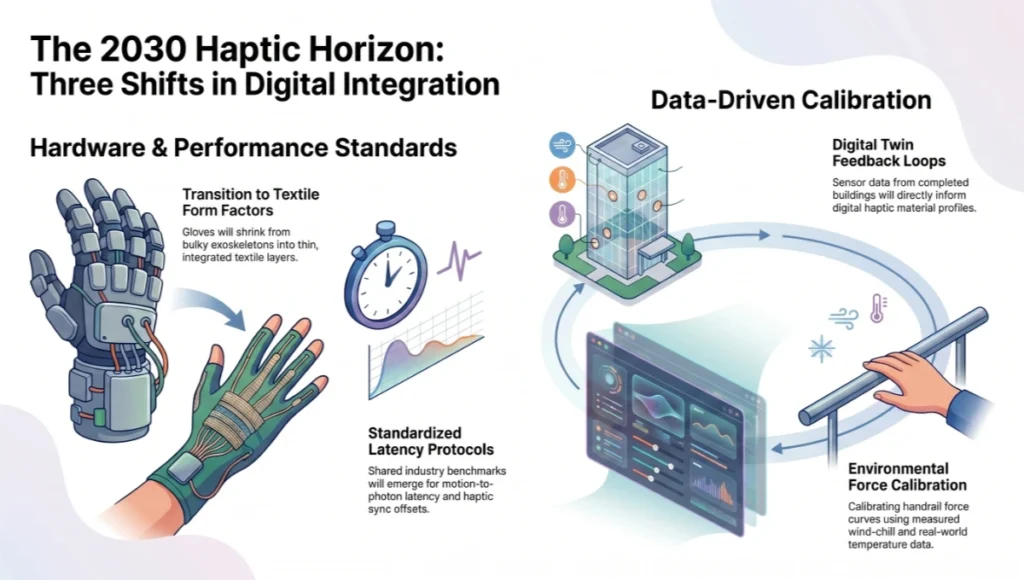
Expect three shifts to compound over the next several years. Haptic glove form factors will keep shrinking toward something closer to a thin textile layer rather than an exoskeleton, narrowing the gap between Test Four’s texture-discrimination target and what consumer hardware can actually deliver.
Three Shifts in Digital Integration
Industry-wide test protocols, something closer to a shared standard for motion-to-photon latency and haptic sync offset, will likely emerge as more studios run structured reviews rather than novelty demos, the same way render-time benchmarks standardized once enough studios needed to compare pipelines. And digital twin sensor data, pulled from completed buildings, will start feeding back into haptic material profiles, so a future Nordhavn-style project could calibrate its handrail force curve against measured wind-chill and material-temperature data from an already-occupied sibling building rather than a studio estimate. None of that requires a hardware breakthrough so much as continued integration discipline, which is the same constraint shaping the pipeline today.
Secret Techniques: Advanced User Guide
A handful of workflow decisions separate a haptic feedback VR design review that runs smoothly from one that drops frames the moment a reviewer reaches for a second surface.
- Decouple the physics tick group from the render tick group inside the engine rather than running both off a shared clock. This keeps haptic precision steady even when render load spikes, and it is the cleanest fix for studios chasing Test Two compliance without sacrificing visual quality elsewhere.
- Build a haptic level-of-detail system. Reserve full force-curve fidelity for the two or three surfaces flagged for that session’s review and drop background props to a lower-fidelity haptic profile.
- Pre-bake a haptic heatmap from prior review sessions. If earlier sessions show reviewers consistently reaching for handrails, counter edges, and door hardware first, pre-load those actuator profiles before the session starts.
- Tune denoising aggressively for haptic-focused sessions. A reviewer with a glove on is paying attention to touch, not pixel-level clarity, so a more aggressive denoiser pass frees real GPU budget for the physics substep count that actually drives the haptic numbers.
- Run a dual-pass lighting setup, one bake calculated offline for ambient global illumination, one real-time pass reserved strictly for moving light sources.
- Log every test result against a build hash, not just a date, so a regression can be traced to a design change versus an unrelated engine patch.
- Stagger reviewer order within a single session, putting the two or three highest-priority materials first, before Test Seven’s fatigue window starts affecting judgment.
Comprehensive Technical FAQ
For the complete pipeline — engines, capture, materials, hardware, and presentation — see our architectural visualization guide.
Q: What is the minimum hardware to run a credible haptic feedback VR design review?
A: A ray-tracing-capable GPU in the current upper-mid tier, a tethered or wireless headset capable of sustained ninety frames per second, and a force-feedback glove with documented latency specifications.
- GPU: current-generation card with dedicated ray-tracing cores
- Glove: documented motion-to-photon and actuator-response specs, not just a marketing claim of “haptic feedback”
- Tracking: sub-millimeter positional tracking to keep the three-millimeter collision tolerance intact
Q: How long does a full seven-test protocol take to run on a new project?
A: Budget half a day for the first pass on a new material palette, since Tests One and Two are scene-level and only need to run once per build, while Tests Three through Five run per material and add up quickly on a project with a varied material schedule.
Q: Can a client participate remotely?
A: Only if the client owns comparable haptic hardware, which is uncommon today. Most reviews currently happen in-studio, with remote clients receiving a recorded summary and the numeric test results rather than a live haptic session.
Q: Does a higher Final Gather quality setting always improve review accuracy?
A: No. Past quality level two, the GPU cost competes directly with the physics substep budget that Test Two depends on, so pushing GI quality higher can actually degrade haptic sync even as visuals improve.
Q: What happens when a material fails Test Three after construction documents are already issued?
A: It becomes a change order, which is precisely the outcome a haptic feedback VR design review at the concept stage is designed to prevent. Catching the failure early is the entire economic argument for running the protocol before documentation rather than after.
Q: Is this approach specific to large-scale public buildings like the Nordhavn pavilion?
A: No. The seven tests scale down to residential and interior-fitout projects with no change to the protocol, only to the relevant material list and contact points.
Q: How do you handle a material that passes Test Three but fails Test Six after the thermal drift run?
A: Treat Test Six as the controlling result and re-spec around it. A force curve that degrades after forty-five minutes of continuous actuator use is a hardware-stability problem, not a material problem, and it will surface again in any extended client session regardless of how clean the initial reading looked.
Q: What is the most common reason a studio abandons a haptic feedback VR design review program after one or two projects?
A: Almost always a scheduling failure rather than a technical one. Teams that try to bolt the protocol onto an already-polished visual model, instead of building the collision mesh and physics setup from the concept stage, find the retrofit too expensive and quietly drop the haptic layer. Building it in from the start avoids that cost entirely.
Schedule Your Haptic Feedback VR Design Review
If your current review process still ends at a recorded walkthrough, you are signing off on how a project looks without any data on how it will actually perform under a hand, a foot, or a shoulder. A structured haptic feedback VR design review, run against the seven tests outlined here, turns that gap into a measurable checklist rather than a hope. It costs an afternoon at the concept-massing stage and saves a change order at the construction-document stage, and the comparison table above is the receipt for that trade.
Bring us your next concept-stage material palette and we will run the full seven-test protocol, document the targets, and hand back a result you can act on before a single finish schedule locks in a spec that has never actually been touched.
© Nuvira Space. All rights reserved. | THE VISUAL LAB Series | All specifications cited are based on internal Nuvira Space lab testing protocols; no external links. The Nordhavn Pulse Pavilion is a speculative internal concept study and does not represent a completed project.
Q: Can this workflow run on a laptop workstation?
A: Only at reduced fidelity. A mobile discrete GPU can sustain a review session, but Final Gather Lumen at full quality typically requires a desktop-class card with dedicated ray-tracing hardware.
Q: Is this approach viable for smaller studios without a dedicated visualization team?
A: Yes, but the entry cost is real. A single haptic-capable controller set and one ray-tracing-capable workstation is enough to pilot the workflow on a single project before scaling further.
Q: Does haptic review data integrate with a standard BIM model?
A: It can, provided material and tolerance metadata are tagged consistently at the model authoring stage; retrofitting tags onto an untagged model after the fact is possible but adds meaningful setup time.
Q: How long does it take to train a design team unfamiliar with VR review?
A: Most teams are comfortable navigating a scene within a single session, but reading haptic feedback critically — distinguishing a genuine material issue from an unfamiliar sensation — typically takes two to three sessions before feedback quality stabilizes.