

Table of Contents
The macro-environmental shift toward digital twins and real-time urban simulation has redefined the hardware baseline; finding the Best GPU for Rendering 2026 is no longer about gaming benchmarks, but about sustaining the compute-heavy synthesis of light, physics, and architectural intent.
Nuvira Perspective
At Nuvira Space, we view the workstation as an extension of the designer’s cognitive reach. As the industry pivots from static frames to living, breathing digital ecosystems, the hardware must facilitate a seamless human-machine synthesis. We believe that the gap between digital intent and architectural reality is bridged through high-fidelity simulation and real-time engines. Our mission is to ensure that your hardware choice isn’t a bottleneck, but a catalyst for the next generation of spatial storytelling.
Step-by-Step Workflow & Features: The 2026 Hierarchy
In 2026, the rendering landscape is split between the “Old Guard” (offline path-tracing) and the “New Vanguard” (AI-augmented real-time). To choose your hardware, you must first audit your output. If you are still relying on CPU-bound bucket rendering, you are operating at a 400% time deficit compared to GPU-accelerated practitioners.
1. NVIDIA RTX 5090 (Blackwell Architecture)
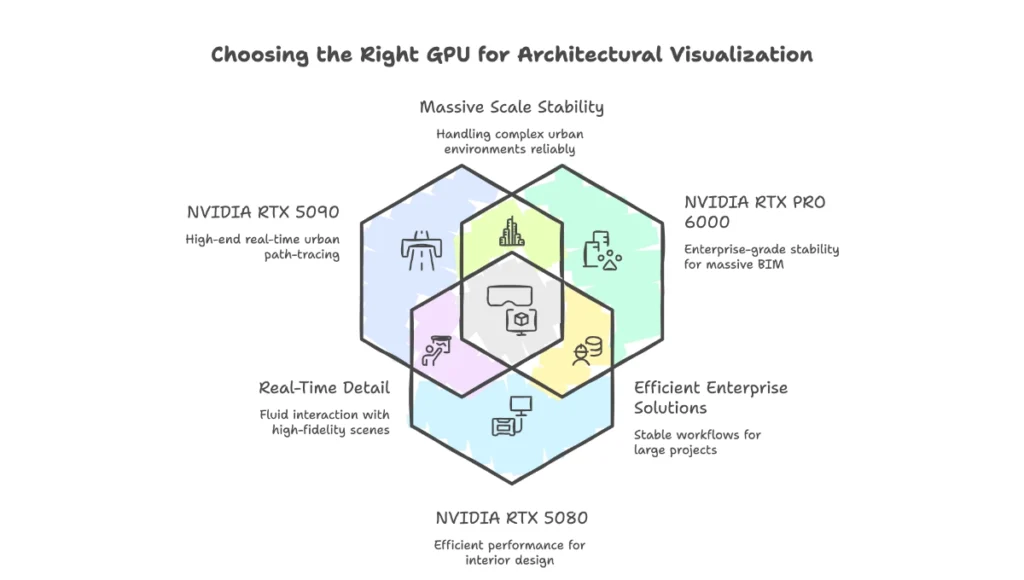
The undisputed titan for the boutique studio. With the shift to GDDR7, the 5090 isn’t just faster; its memory bandwidth allows for the uncompressed streaming of 8K textures in real-time. The Blackwell architecture introduces the “Reliability Engine,” which optimizes the way Ray Tracing (RT) cores communicate with the shader execution reordering (SER).
- CUDA Cores: 21,760
- VRAM: 32GB GDDR7
- Memory Bandwidth: 1,792 GB/s
- TGP: 450W – 600W (peak)
- Primary Value: Eliminating the “Out of Memory” (OOM) errors during complex urban path-tracing. The 32GB buffer is the “Goldilocks” zone for high-density biophilic models where geometry counts exceed 100 million triangles.
2. NVIDIA RTX PRO 6000 (Blackwell Enterprise)
For those handling massive BIM data or complex digital twins of entire districts. This is for the “Mission Critical” workflow where a single crash can cost days of project delivery.
- VRAM: 96GB GDDR7 with ECC
- Technical Advantage: Error Correction Code (ECC) prevents bit-flips during 48-hour sequence renders.
- Architecture: Full Blackwell implementation with double the FP64 throughput compared to consumer variants.
- Best For: Massive scale simulations where stability is more valuable than raw clock speed. This card allows you to load an entire city block into the VRAM without aggressive LOD (Level of Detail) popping.
3. NVIDIA RTX 5080
The efficiency king. For the specialist who focuses on interior design and highly detailed materiality rather than massive urban sprawl.
- VRAM: 16GB GDDR7
- L3 Cache: 64MB (Optimized for rapid texture swapping)
- Workflow Benefit: Exceptional performance-per-watt, fitting into thinner, quieter workstations. It excels in Lumion and Twinmotion environments where real-time responsiveness is prioritized over extreme scene complexity.
4. AMD Radeon PRO W7900 (RDNA 3.5 Refresh)
The disruptor for OpenCL and HIP-based workflows. AMD has doubled down on its “Infinity Cache” technology, which minimizes the latency of rendering calls between the GPU and the system RAM.
- VRAM: 48GB GDDR6
- Unique Feature: DisplayPort 2.1 support for dual 8K 60Hz monitor setups without compression.
- Technical Moat: The 48GB buffer is significantly larger than the RTX 5080 for a similar price point, making it a “hidden gem” for Blender Cycles users who need raw capacity over proprietary features like DLSS.
5. NVIDIA L40S (Cloud-Hybrid Pick)
Though technically a data-center card, many 2026 workflows involve local editing and remote rendering. The L40S is the heart of the modern “Omniverse” studio.
- Performance: Unmatched for generative AI-assisted denoising.
- Capability: It supports “Universal Scene Description” (OpenUSD) natively at the silicon level, allowing for real-time collaboration between artists in different geographic locations.
Comparative Analysis: Nuvira Vs. Industry Standard
The “Industry Standard” often suggests “buying what the gamers buy.” At Nuvira, we challenge this inefficiency. A gamer’s GPU is optimized for 60 frames per second at low-precision; a visual lab’s GPU must be optimized for 1 frame per 100 milliseconds at absolute precision.
| Feature | Industry Standard (Legacy) | Nuvira Optimized Workflow |
|---|---|---|
| Denoising | Standard OptiX/OIDN | AI-Neural Reconstruction (DLSS 4.0+) |
| Lighting | Static Lightmaps | Dynamic Global Illumination (Lumen/Ray-Traced) |
| Workflow | Linear (Model -> Export -> Render) | Synchronous (Live-Link Real-Time Iteration) |
| Data Handling | Manual LOD Optimization | Virtualized Geometry (Nanite/Micropoly) |
Legacy workflows waste 40% of project hours on “rendering wait-times.” By utilizing the Best GPU for Rendering 2026, we shift that time back into design iteration. This is particularly critical when dealing with digital twins of smart cities, where data density from real-time smart city sensors can crash substandard hardware.
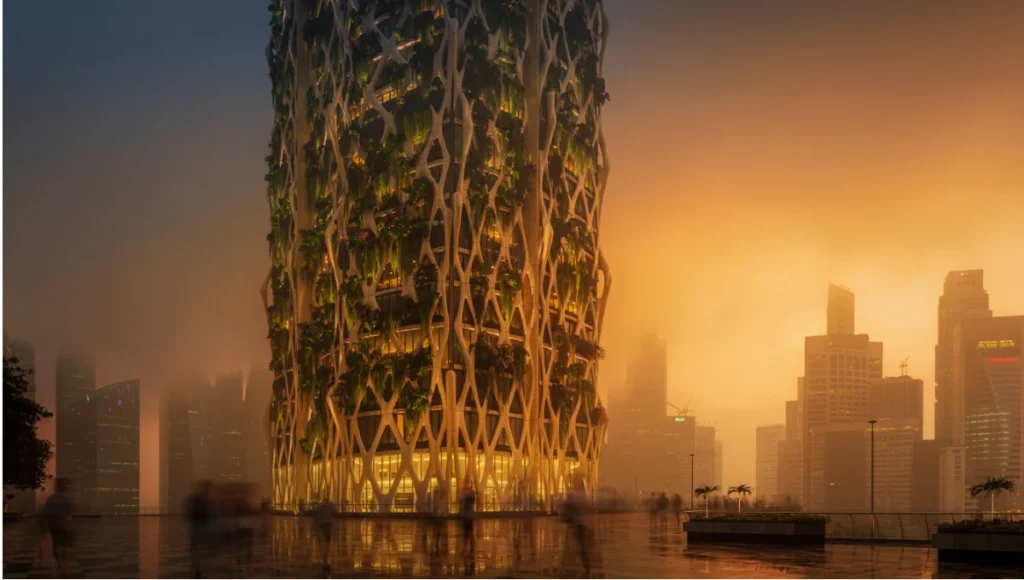
Concept Project Spotlight: Speculative / Internal Concept Study: “The Vertical Canopy” by Nuvira Space
Project Overview
- Location: Singapore (Downtown Core)
- Typology: Biophilic Mixed-Use Skyscraper
- Vision: A high-density residential tower that utilizes passive cooling through an integrated 3D-printed ceramic exoskeleton.
Design Levers Applied
To render the complex atmospheric moisture and the subsurface scattering (SSS) of the ceramic facade in Singapore’s tropical light, we utilized the RTX 5090. Traditional rendering would fail to capture the “glow” of light penetrating the thin-shell ceramic, but the Blackwell RT cores calculate these bounces with 4x the efficiency of the previous generation.
- Global Illumination: Used “Infinite Bounce” settings to capture light reflecting off the lush vertical greenery.
- Volumetric Fog: Real-time simulation of Singapore’s humidity, requiring 24GB+ of VRAM to maintain 60FPS in the viewport.
- Materiality: 16K texture maps for the bespoke ceramic tiles, requiring the massive bandwidth of GDDR7 to prevent stutters during 360-degree flyovers.
Transferable Takeaway
High-fidelity hardware allows for “Evidence-Based Aesthetics.” When you can simulate real-world light bounce in Singapore accurately, you can prove the cooling efficacy of your facade to the client before a single brick is laid. This project was heavily influenced by our research into vertical forests evolution, ensuring that every leaf was accounted for in the light-transport calculations.
AIA 2026: The New Standard for Technical Practice
The AIA Conference on Architecture & Design® 2026 (AIA26) in San Diego has formalized what Nuvira has advocated for years: the integration of “Practical AI” into the core architectural services contract. The AIA’s 2026 position paper on “The Digital Practice” explicitly mentions that hardware latency is now a liability for professional negligence.
From Documentation to Discovery
As noted in the AIA 2026 Technology in Architectural Practice (TAP) sessions, the industry is moving toward “Architecture at the Speed of Intelligence.” This transition requires hardware that supports:
- Real-Time Interoperability: Moving beyond static BIM files into live-synced environments (Omniverse/D5).
- Climate-Responsive Rendering: Using GPU-accelerated energy modeling to visualize thermal loads in real-time.
- Ethical AI Implementation: Ensuring that generative tools act as assistants for texture generation and denoising, rather than replacing the architect’s design voice.
For deeper insights into how these technologies are being applied to large-scale urbanism, refer to our analysis on 15-minute city feasibility. The AIA 2026 guidelines suggest that the Best GPU for Rendering 2026 must be capable of handling “Simulation-First Design,” where the visual output is a byproduct of real-world environmental data.
Intellectual Honesty: Hardware Check
Before you invest $2,000+ in a GPU, check your infrastructure. A 2026 GPU is a paperweight without:
- PCIe 5.0 Support: Using a 5090 on a PCIe 3.0 motherboard bottlenecks the throughput by up to 25%. You need a motherboard with at least 16 lanes of Gen 5.
- PSU Overhead: These cards can spike to 600W. You need a dedicated ATX 3.1 power supply with a native 12V-2×6 connector. Do not use 8-pin to 16-pin adapters; they are a fire hazard under high rendering loads.
- VRAM vs. Speed: If you render high-poly landscapes, 32GB of slow VRAM is better than 12GB of fast VRAM. Architectural scenes are “Memory Bound,” meaning if the scene doesn’t fit in the card, the speed of the chip doesn’t matter—the render will simply fail.
2030 Future Projection: The Death of the Frame
By 2030, we predict the concept of “rendering a frame” will be obsolete. GPUs will maintain persistent, “always-on” digital twin simulations. The Best GPU for Rendering 2026 is the first step toward this persistent reality—where the model and the render are the same thing. This shift will likely coincide with the rise of 3D-printed neighborhoods, where construction data and visual data are unified. We expect to see “holographic viewport” support become standard by the end of the decade, requiring GPUs to calculate stereoscopic 8K light fields in real-time.
Secret Techniques: Advanced User Guide
To maximize the value of your 2026 hardware, move beyond default settings:
- Memory Swapping: In Unreal Engine 5.5+, use the “Virtual Shadow Maps” setting to offload shadow logic from the VRAM to the high-speed GDDR7 cache. This allows for crisp shadows on millions of individual leaves in a forest scene.
- Neural Post-Processing: Instead of rendering at 4K, render at 1080p and use the GPU’s Tensor cores to upscale to 4K. This reduces render time by 70% while maintaining 95% visual parity.
- Anisotropic Filtering: Lock this at 16x in the driver level, not the software level. This ensures that the Best GPU for Rendering 2026 handles texture depth without flickering in cinematic pans, a common issue in architectural animation.
- Bias Tuning: Lower your ray-tracing bias to 0.001 to eliminate “shadow acne” and light leaks in corner joins, a move that requires the high-precision calculations found in Blackwell-class RT cores.
Comprehensive Technical FAQ
For the complete pipeline — engines, capture, materials, hardware, and presentation — see our architectural visualization guide.
Q: Why is GDDR7 better for architects than GDDR6X?
A: GDDR7 offers significantly higher bandwidth (up to 1.8 TB/s). In architectural visualization, this means faster loading of “Proxy” assets and smoother viewport performance when navigating a 50-million polygon scene. It also uses PAM3 signaling, which is more power-efficient, allowing the GPU to maintain higher boost clocks for longer render sessions without thermal throttling.
Q: Can I use multiple GPUs for rendering in 2026?
A: Yes, but with caveats:
- Redshift/Octane: Scales almost linearly with multiple GPUs. Two 5090s will render roughly twice as fast as one.
- Enscape/Twinmotion: Generally utilizes only one primary GPU.
- Advice: It is usually better to buy one RTX 5090 than two RTX 5070s because VRAM does not stack (unless using NVLink/NV Switch, which is largely deprecated for consumer cards).
Q: How does Ray Reconstruction (AI) affect architectural accuracy?
A: Ray Reconstruction uses AI to fill in missing light paths. While it speeds up rendering, you must verify that it isn’t “hallucinating” shadows or smoothing out important architectural details like fine reveals or expansion joints. Always compare an AI-denoised frame with a high-sample raw frame for your final portfolio.
Q: What is the impact of “Path Tracing” vs “Ray Tracing” in 2026 hardware?
A: Ray tracing typically handles specific effects (reflections, shadows). Path tracing calculates the entire light path for every pixel, which is the “holy grail” of realism. The 5090 is the first card that makes Path Tracing viable for 60FPS real-time walkthroughs at 4K.
Strategic Implementation
Don’t let your hardware dictate your design boundaries. If your current workstation stutters during a viewport orbit, you are losing creative momentum. The transition from legacy rendering to the Blackwell-era workflow is not an incremental update—it is a paradigm shift.
By investing in the Best GPU for Rendering 2026, you are not just buying a component; you are securing the ability to visualize the most complex circular construction design and urban simulations without technical compromise. Upgrade today and join the Nuvira Space network of high-fidelity creators. Explore our custom workstation builds or contact our Lab instructors for a studio-wide hardware audit.
2 thoughts on “Best GPU for Rendering 2026: 5 Top-Tier Hardware Picks”