

Table of Contents
The legacy rendering workflow is an exercise in diminishing returns. For decades, architects have been held hostage by the “Linear Bottleneck”: the more detail you add to a Rhino or SketchUp model, the longer the CPU-bound light cache takes to calculate. Today, we are witnessing a disruption where AI rendering plugins are replacing brute-force calculation with neural estimation.
According to the AIA 2025/2026 research study, Artificial Intelligence Adoption in Architecture, the industry has reached a structural tipping point. While only 8% of firm leaders have fully integrated AI into every phase, over 53% of practitioners have actively experimented with these tools. Usage density jumps to 67% among designers under age 35, signaling a generational shift toward “Zero-Wait Workflows.” The feedback loop between a geometric change in Rhino and a photorealistic update is no longer measured in hours, but in milliseconds. This represents the total collapse of the time-gap between architectural thought and visualization.
Nuvira Perspective
At Nuvira Space, we view the current transition in architectural visualization not as a trend, but as a fundamental shift toward human-machine synthesis. The traditional barrier between digital intent—the raw geometry of a SketchUp or Rhino model—and architectural reality is being dissolved by neural simulation. We believe that AI rendering plugins are not shortcuts; they are advanced analytical engines that bridge the gap between abstract form and atmospheric truth. By leveraging real-time engines and high-fidelity simulation, we empower designers to move beyond static representation into a world where AI becomes a primary design lever, facilitating a seamless transition into digital twins and smart cityintegration.
1. Veras by EvolveLAB: The Geometry-Retention Specialist in AI Rendering Plugins
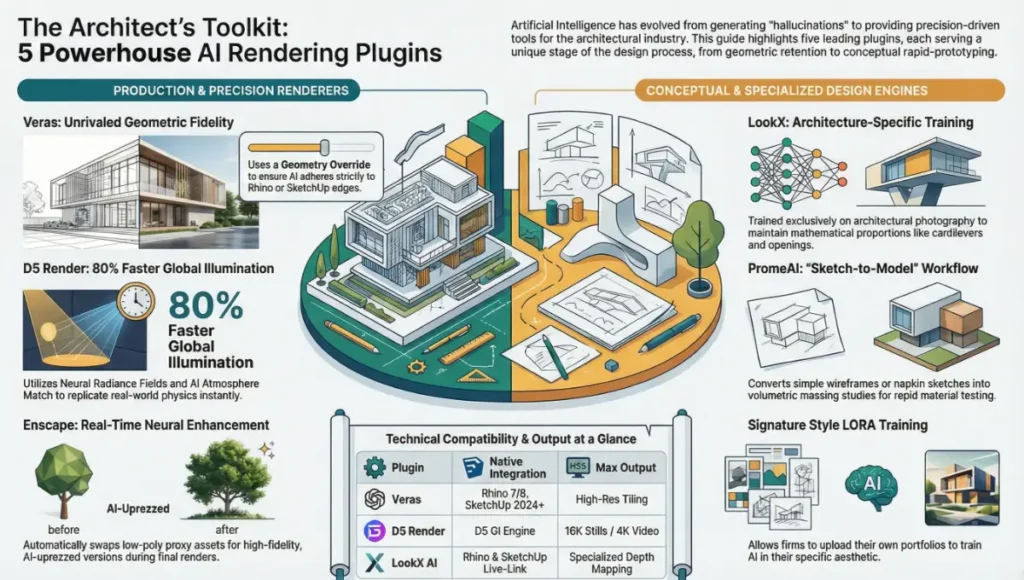
Veras remains the benchmark for architects who prioritize structural accuracy over generative “hallucinations.” It acts as a sophisticated diffusion layer directly within the modeling viewport.
AI Rendering Plugin Workflow: Veras Feature Set
- Geometric Fidelity Control: Users utilize a “Geometry Override” slider. At a setting of 0, the AI strictly adheres to the edges of Rhino NURBS or SketchUp faces, preventing the “warping” of structural lines.
- Atmospheric Prompting: Veras interprets technical lighting prompts such as “Low-angle specular highlights, 5400K color temperature” to generate scientifically grounded results.
- Consistent Iteration: By locking the “Seed” value, architects can test different facade materials (e.g., kinetic architecture facades) while keeping the lighting environment constant.
- Technical Specs:
- Native Integration: SketchUp 2024+, Rhino 7 & 8.
- Processing: Hybrid (supports local GPU and Cloud offloading).
- Output: High-res tiling for large-format site boards.
2. Enscape + Chaos AI Enhancer: The Real-Time Powerhouse
The integration of Chaos AI into the Enscape ecosystem has bridged the gap between real-time speed and photorealistic polish, solidifying its place among top-tier AI rendering plugins.
Real-Time Visualization Features
- Neural Asset Enhancement: Low-poly proxy assets (vegetation, people) are automatically swapped for high-fidelity, AI-uprezzed versions during the final render frame.
- One-Click Denoising: Utilizing NVIDIA OptiX AI, Enscape predicts and removes ray-tracing noise in milliseconds.
- Batch Processing: Uses Chaos Cloud to render AI-enhanced animations for complex AR vs VR construction walkthroughs.
- Technical Specs:
- Ray-Tracing: Hardware-accelerated (NVIDIA RTX / AMD 6000+).
- Asset Library: Access to Chaos Cosmos with AI-optimized materials.
3. D5 Render: The Global Illumination Disruptor
D5 Render has successfully utilized Neural Radiance Fields to compete with traditional offline engines like V-Ray, offering an 80% reduction in rendering time through advanced AI rendering plugin architecture.
Global Illumination and PBR Synthesis
- AI Atmosphere Match: Upload a reference photo (e.g., a misty morning in Rotterdam), and the AI calibrates the ozone, turbidity, and sun angle to match the photo’s physics.
- PBR Texture Synthesis: A simple photo of a surface is converted into a full Physically Based Rendering (PBR) stack, including Normal, Roughness, and Metallic maps.
- Smart Planting: Uses AI to procedurally scatter vegetation based on the building’s shadow patterns.
- Technical Specs:
- Engine: D5 GI (Global Illumination) based on real-time neural rendering.
- Resolution: Supports up to 16K stills and 4K video exports.
4. LookX AI: The Trained Architectural Brain
LookX is an industry outlier because its neural network is trained exclusively on architectural photography rather than generic internet imagery, making it one of the most context-aware AI rendering plugins available.
Architecture-Specific Neural Training
- Style Adapters: Select specific architectural movements (Brutalist, Parametric, Minimalist) to act as a logic filter over your Rhino massing.
- ControlNet Depth Mapping: Reads the Z-depth of the 3D model to ensure that cantilevers and openings maintain their mathematical proportions.
- LORA Training: Firms can upload their own portfolio to “train” the plugin to render in the office’s specific signature style.
- Technical Specs:
- Modeling Sync: Direct “Live-Link” for Rhino and SketchUp.
- Model Weights: Specialized weights for “Interior Design” vs. “Urban Planning.”
5. PromeAI: The Conceptual Iteration King
PromeAI is the primary tool for the “Sketch-to-Model” phase, allowing for high-speed material testing before detailed modeling begins, filling a vital niche in the ecosystem of AI rendering plugins.
Concept Study Workflow
- Wireframe-to-Photo: Converts a simple wireframe export into a volumetric massing study, ideal for testing the aesthetic impact of graphene in construction.
- Precision Refinement Brush: Allows for localized AI updates (e.g., only changing the glazing of a specific lobby) without re-rendering the entire scene.
- Technical Specs:
- Platform: Web-based and plugin-integrated.
- Workflow: Ideal for “napkin sketch” to client presentation loops.
Comparative Analysis: AI Rendering Plugins vs. Legacy Standards
The “Standard” workflow is rapidly becoming a competitive liability due to its high overhead in time and manual labor.
| Metric | Legacy Standard (V-Ray/Maxwell) | Nuvira AI-Accelerated Stack |
|---|---|---|
| Bake Time | 4–12 Hours (High-res Animation) | 20–40 Minutes (Neural Denoised) |
| Material Setup | Manual Node Mapping (30+ mins) | AI Texture Synthesis (2 mins) |
| Global Illumination | Brute Force / Light Cache (Slow) | Neural GI / ReSTIR (Instant) |
| Hardware | Heavy CPU/RAM Dependence | GPU-Centric (Tensor Cores) |
| Client Interaction | Static “Overnight” Deliverables | Live, AI-driven style swapping |
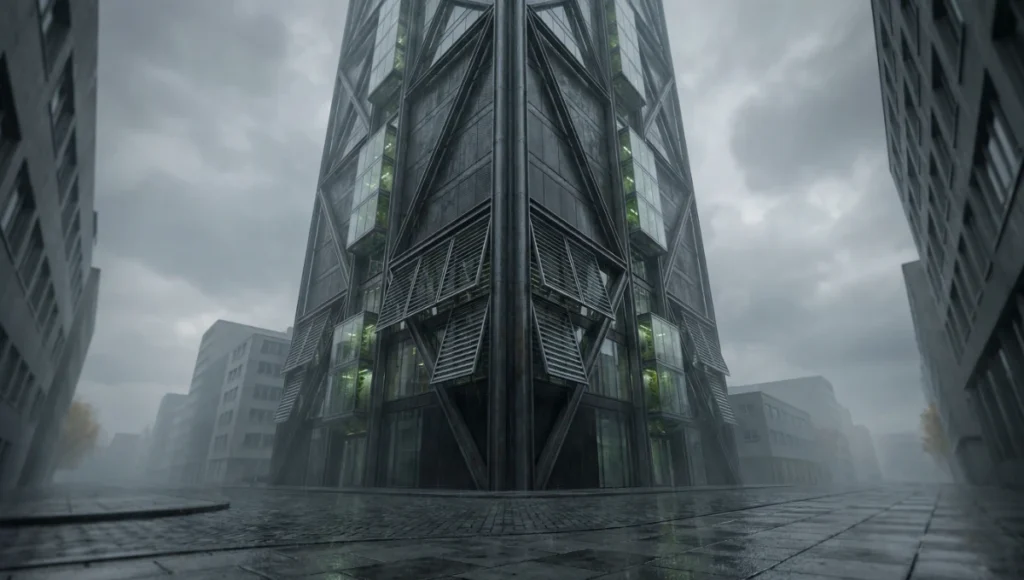
Concept Project Spotlight: Simulating Complexity with AI Rendering Plugins
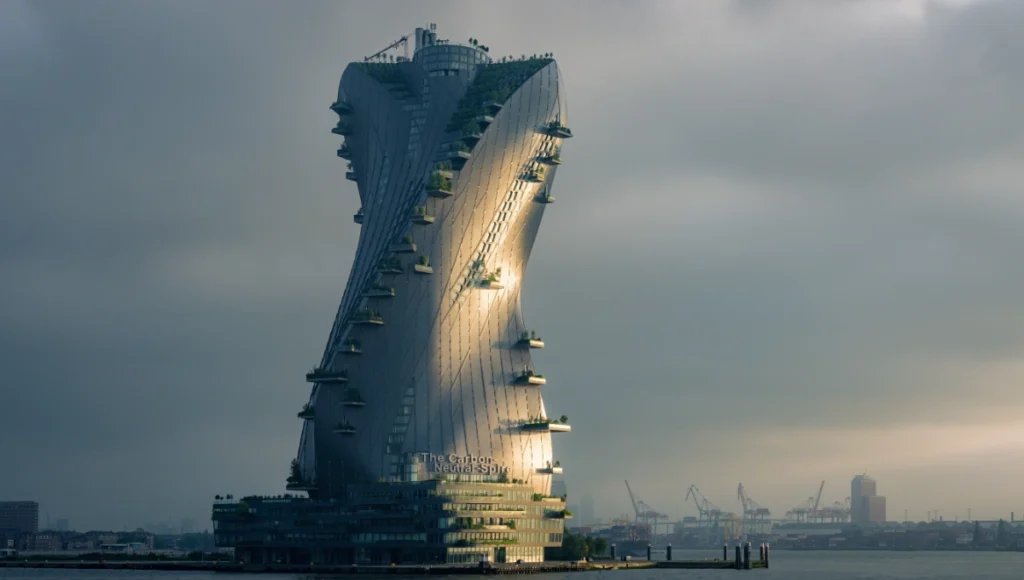
Speculative Concept Study: The Carbon-Neutral Spire by Nuvira Space
Project Overview
- Location: Rotterdam, Netherlands (Waalhaven District)
- Typology: Vertical Bio-Laboratory & Carbon-Capture Hub.
- Vision: A study on how high-density urban massing can utilize adaptive AI rendering to simulate local micro-climates and material light-absorption.
Design Levers Applied
- Environmental Simulation: We utilized D5 Render’s AI sky system to simulate the specific overcast, high-moisture conditions of a Rotterdam autumn, measuring the visual impact on the solar-glare of the facade.
- Massing Iteration: LookX AI was used to test 15 diagrid configurations in Rhino; each iteration took less than 30 seconds to visualize.
- Materiality: We applied AI-enhanced textures to simulate a facade composed of carbon-sequestering composites, ensuring the light absorption matched the theoretical density of the material.
Transferable Takeaway
By moving to an AI-first rendering workflow, the design team identified a solar-glare issue on the kinetic facade three weeks earlier than a traditional workflow would have allowed.
Intellectual Honesty: Hardware Requirements for AI Rendering Plugins
AI rendering shifts the burden from the CPU to the GPU’s Tensor Cores. As of February 2026, the hardware requirements have evolved significantly:
- VRAM Capacity: A minimum of 16GB VRAM is now the professional floor. The NVIDIA RTX 5090 (Blackwell) with 32GB of GDDR7 is the current gold standard, offering a 40% rendering speed increase over the 4090.
- Memory Bandwidth: The shift to GDDR7 (reaching up to 1.7 TB/s) is critical for handling massive 4K neural texture swaps without stuttering.
- RTX Neural Shaders: The Blackwell architecture introduces dedicated AI networks within the shaders themselves, allowing for film-quality refraction in real-time viewports.
- Local vs. Cloud: For data privacy and “Live-Sync” stability, Nuvira recommends local execution on workstations with a minimum 1000W-1200W Power Supply to handle the power spikes (peak 575W+) of Blackwell chips.
2030 Future Projection: The Evolution Beyond AI Rendering Plugins
By 2030, the “render” as a separate phase will be extinct. We will move toward Predictive Visualization, where software predicts the most aesthetically and structurally sound design path as you model. The rendering plugin will be replaced by a “Generative BIM” environment that provides real-time feedback on carbon footprint, cost, and the emotional response of occupants (Neuroarchitecture).
Secret Techniques: Mastering AI Rendering Plugins
- The 30/70 Rule: Model 70% of the detail in Rhino and let the AI handle 30% (entourage, haze, and micro-texture).
- Depth-Pass Sharpening: Export a Z-Buffer pass and use it as a mask in Photoshop for a “High Pass” filter to reclaim structural crispness.
- Negative Prompting: To avoid the “AI look,” use negative prompts like:
[unrealistic reflections, plastic texture, distorted geometry, cartoonish, lens flare].
Comprehensive Technical FAQ
For the complete pipeline — engines, capture, materials, hardware, and presentation — see our architectural visualization guide.
Q: Does using AI rendering plugins infringe on intellectual property?
A: This is a major concern cited by 93% of architects in the AIA report. Pro-tier tools (Veras, D5) now offer Private Local Models where your data is not used for global training, ensuring firm proprietary designs stay secure.
Q: Can these tools handle precise IES light profiles?
A: Yes.
- Enscape and D5 respect native IES data.
- The AI then “beautifies” the falloff and bounce, while the initial light source remains mathematically accurate to the manufacturer’s spec.
Q: Will AI rendering replace 3D artists?
A: No. It replaces the “operator.” The 3D artist of the future is a Director of Simulation—someone who understands light, composition, and architectural intent but no longer wastes time on manual UV unwrapping.
Integrating the Future of Simulation
The gap between architectural intent and visual reality has been compressed into a single click. For firms still reliant on overnight light caches and manual texture mapping, the competitive landscape is shifting irrevocably. The tools outlined above are not just plugins; they are the entry points to a new era of high-fidelity design synthesis.
To stay at the vanguard of this transition, practitioners must move beyond passive observation. We invite you to explore the latest workflows and hardware benchmarks within the Nuvira Visual Lab, where the synthesis of human creativity and neural acceleration is redefined daily. Build the future, one frame at a time.
This article is part of our smart building technology guide, the state-of-play synthesis across generative AI, robotics, and sensing layers.
1 thought on “5 Premier AI Rendering Plugins for SketchUp and Rhino”