

Table of Contents
AI architecture visualization rendering has crossed the threshold from experimental novelty to production-critical discipline. In Singapore’s 2025 Urban Redevelopment Authority procurement cycle, over 60% of shortlisted firms submitted AI-assisted visualization packages for evaluation — not as supplementary mood boards, but as primary design-intent documents. The render is no longer the final act. It is now the opening argument.
Nuvira Perspective
At Nuvira Space, we define the frontier of human-machine synthesis in architectural design not by what AI can generate in isolation, but by how precisely it translates geometric intent into visual language that clients, planners, and fabricators can act on. Real-time engines and high-fidelity simulation have closed the gap between digital intent and architectural reality to a matter of seconds. The question is no longer capability — it is certification: which tools perform reliably under the pressures of real deadlines, complex BIM models, and multi-stakeholder presentation workflows.
This guide maps six AI architecture visualization rendering tools across four production stages, evaluating each against the technical thresholds that matter in professional practice: geometric fidelity, render-time performance, BIM pipeline compatibility, and output resolution for print and screen. We reference the American Institute of Architects (AIA) Technology in Architectural Practice framework as the professional benchmark for tool integration standards.
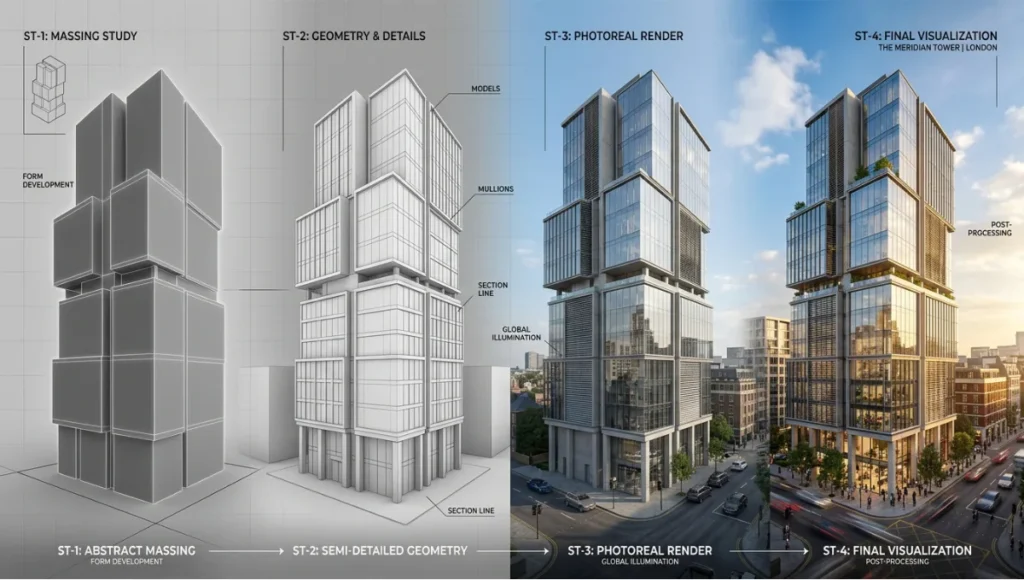
Step-by-Step Workflow: The 4-Stage Visualization Pipeline
Before selecting a tool, map your requirement to one of the four production stages where AI architecture visualization rendering delivers measurable value. Most workflow failures in AI rendering adoption occur because practitioners apply a Stage 1 tool to a Stage 3 requirement.
Stage 1 — Concept Exploration
Convert massing volumes, hand sketches, and reference imagery into atmospheric visuals for client alignment and design direction setting. Speed over precision.
- Primary variable: generation speed (target: under 10 seconds per image)
- Geometric accuracy: secondary — hallucination of structural logic is acceptable
- Output resolution: 1024×1024 minimum for screen presentation
- Recommended tools: Midjourney v7, Archsynth
Stage 2 — Schematic Development
Preserve design intent from the live BIM or CAD model. The AI must read actual geometry — wall thickness, fenestration proportion, cantilever dimension — and render it without geometric hallucination.
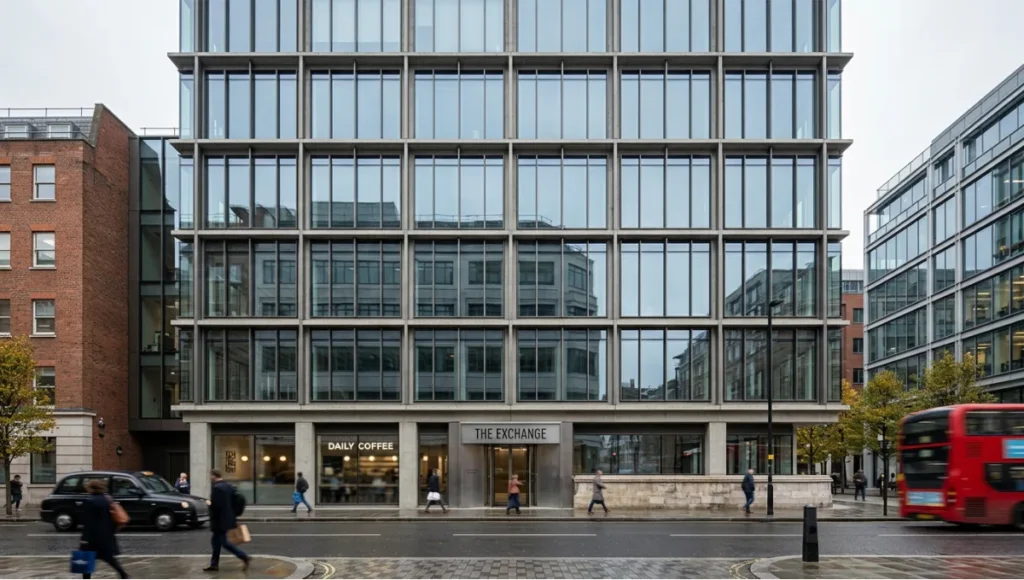
- Primary variable: geometric fidelity (Geometry Override ≤ 20%)
- BIM integration: plugin or direct viewport capture required
- Output resolution: 2048×2048 minimum for design team review
- Recommended tools: Veras by Chaos, mnml.ai
Stage 3 — Presentation Output
Photorealistic quality, lighting consistency across a suite of views, client-safe resolution. The render that closes the deal or secures planning approval.
- Primary variable: output quality and cross-view consistency (Render Seed required)
- Resolution: 4K (3840×2160) or A1 300dpi equivalent minimum
- BIM integration: non-negotiable for larger practices
- Recommended tools: Veras by Chaos (primary), mnml.ai (secondary)
Stage 4 — Post-Production Enhancement
AI-assisted upscaling, in-painting, entourage insertion, sky replacement, and atmospheric correction applied to renders produced by traditional engines (V-Ray, Corona, Lumion).
- Primary variable: compositing quality and editorial control
- Tools operate on existing renders — not from live models
- Recommended tools: Adobe Firefly (generative fill), Rendair AI (consolidated studio workflow)
AI Architecture Visualization Rendering: 6 Certified Tools
Tool 1: Veras by Chaos — The BIM-Native Standard
Stages certified: 2 and 3 | BIM Integration: 7 platforms | Starting price: $29/month (annual)
Veras is the most architecturally fluent AI rendering tool available in 2026. Its native plugin integration into Revit, SketchUp, Rhino, Vectorworks, Archicad, Autodesk Forma, and Allplan is unmatched by any competing platform. The Geometry Override system is the most sophisticated geometric control mechanism in any AI rendering environment currently on the market.
Key Technical Specifications
- AI Engine: Nano Banana 2 (Google Gemini) + Stable Diffusion
- Geometry Override range: 0–100% (low = faithful, high = generative)
- Render Seed: Locks visual style across multiple views for deck consistency
- Image-to-Video: 12 camera preset paths, generates walkthrough from still render
- 2D-to-3D: Converts flat sketches to dimensional renders in client workshops
- AI Denoising + Upscaling: Fast low-res preview → high-quality final in two passes
- Synapse feature: In-context, real-scale rendering within floor plan drawings
- Output: Resolution tied to host application viewport; Stable Diffusion renders: unlimited; Nano Banana: quota-based
For the Nuvira Visual Lab methodology, Veras at 15% Geometry Override is the standard setting for schematic-stage renders where design intent must be preserved without sacrificing material warmth. Setting override above 30% introduces geometric risk for planning-critical submissions.
See how Veras compares to Lumion and D5 Render as part of a broader engine evaluation: Lumion vs Enscape vs D5 Render — Nuvira Space
Tool 2: Midjourney v7 — The Concept Mood Engine
Stages certified: 1 | BIM Integration: None | Starting price: $10/month
Midjourney produces the most visually compelling atmospheric images of any tool in this comparison. The v7 model (released early 2026) improved substantially on architectural prompt comprehension — fenestration patterns, structural rhythms, and material adjacencies are handled with more spatial intelligence than previous versions. For Stage 1 concept alignment, it remains the standard instrument.
Key Technical Specifications
- AI Engine: Proprietary (Midjourney v7)
- Output resolution: 1024×1024 base; upscalable to 2048×2048
- Generation speed: 8–12 seconds per image at standard quality
- Geometric control: None — text-prompt-only input
- BIM integration: None — cannot read source geometry
- Known limitation: Geometry hallucination on complex structural conditions
Geometry hallucination — where the AI generates structurally implausible cantilevers, misaligned fenestration, or facades with no construction logic — is a documented limitation. For Stage 1 mood work: acceptable. For schematic approval: not.
Tool 3: mnml.ai — The Cross-Platform Speed Engine
Stages certified: 1 and 2 | BIM Integration: SketchUp, Revit, Blender, 3ds Max, Lumion, V-Ray, Twinmotion | Starting price: Free tier available
mnml.ai has built the widest model compatibility of any platform in this comparison. Its ArchDiffusion v4.2 engine with ARX technology accepts viewport captures from seven different modeling and rendering hosts without requiring a dedicated plugin — operationally flexible for mixed-software practices.
Key Technical Specifications
- AI Engine: ArchDiffusion v4.2 with ARX technology
- Architectural styles: 40+ presets (photorealistic exterior to ink sketch, CGI, watercolour)
- Render tools: 12 AI-powered rendering functions
- Upscaling: Up to 8K via Render Enhancer module
- Text-to-render: Architectural exterior generation from written description
- One-click render: Style preset applied to uploaded viewport in under 15 seconds
- Structural limitation: Web-based upload — no live model connection, manual export step required
For a deeper comparison of AI rendering plugins across BIM hosts, see: AI Rendering Plugins — Nuvira Space
Tool 4: Rendair AI — The Studio Consolidation Platform
Stages certified: 3 and 4 | BIM Integration: Web-based (accepts any uploaded image) | Starting price: ~$7.60/month (student tier)
Rendair AI is built for consolidation. Rather than specialising in a single rendering function, it provides a unified workspace covering upscaling, in-painting, entourage generation, AI denoising, and video generation from still renders. For visualization studios managing multiple simultaneous projects, this multi-capability model reduces the subscription overhead of maintaining separate tools for each post-production task.
Key Technical Specifications
- In-painting control: Selective regeneration of render regions (sky, entourage, context)
- Style reference: Matches entourage additions to existing render visual language
- Image-to-Video: 12 camera presets, 1080p output, no 3D model required
- Upscaling: Production-quality output for print and screen
- Structural limitation: Web-only — every render begins with image upload, not live model
Tool 5: Adobe Firefly — The Post-Production Standard
Stages certified: 4 | BIM Integration: None (post-production only) | Starting price: Included in Creative Cloud from $54.99/month; standalone from $4.99/month for credits
Adobe Firefly is not an architectural rendering tool in the conventional sense. It is a post-production enhancement platform that has become the professional standard for AI-assisted compositing in architectural visualization. Its generative fill, sky replacement, material extension, and background reconstruction capabilities integrate seamlessly with renders produced by traditional engines.
Key Technical Specifications
- Generative fill: AI-extends renders — context buildings, foreground landscaping, sky
- Sky replacement: Consistent directional lighting matched to photographed site context
- Resolution: Full Photoshop resolution support — 300dpi A0 print output
- Integration: Native within Photoshop — zero platform switching for Adobe workflows
- Learning curve: Hours, not weeks, for users already working in Photoshop
- Structural limitation: Cannot generate primary renders from models or sketches — post-production only
Tool 6: Archsynth — The Budget-Certified Option
Stages certified: 1 | BIM Integration: None (web-based) | Starting price: ~$0.049/render (pay-per-use)
Archsynth’s pay-per-render pricing model is structurally different from every other tool in this comparison. For sole practitioners, architecture students, and small studios with irregular visualization needs, it represents a measurably better value proposition than a fixed monthly subscription at equivalent Stage 1 output quality.
Key Technical Specifications
- Pricing model: Pay-per-render — ~$0.049/render (no monthly commitment)
- Image-to-3D: Converts flat sketches or reference images into volumetric interpretations
- Web-only: No BIM plugin, manual upload for every render
- Cost example: 20-image concept exploration = ~$1.00 total
- Structural limitation: Geometric control below Veras and mnml.ai — not suited to Stage 2 or 3
Comparative Analysis: Nuvira vs. Industry Standard
Tool Performance Matrix by Visualization Stage
| Tool | Stage 1 | Stage 2 | Stage 3 | Stage 4 | BIM Plugins | Price/mo |
|---|---|---|---|---|---|---|
| Veras by Chaos | — | ✓ Primary | ✓ Primary | — | 7 hosts | $29+ |
| Midjourney v7 | ✓ Primary | ⚠ Risk | ✗ Not rec. | — | None | $10 |
| mnml.ai | ✓ Secondary | ✓ Secondary | ✓ Secondary | — | 7 (upload) | Free+ |
| Rendair AI | — | — | ✓ Secondary | ✓ Primary | None (web) | $7.60+ |
| Adobe Firefly | — | — | ✔ Enhancement | ✓ Primary | None | $4.99+ |
| Archsynth | ✓ Budget | ✗ Not rec. | ✗ Not rec. | — | None (web) | ~$0.05/render |
Key: ✓ Certified | ⚠ Conditional | ✗ Not recommended for this stage
Where Nuvira’s Visual Lab Framework Differs from Industry Standard
Most competitor analyses evaluate AI rendering tools on image quality alone. The Visual Lab framework adds two criteria that competitors consistently omit:
- Stage mapping: Each tool is evaluated by where it fits in the production pipeline, not by aggregate score
- Geometric certification threshold: Tools are only ‘certified’ for stages where they meet geometric accuracy standards under real BIM model conditions — not test scenes
This distinction matters operationally: a tool that scores 9/10 on visual quality but hallucinate geometry at Stage 2 is not certified for schematic development regardless of image beauty.
For an extended comparison of AI tools across the broader architectural design process, see: AI Architecture Design Tools — Nuvira Space
Concept Project Spotlight
| Speculative / Internal Concept Study: ‘Telok Ayer Stack’ by Nuvira Space |
The following is a speculative internal study. It does not represent a completed or commissioned project.
Project Overview
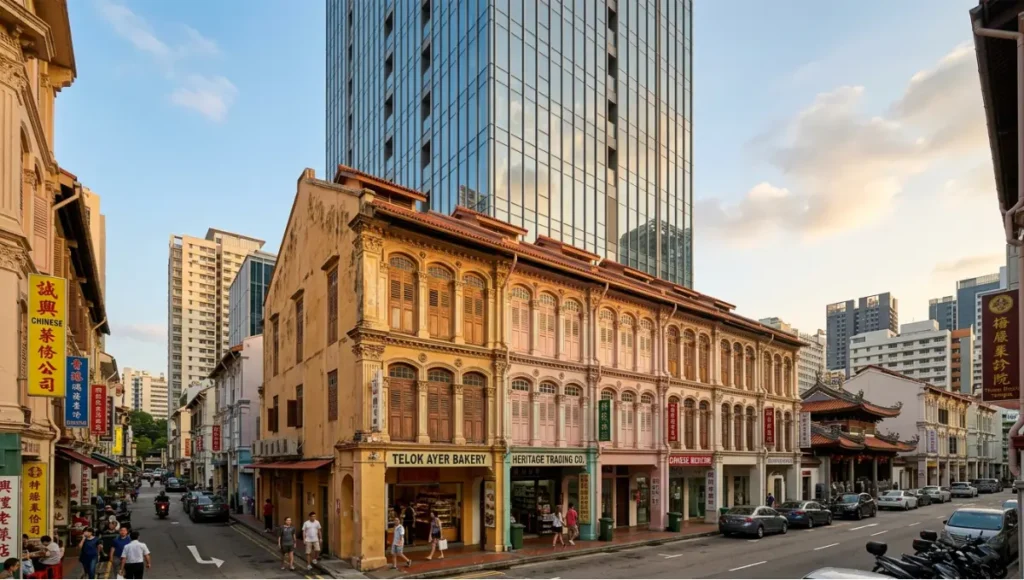
- Location: Telok Ayer Street, Singapore — Central Business District conservation zone
- Typology: Mixed-use residential stack — conservation shophouse podium with contemporary tower insertion
- Vision: Test the Nuvira 4-stage pipeline on a geometrically complex condition: heritage masonry base + contemporary glazed curtain wall above the conservation cornice line
- Challenge: Geometric precision requirement across two radically different material systems within a single render composition
Design Levers Applied
Stage 1 — Concept (Midjourney v7 + Archsynth)
- Midjourney v7: Generated 12 atmospheric concepts in 96 seconds total. Golden-hour renders with warm reflected light off heritage masonry scored highest in client alignment session.
- Archsynth: Produced 3 massing volume interpretations at $0.15 total. Used to test tower height-to-shophouse-width ratio before committing to Revit model.
- Combined Stage 1 time: 18 minutes including review and selection.
Stage 2 — Schematic (Veras in Archicad)
- Geometry Override setting: 12% — critical for preserving heritage cornice profile and shophouse proportion
- Render Seed: Locked after first approved southwest elevation view
- Views produced: 4: SW elevation, NE elevation, street-level perspective, heritage detail
- Total render time: 63 seconds for all 4 views
- Outcome: Heritage Conservation Board submission package passed geometric review without manual correction
Stage 4 — Post-Production (Adobe Firefly in Photoshop)
- Sky replacement: Overcast Singapore afternoon sky — consistent directional light with photographed site context.
- Generative fill: Extended street-level context to the left of the shophouse frame, adding 3 heritage shopfronts consistent with Telok Ayer Street visual character.
- Total post-production time: 31 minutes for 4 hero images.
Transferable Takeaway
The Telok Ayer Stack study confirmed that the 12% Geometry Override threshold is the operational standard for heritage conservation work in the Nuvira Visual Lab pipeline. Above 15%, Veras begins reinterpreting heritage masonry details in ways that do not survive conservation officer review. Below 10%, material warmth is insufficient for client-facing presentations.
| Rule: For conservation typologies, lock Geometry Override at 10–12%. For contemporary typologies with complex geometry, 15–20% delivers the best balance of fidelity and photorealism. |
Intellectual Honesty: Hardware Check
AI architecture visualization rendering is cloud-processed for most tools in this comparison, which means your local GPU is not the primary performance bottleneck. However, the following hardware conditions affect production workflow materially:
For BIM-Native Tools (Veras in Revit/Archicad)
- RAM minimum: 32GB — 16GB produces viewport lag in complex Revit models during Veras live preview
- GPU: Dedicated GPU recommended for Archicad viewport performance; not required for Veras rendering (cloud-processed)
- CPU: 8-core minimum for Revit model stability at Stage 2 complexity
- Internet: Stable 50Mbps+ connection required — Veras renders are cloud-returned, not locally processed
For Post-Production (Adobe Firefly in Photoshop)
- RAM: 64GB for 4K multi-layer Photoshop compositing without performance degradation
- GPU: Dedicated GPU with 8GB+ VRAM accelerates Photoshop generative fill preview rendering
- Storage: NVMe SSD essential — 4K PSD files exceed 500MB; mechanical drives create save-cycle bottlenecks
Budget Hardware Reality Check
Solo practitioners and small studios with older hardware (16GB RAM, integrated graphics) can run all six tools reviewed here via web browser or cloud connection. Performance limitations appear in Photoshop post-production at 4K resolution, not in AI render generation itself. If hardware is a constraint, prioritise Archsynth and Midjourney (web-only, zero local processing) for Stage 1, and defer Stage 4 post-production to hardware-upgrade schedule.
2030 Future Projection
The current 4-stage pipeline will compress into 2 operational stages by 2028–2030, driven by three converging technical developments:
1. Geometry-Aware Foundation Models
The next generation of AI rendering engines will ingest IFC geometry files directly, eliminating the viewport-capture intermediary step that currently separates BIM-native tools (Veras) from web-upload tools (mnml.ai). Geometric fidelity at Stage 2 will become baseline rather than differentiator.
2. Real-Time Rendering Parity
Real-time engines (Unreal Engine 5, D5 Render) are closing the quality gap with offline render engines (V-Ray, Corona) at a pace that will eliminate the Stage 4 post-production pass for standard-quality presentations within 3–4 years. Lumen and Nanite in UE5 already produce AEC-quality global illumination without bake passes. AI post-production will shift from quality correction to creative augmentation.
3. Multi-Modal Client Presentation
By 2030, client presentations will combine static renders, AI-generated walkthrough animations, and real-time VR environments from a single master AI pipeline. The render and the interactive model will be generated simultaneously from the same prompt and geometry input, collapsing the current sequential workflow into a parallel generation process.
| The practices investing now in structured 4-stage AI rendering workflows are building the operational literacy that will enable them to adopt the 2-stage pipeline when it arrives — rather than rebuilding from scratch. |
Secret Techniques: Advanced User Guide
PRO-LEVEL CONSISTENCY & CALIBRATION
Technique 1: Render Seed Cross-Tool Consistency
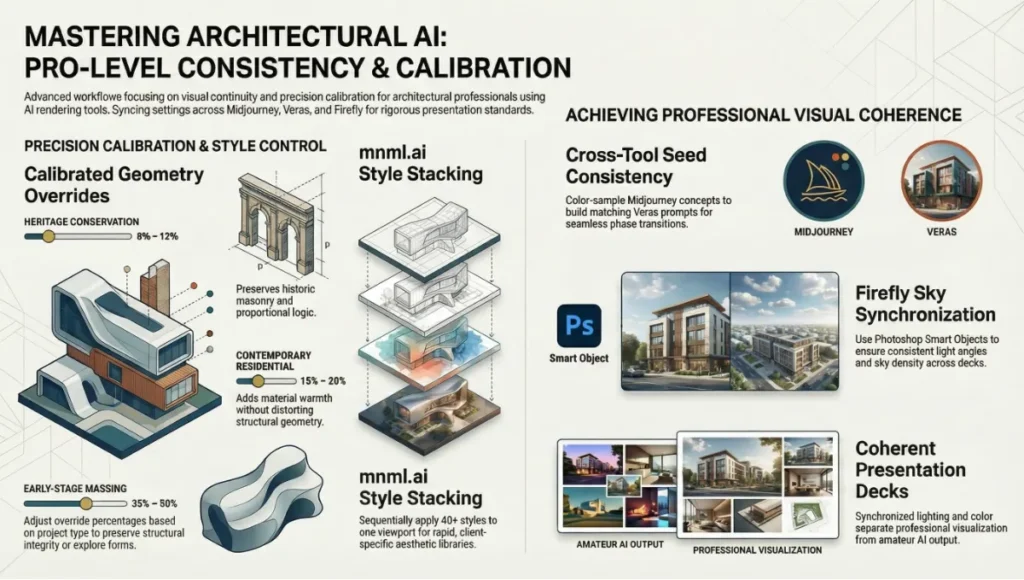
When using Veras for Stage 2 and 3 renders alongside Midjourney for Stage 1 concept images in the same project, extract the dominant colour temperature and material warmth from your best Midjourney concept image, then build a matching Veras text prompt. This creates visual continuity between the concept mood board and the certified schematic renders — a consistency that impresses clients who review both phases.
- Process: Export Midjourney hero image → colour-sample in Photoshop → build Veras prompt: ‘warm amber materials, soft overcast diffused light, [your project specifics]’
- Result: Cross-stage visual coherence without manual colour grading
Technique 2: Geometry Override Calibration by Project Type
The optimal Geometry Override setting in Veras is project-type dependent. Advanced users calibrate this as a deliberate design decision rather than leaving it at the default:
- Heritage conservation: 8–12% — preserves historic masonry details and proportional logic
- Contemporary residential: 15–20% — adds material warmth without distorting structural geometry
- Early-stage massing study: 35–50% — allows AI to propose material and formal variations on a loose volume
- Concept exploration (not for submission): 60–80% — generative creative territory, not suitable for planning documents
Technique 3: mnml.ai Style Stacking
mnml.ai’s 40+ architectural styles can be applied sequentially to the same viewport capture to build a visual library of the same design in multiple aesthetic registers. For practices pitching to multiple client types (residential developer, planning authority, design award jury), this produces a tailored image library from a single source model in under 10 minutes.
Technique 4: Firefly Sky Synchronisation
When applying sky replacement across a suite of elevation and perspective renders in Adobe Firefly, save the generated sky as a Smart Object in Photoshop before applying it to the first image. Reuse the same Smart Object across all images in the suite. This ensures directional light angle, sky density, and colour temperature are physically consistent across the entire presentation deck — a detail that separates professional visualization from amateur AI output.
Comprehensive Technical FAQ
Tools & Selection
Q: What is AI architecture visualization rendering?
A: The process of using machine learning models to convert architectural models, sketches, or text prompts into photorealistic images of unbuilt buildings. Unlike traditional rendering (manual material assignment, lighting setup, overnight farm processing), AI rendering generates output in seconds by learning from large datasets of architectural photography and 3D imagery.
Q: Which tool has the best BIM integration in 2026?
A: Veras by Chaos. Seven certified BIM/CAD host integrations: Revit, SketchUp, Rhino, Vectorworks, Archicad, Autodesk Forma, and Allplan. No competing tool matches this breadth of certified platform support.
Q: Can I use Midjourney for a planning submission?
A: No. Midjourney generates geometry from text prompts, not from source models. It cannot guarantee that rendered volumes reflect actual floor plates, structural grids, or glazing ratios. Geometry hallucination is a documented limitation that disqualifies it for any submission requiring geometric accuracy. Use Veras at Stage 2 for planning documents.
Workflow & Performance
For the complete pipeline — engines, capture, materials, hardware, and presentation — see our architectural visualization guide.
Q: How accurate is AI rendering compared to V-Ray or Corona?
A: At Stage 3 presentation quality, BIM-native tools like Veras produce output that is visually comparable to traditional render engines for material and lighting fidelity. The key difference is geometric computation: AI rendering interpolates geometry rather than computing it mathematically. Complex details — tight reveals, perforated screens, structural connections — require Geometry Override at 15% or below and human verification. Traditional engines remain more reliable for technical accuracy at construction document stage.
Q: What resolution do these tools produce?
A: Midjourney v7: 1024×1024 base, upscalable to 2048×2048. Veras: tied to host application viewport resolution. mnml.ai: up to 8K via Render Enhancer. Adobe Firefly: full Photoshop resolution, 300dpi A0 print support. Always verify output resolution against your specific submission or print requirement before committing to a tool in a production workflow.
Q: Can AI rendering replace a visualization artist?
A: No — but it restructures what visualization artists spend their time on. Mechanical labor (scene setup, lighting rigs, overnight render batches) is substantially reduced. Art direction, client communication, composition judgment, and Stage 4 post-production craft remain human-dependent. Practices seeing the most significant efficiency gains from AI rendering are those that have redeployed visualization artist time from Stage 2–3 mechanical setup toward Stage 4 creative quality.
Cost & Licensing
Q: What does Archsynth’s pay-per-render model mean for a typical concept phase?
A: A standard 20-image Stage 1 concept exploration costs approximately $1.00 at the $0.049/render rate. A more intensive 100-image concept session (multiple design directions) costs $4.90. This is materially cheaper than any monthly subscription for firms with irregular visualization needs.
Q: Is Adobe Firefly included in my existing Creative Cloud subscription?
A: Firefly generative credits are included in Creative Cloud plans from $54.99/month (All Apps). Usage beyond the monthly credit allocation is charged at the standalone credit rate. For high-volume visualization studios completing multiple hero-image post-production passes per week, the standalone credit plan ($4.99/month for 100 credits) may not be sufficient; monitor credit consumption in the first 30 days of production use.
Take Your Visualization Pipeline to the Next Stage
The six certified tools in this guide are not interchangeable. They are stage-specific instruments in a structured production pipeline. The practices producing better visual work faster in 2026 are not the ones with the largest AI budgets — they are the ones that have made a precise, stage-by-stage decision about where AI intervention adds measured value and where human judgment remains irreplaceable.
Start with your most frequent visualization stage and certify one tool for it. Build the pipeline incrementally. The goal is not to replace your workflow with AI — it is to make your existing workflow faster, more consistent, and more competitive on the projects that matter.
| The Visual Lab evaluates every tool independently, without vendor compensation. If a tool does not meet our geometric certification threshold in real BIM model conditions, it is not listed as certified — regardless of marketing claims. |
© Nuvira Space All rights reserved. | THE VISUAL LAB Series. All specifications cited are based on publicly available tool documentation, the Chaos State of ArchViz Report 2025, and the American Institute of Architects (AIA) Technology in Architectural Practice knowledge community framework. The ‘Telok Ayer Stack’ is a speculative internal concept study and does not represent a completed or commissioned project.
This article is part of our smart building technology guide, the state-of-play synthesis across generative AI, robotics, and sensing layers.